
If you have ever pasted the same photography follow-up script into Claude for the third time this week, you already understand the problem Anthropic is solving. The newest Claude models do not need a giant rulebook stuffed into every chat. They need the right instructions, loaded at the right time. Anthropic calls that context engineering, and in July 2026 they published how they removed over 80% of Claude Code's system prompt for models like Claude Opus 5 and Claude Fable 5 with no measurable loss on their coding evaluations.
This guide translates that documentation into studio English. The headline lesson: do the work first, then let skill-creator save the trail behind you. Improve that skill every time you use it (wrap-up is our favorite loop). Audit with /doctor monthly or quarterly, not daily. It is written for photographers who run websites, ads, and follow-up with AI tools, not for people who live in a terminal all day.
Key Takeaways
- Humberto Garcia and Photography to Profits treat skills as a trail behind real work: do the job manually first, then save it with skill-creator. Do not invent a pile of skills for work you have never done.
- Improve the skill every time you use it. Our favorite loop is wrap-up: end the session, capture lessons, prune docs, and tighten the skill that just ran.
- Anthropic's skill-creator is the right tool for turning that trail into a clean
SKILL.md. Source: Improving skill-creator. - A skill is a folder with a
SKILL.mdfile, not a random note. Official docs: Extend Claude with skills. /doctoris a monthly or quarterly audit, not a daily habit. Day to day: work, wrap up, improve the skill.
What's In This Guide
- What "context" means in a photography studio
- The new rules, translated (Then vs Now)
- Where instructions live: CLAUDE.md vs skills vs hooks
- The trail: work first, skill later
- Skill-creator: the kid-gloves way to build one
- Wrap-up: improve the skill after every session
- Studio starter pack: five skills worth making
- Monthly or quarterly: /doctor audit
- Verification loops: make Claude check its own work
- How this fits Claude Code, Cowork, and Cursor
- Frequently Asked Questions
What "context" means in a photography studio
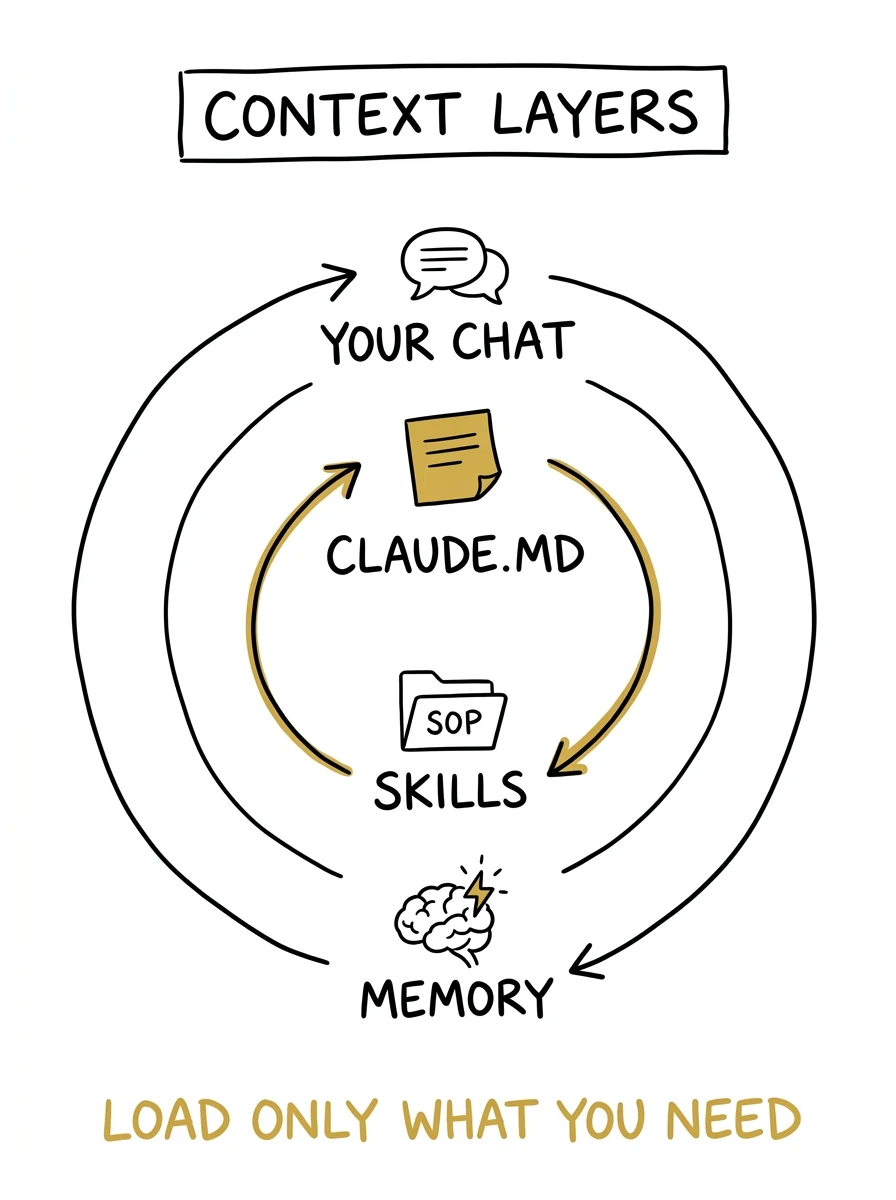
When you send Claude a message, that sentence is only part of what it sees. Anthropic explains that much of the context is assembled from the system prompt, Skills, CLAUDE.md files, memory, and other sources. They call the craft of assembling that stack context engineering.
Studio analogy: your chat is the client brief. The system prompt is the agency handbook you rarely edit. CLAUDE.md is the sticky note on the studio door ("here is how this business works"). Skills are the laminated SOPs in the drawer: lead follow-up, ad creative brief, website QA. Memory is the assistant who remembers you hate emojis in client emails.
If every SOP is taped to the door at once, the assistant gets confused and slow. If the drawer is empty, you re-explain the same workflow every Monday. Good context engineering is the middle path.
The new rules, translated (Then vs Now)
Anthropic's July 24, 2026 post, The new rules of context engineering for Claude 5 generation models, is the spine of this guide. They found older best practices had become myths once the models got better judgment. Here is the studio translation of their Then / Now table.
| Then (old habit) | Now (new habit) | Studio English |
|---|---|---|
| Give Claude rigid rules | Let Claude use judgment | Stop saying "NEVER write comments" style absolutes that fight your real request |
| Give Claude lots of examples | Design clearer tools and interfaces | A clean checklist with clear statuses beats five conflicting sample emails |
| Put everything upfront | Use progressive disclosure | Keep the door note short; put long procedures in skills Claude opens when needed |
| Repeat yourself in many places | Simple tool and skill descriptions | Say the rule once, in the place that owns it |
| Stuff memory into CLAUDE.md by hand | Auto-memory for relevant facts | Let Claude remember preferences; keep CLAUDE.md for project gotchas |
| Simple markdown specs only | Rich references (artifacts, tests, rubrics) | Point at a real page mockup or checklist file, not a vague paragraph |
Anthropic's own example of the shift: older prompts banned multi-line comments by default. Newer guidance is closer to "match the surrounding code." Same idea for studios: instead of "NEVER change pricing language," say "match the pricing page voice and ask before changing package names."
Want the broader Claude Code operating system we use at Photography to Profits (Cowork, Claude Code, and the weekly stack)?
Read Claude Code for Photographers →Where instructions live: CLAUDE.md vs skills vs hooks
Anthropic's steering guide, Steering Claude Code: when to use CLAUDE.md, skills, hooks, and subagents, lists seven methods for instructing Claude. You do not need all seven on day one. Photographers get 90% of the value from three.
| Tool | When it loads | Context cost | Use it for | Studio example |
|---|---|---|---|---|
| CLAUDE.md | Session start (root file stays on) | High: every line costs tokens always | Facts about this project | "We shoot boudoir, GHL is CRM, never invent testimonials" |
| Skills | Name/description always; full body only when invoked | Low until used | Procedures and checklists | /lead-follow-up, /ad-angle-brief, /site-qa |
| Hooks | On lifecycle events | Low (runs as code) | Must-happen automation | Block deleting client galleries; run a linter after edits |
| Rules | Always, or only when matching files are touched | Medium | Hard constraints | "All form copy must include the 15-minute call CTA" |
| Subagents | Only when called | Low in main chat | Side research returning a summary | Competitor landing-page teardown while you edit your site |
Anthropic's tip for CLAUDE.md: keep it under about 200 lines, give it an owner, and treat changes like code review. Procedures do not belong there. If a section of CLAUDE.md has grown into a multi-step runbook, that is the signal to move it into a skill. Official skills docs say the same: create a skill when you keep pasting the same checklist, or when CLAUDE.md content has become a procedure rather than a fact.
The trail: work first, skill later
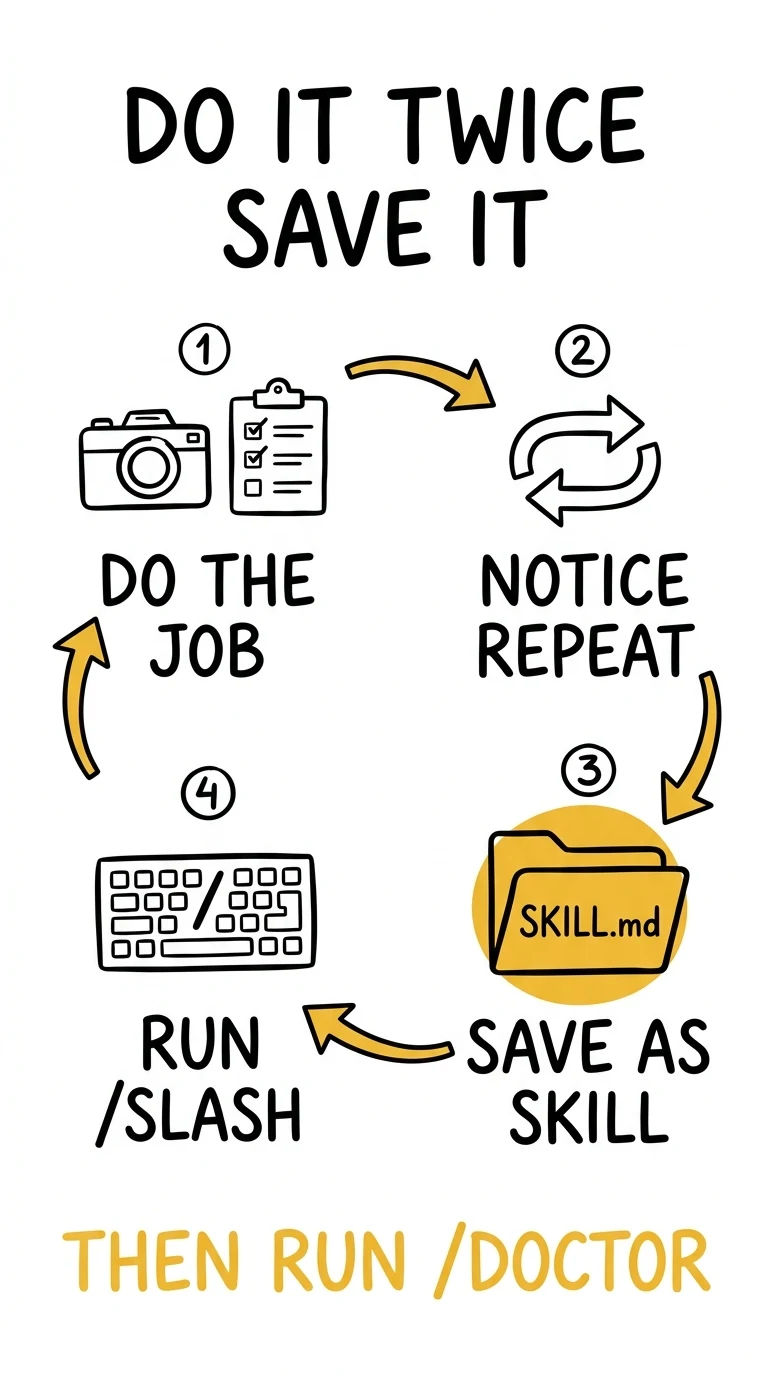
The biggest mistake we see is photographers (and agencies) brainstorming a fantasy library of skills before they have done the work. That creates busywork and brittle SOPs. The Photography to Profits rule is the opposite.
Do the work manually in the harness first. Write the follow-up. Fix the page. Build the ad brief. Feel the friction. Only when you notice yourself repeating steps do you open Anthropic's skill-creator and save the trail behind you.
- Do the job once in chat or Claude Code (explore, make mistakes, learn the real steps).
- Do it again. Notice what you re-typed or re-explained.
- Only then run skill-creator (or hand-write a lean
SKILL.md) so the skill matches reality, not a wishlist. - Next time, invoke
/your-skill-nameand edit the skill when something was wrong, missing, or too wordy. - End sessions with wrap-up when you can: ship, remember, prune, tighten the skill that just ran.
- About once a month or once a quarter, run
/doctoras an audit of the whole library. Not every day.
Think of skills like Lightroom presets you earned from real edits, not a downloaded pack you never open. Anthropic's design agrees: skills should encode opinions and practices particular to you, loaded only when needed. Official Claude Code docs: create a skill when you keep pasting the same checklist, or when a section of CLAUDE.md has grown into a procedure rather than a fact.
Locations that matter for a solo studio owner:
- Personal:
~/.claude/skills/<name>/SKILL.md(across projects; Claude Code, and the same idea ports to Codex and Cursor via shared skill folders) - Project:
.claude/skills/<name>/SKILL.md(this website or marketing repo only)
Anthropic's lessons post, How we use skills, stresses that skills are folders (scripts, assets, references), not "just markdown."
Skill-creator: the kid-gloves way to build one
You can hand-write a skill. You can also let Claude interview you. Anthropic's verification-loop post says the fastest path is installing the skill-creator plugin and letting Claude walk you through it. Anthropic also published Equipping agents for the real world with Agent Skills and a longer Complete Guide to Building Skills for Claude (PDF) that explains the three-level progressive disclosure model: metadata always loaded, SKILL.md body on trigger, bundled files only when needed. Their product update, Improving skill-creator: test, measure, and refine Agent Skills, adds evals and benchmarks so you can check whether a skill still works as models change, without writing code.
In Claude Code (from current docs):
/plugin install skill-creator@claude-plugins-official
/reload-plugins
If the marketplace is missing, docs say to add it with /plugin marketplace add anthropics/claude-plugins-official, then update and retry. Then ask something like: "Create a new skill for my photography lead follow-up with skill-creator" or "Evaluate my site-qa skill with skill-creator."
What goes in a good SKILL.md (from Anthropic docs and the open skill-creator guidance):
- Frontmatter description: what it does and when to use it (this is how Claude auto-triggers).
- Lean body: steps Claude should follow; keep it concise because loaded skills stay in context.
- Progressive disclosure: put long reference material in separate files the skill points to, so Claude only reads them when needed.
- Your opinions: brand voice, forbidden claims, where client files live, what "done" means for your studio.
If your website is the product Claude is editing, pair skills with an agent-ready site so assistants can actually read you.
See AEO for Photographers →Wrap-up: improve the skill after every session
Our favorite skill is wrap-up. It is not flashy. It is the discipline that keeps documentation lean and skills honest.
After a real work session (not after daydreaming about tools), wrap-up asks: what did we ship, what should be remembered, what rule is duplicated or stale, and which skill should get sharper because of what just happened? That is how you improve skills every time you use them: the trail gets cleaner, not longer.
Practically:
- If the skill missed a step, add the step (or a pointer to a short reference file).
- If the skill was too bossy or too long, cut it. Newer Claude models prefer judgment over conflicting MUST/NEVER walls.
- If a "lesson" could be a script or test instead of prose, prefer the check. Rules age; checks fail loudly.
- The same wrap-up habit works whether you are in Claude Code, Codex, or Cursor. The point is the loop: work → wrap up → improve the skill → maybe doctor later.
Skill-creator still helps you author and evaluate the file. Wrap-up is how the file stays true after contact with reality.
Studio starter pack: five skills worth making
Start tiny, and only after you have done each job at least once by hand. One skill that saves you thirty minutes a week beats a fantasy library. These five map cleanly to photography businesses once the trail exists:
| Skill name | Trigger when | What "done" looks like |
|---|---|---|
lead-follow-up |
New inquiry, quiz lead, or missed call | SMS + email draft in your voice, with the 15-minute call CTA, no invented discounts |
ad-angle-brief |
You need Meta or Google creative angles | 3 hooks, 3 primary texts, audience notes, and which proof asset to use |
site-qa |
After Claude edits a page | Checklist: CTA present, no em-dashes in marketing copy, mobile hero readable, form still posts |
pricing-faq |
Someone asks "how much" in DMs or email | Answer framed around packages and next step, never a random number Claude invents |
weekly-studio-review |
Sunday planning | Leads in, booked, show rate, content to shoot, one experiment for next week |
Notice each row has a verification idea. That is intentional. Anthropic found verification skills had the most measurable impact on output quality internally. Encode what good looks like so Claude can close the loop.
Monthly or quarterly: /doctor audit
You do not need /doctor every session. Think of it like a quarterly studio clean-out: useful about once a month or once a quarter, or when Claude starts ignoring instructions because the skill list got fat.
Anthropic's context-engineering post introduced claude doctor / /doctor to help rightsize skills and CLAUDE.md. Current Claude Code docs (Debug your configuration) say it checks installation health, invalid settings, unused extensions, duplicate names, and CLAUDE.md content Claude can already derive from the codebase, then proposes fixes you confirm.
Day-to-day priority: do the work, wrap up, improve the skill that just ran. Reach for /doctor when you are auditing the whole drawer, not after every edit.
Verification loops: make Claude check its own work
Anthropic's post Building verification loops in Claude Code with skills defines a verification loop as Claude checking and fixing its work: tests, linters, or custom checks, packaged as a skill so you are not the only quality gate.
Related reading: Loop engineering: Getting started with loops.
Studio examples that are not "software tests":
- After a page edit, run
/site-qaand require a pass/fail list before you publish. - After ad copy, require the skill to check for banned claims (guarantee language you do not offer, competitor names, medical claims for boudoir).
- After a follow-up draft, require the skill to confirm the calendar link and opt-out language are present.
If you only build one advanced skill this quarter, make it a verifier for your riskiest workflow (usually ads or pricing).
How this fits Claude Code, Cowork, and Cursor
Skills live most naturally in Claude Code, where folders and slash commands are first-class. Claude Cowork is stronger for visual desktop and browser jobs. Cursor is an IDE for people already inside a codebase. We map those tools for photographers in our dedicated Cowork vs Codex guide. This post is the skills chapter: how you teach the stack so it compounds.
Also useful: Anthropic's platform overview at platform.claude.com agent skills, plus skill authoring best practices, and the CLAUDE.md customization post Using CLAUDE.md files.
For the full AI business stack around Claude (CRM, research, creative), start here.
AI Tools for Photographers →Frequently Asked Questions
What is a Claude skill in plain English?
A reusable SOP Claude can load on demand. Officially it is a folder with a SKILL.md file (and optional scripts or references). You invoke it with /skill-name, or Claude matches your request to the skill description.
Do I need to be a developer to use skills?
No. You need a clear procedure and a place to save it. Skill-creator is designed so authors can write evals and improve skills without writing code. Developers get extra power with scripts inside the skill folder.
What is the difference between CLAUDE.md and a skill?
CLAUDE.md is always-on project context (facts, gotchas, build commands). A skill is a procedure loaded when needed. Anthropic recommends keeping CLAUDE.md lean and moving runbooks into skills.
What does /doctor do?
It is Claude Code's setup checkup. It reports installation and config issues, unused extensions, duplicate names, and CLAUDE.md content that is redundant with the codebase, then proposes fixes you confirm. It also helps with skill-listing bloat.
Will skills work in Claude.ai and Cowork too?
Anthropic's skill-creator update states the improvements are available in Claude.ai and Cowork, as a Claude Code plugin, and in their public skills repo. Exact packaging differs by product; Claude Code is where slash commands and project folders feel most native for website work.
How many skills should a photography studio start with?
Three or fewer. Lead follow-up, site QA, and one ad or pricing skill. Add more only after you confirm Claude is actually invoking the ones you have.
How do I add a skill to Claude Code?
Save it as a folder with a SKILL.md file: ~/.claude/skills/your-skill-name/SKILL.md to use it across projects, or .claude/skills/your-skill-name/SKILL.md for one website or marketing repo. The easiest way to build one is Anthropic's skill-creator plugin. Run /plugin install skill-creator@claude-plugins-official, then /reload-plugins, and ask Claude to create a skill from a job you've already done twice.
Conclusion: Leave a trail, do not build a museum
The photographers who win with Claude are not the ones who invent the longest skill library on day one. They do real studio work in the harness, save only what they repeated, improve that skill every time it runs (especially through wrap-up), and maybe once a month or quarter run /doctor so the drawer stays lean. That matches Anthropic's newer context rules: less forced constraint, more judgment, load detail only when the job needs it.
Humberto Garcia and Photography to Profits run this trail on our own marketing site. This weekend, pick one workflow you already did twice. Use skill-creator to capture it. Next time you run it, wrap up and tighten it. The compound interest is in skills earned from reality.
Action step: finish one real task in Claude Code (or Codex or Cursor), then create or update exactly one skill from that trail. Do not brainstorm five "someday" skills first.