If you're searching for the best AI tools for photography business operations in 2026, you'll find dozens of articles recommending Imagen AI, AfterShoot, and Luminar for culling and editing. Those tools are real and useful, and we break them down in our guide to AI tools for photographers. They edit your photos. Claude Code does something entirely different: it runs your business. It writes your copy, builds your website, manages your SEO, automates your marketing, and deploys your campaigns, without a developer, copywriter, or agency on retainer.
We manage marketing for portrait studios, wedding photographers, boudoir studios, and commercial photographers across the country. Our competitors have 15-person teams, dedicated developers, a copywriter on staff, and an SEO agency on retainer. We have Claude Code, and it's not even close.
Over the past six months, five AI techniques went viral on X (formerly Twitter), collectively earning over 200,000 likes from the world's top builders, researchers, and founders. Every single one applies directly to a photography studio. Every single one is something we use at Photography to Profits. And almost nobody in the photography industry knows any of this exists.
Entrepreneur Greg Isenberg, who has sold three startups and backed companies from seed to unicorn, called 2026 the greatest time to build a business in 30 years. His reason: niche audiences of 5,000 people that were previously too small to profitably serve can now be turned into thriving businesses because one person with Claude can do the work of five. That's the world you're operating in right now as a photography studio owner. Your competitors don't know it yet.
This guide covers everything: the five viral techniques, the hooks system, the Zapier replacement, the CRM connections, and the exact week-by-week setup sequence, all in plain English, no coding required.
What Is Claude Code for Photographers?
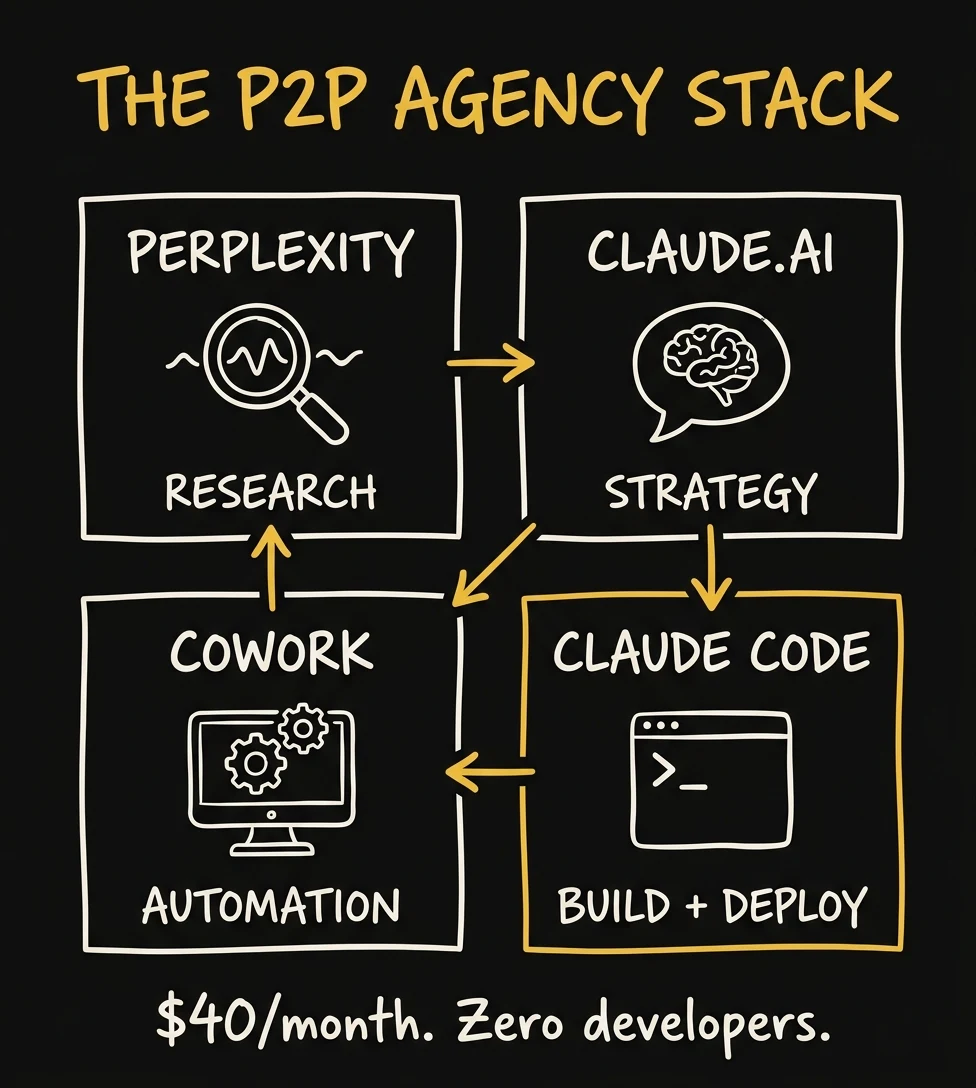
Claude Code is an AI agent (not a chatbot) that operates your computer, builds your website, writes your marketing copy, manages your SEO, and automates your studio workflows, all from plain-English instructions. For photography studios, it replaces the work of a developer, copywriter, SEO agency, and social media manager. The full stack costs $40/month.
Key Takeaways
- Claude Code is not a chatbot. It's an AI agent that reads your files, writes code, updates your website, publishes blog posts, and deploys to the internet, all from a single instruction in plain English.
- Humberto Garcia, founder of Photography to Profits, runs the entire P2P content, SEO, ad copy, and website operation on this stack, without a developer, copywriter, or SEO agency.
- Studios using AI automation tools report cutting editing time 60%, recovering 15-25 hours per week, reducing no-show rates from 15% to 2%, and adding $150K+ in annual revenue.
- The five techniques covered here (Computer Use, Scheduled Tasks + Hooks, Knowledge Bases, Mega-Prompt GTM, and CLAUDE.md + Skills) earned 200,000+ combined likes on X and are directly usable by studio owners today.
- The complete stack costs $40/month: $20 for Claude Pro, $20 for Perplexity Pro. Hosting is free on Vercel's hobby tier.
What's In This Guide
- You Are an Outcome Engineer, Not a Coder
- Trick #1: Computer Use (139,000 Likes)
- Trick #2: Scheduled Tasks + Hooks (22,000 Likes)
- Trick #3: The Studio Brain (53,000 Likes)
- Trick #4: The Mega-Prompt (5,000 Likes)
- Trick #5: CLAUDE.md + Skills (9,000 Likes)
- Trick #6: Replace Zapier with Claude + n8n
- A Real Week at P2P
- Your First Week Setup
- Claude Cowork, Cursor, Codex, and Claude Code
- Frequently Asked Questions
You Are an Outcome Engineer, Not a Coder
Before we get into the techniques, you need a mental model that changes everything about how you'll use these tools. In February 2025, Andrej Karpathy, founder of OpenAI's training department, coined a term that spread through the technology world instantly: vibe coding.
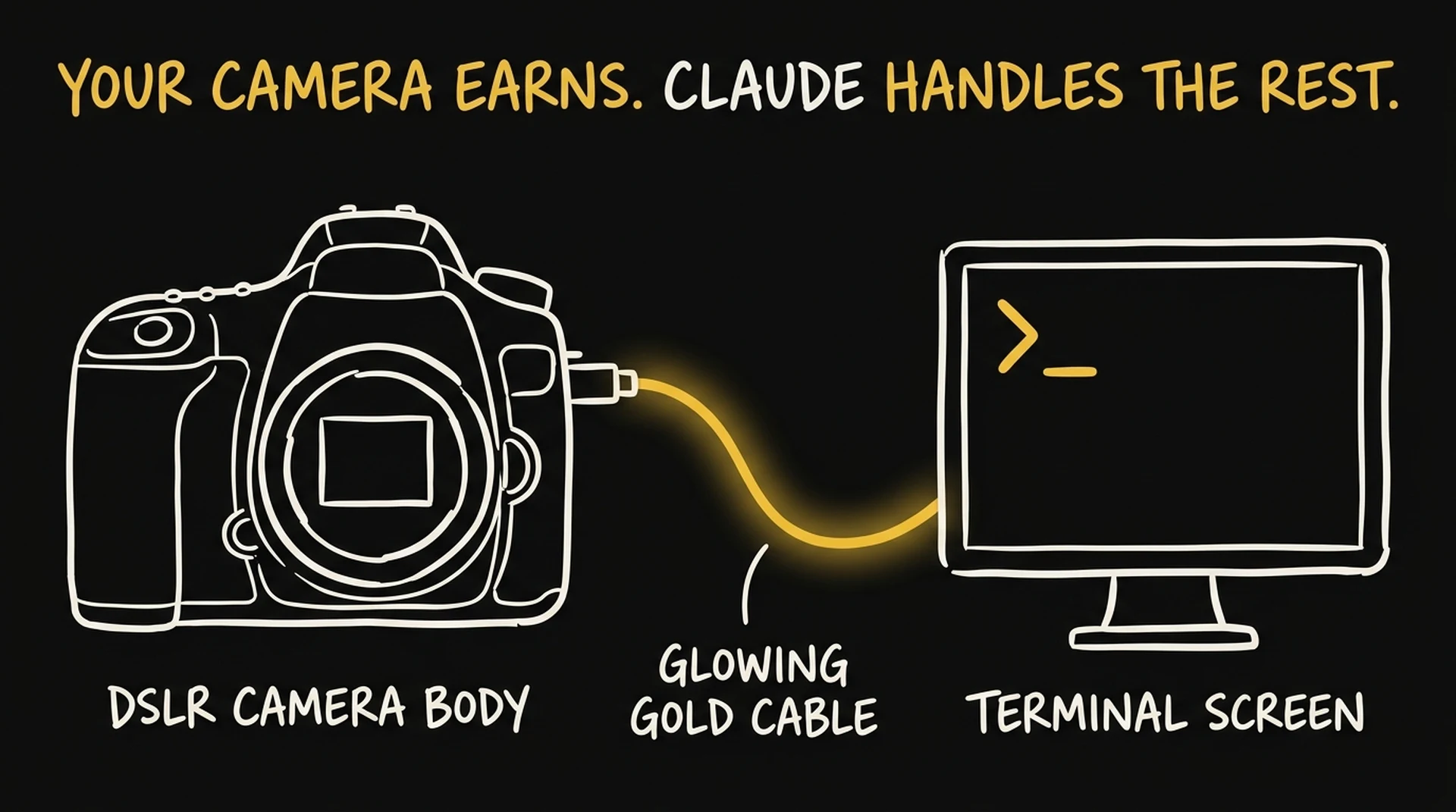
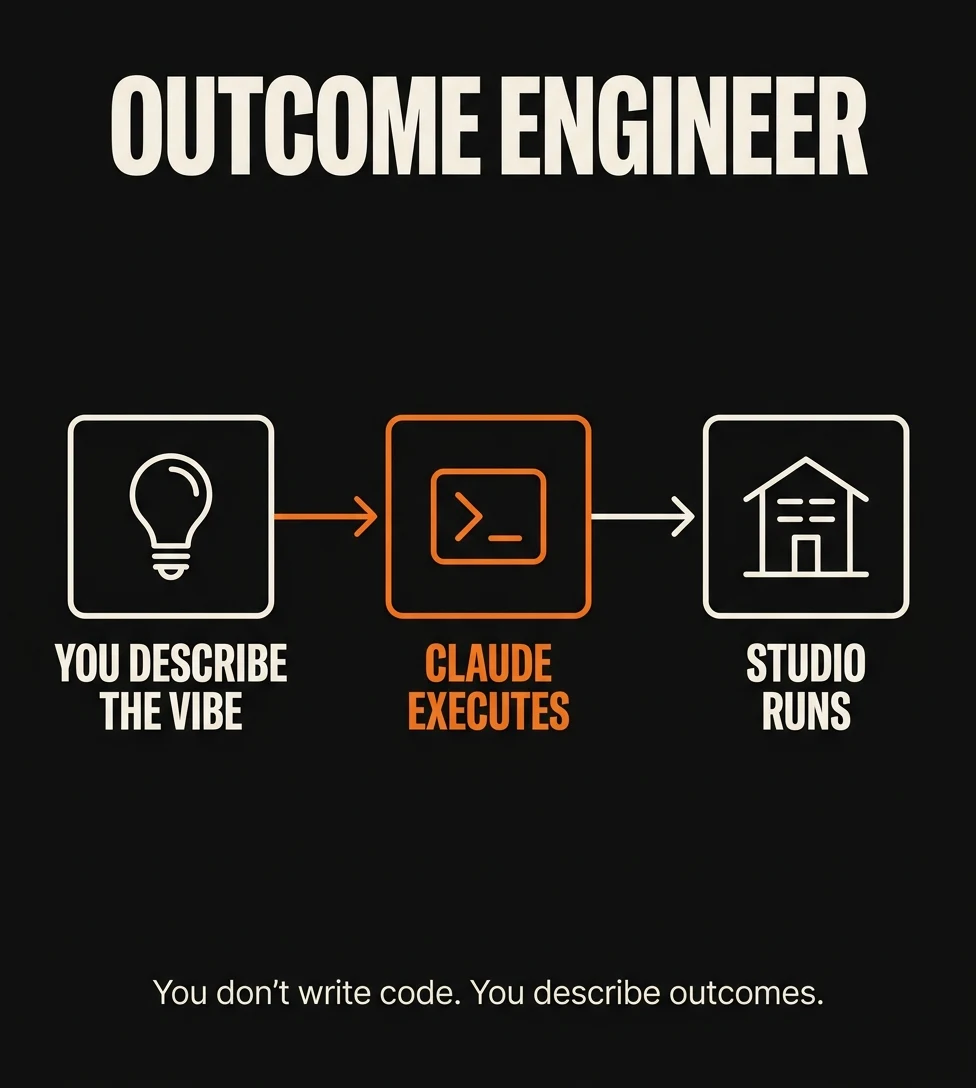
Vibe coding means you describe the intent, the user experience, the outcome you want (the vibe), and the AI writes the code. You are not a programmer. You are an Outcome Engineer. The constraint is no longer "can I write code?" It's "can I describe clearly enough what I want?"
Greg Isenberg took this concept one step further with what he called vibe marketing, the same principle applied to marketing operations. One marketer with AI agents running the show can execute at the level of five people. Marketing calendars that took weeks to build can be auto-generated in an afternoon. Ad tests that required a copywriter, designer, and media buyer can be deployed by one person with a well-configured Claude setup. Within eight months of Isenberg naming the concept, vibe marketing exploded to 686% search growth and was running internal workshops at Fortune 50 companies.
For a photography studio owner, this means something specific: you don't need to hire an SEO agency, a copywriter, a web developer, or a social media manager. You need to learn to describe what you want with enough clarity that Claude can execute it. That is the entire skill. Everything else this guide teaches is just the specific techniques for doing it well.
The community around this is real and growing fast. The r/ClaudeCode subreddit hit 4,200+ weekly contributors by early 2026, more than triple the next-largest AI coding community. The r/vibecoding subreddit has 89,000 members. These aren't developers talking to each other. Increasingly, they're business owners, studio owners, and non-technical founders documenting what they built and what it took to do it.
Here are three tiers of Claude, each more powerful than the last, all included in a single $20/month subscription:
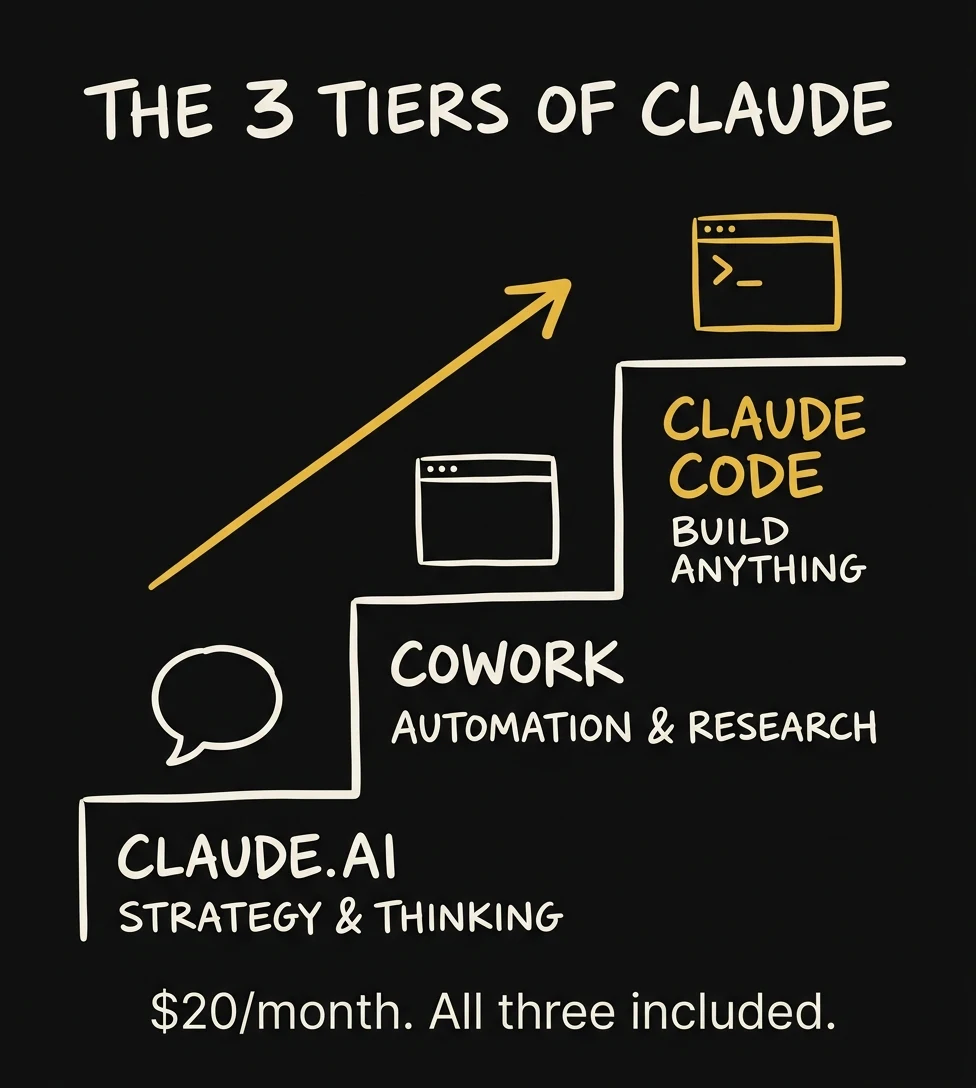
- Claude.ai (the website): Conversational. You type, it responds. Excellent for strategy, copy drafts, market analysis, consultation scripts. It advises. You execute.
- Claude Cowork (desktop app, launched January 2026): An AI agent with a visual interface. You give it a task, it builds a plan, you approve, and it executes: browsing real websites, reading files, filling forms, taking screenshots. Think of it as your research and automation assistant.
- Claude Code (terminal-based): Full access to your codebase, your database, and your deployment pipeline. This is where the P2P website lives. Every blog post, every page, every SEO audit, every Vercel deployment happens here.
You start with Claude.ai, learn to use Cowork for research, and graduate to Claude Code when you're ready to automate your whole operation. Most studio owners get real, tangible value within the first week, before they've ever opened a terminal.
Boris Cherny, the creator of Claude Code at Anthropic, posted his personal workflow to 9,000+ likes. The developer community expected a complex, exotic setup. It was described as "surprisingly vanilla." The power isn't in the configuration. It's in the methodology. And that's exactly what this guide teaches.
Viral Trick #1: Computer Use, Where Claude Controls Your Computer (139,000 Likes)
In March 2026, Anthropic's official account posted a demonstration of Computer Use: Claude Code controlling a real macOS desktop, opening applications, clicking UI elements, navigating interfaces, and completing tasks exactly as a human would. The post earned 139,000 likes. It was the most-liked AI tool announcement of the year.
Here's what it means for you: Claude can now open Lightroom Classic, apply your presets, cull images by your rating system, export galleries, update your invoice spreadsheet, and post to Instagram, all while you're in a session with a client or at dinner with your family.
The numbers coming out of studios running AI automation are real. Imagen AI's research found that photographers using AI tools save an average of 473 hours per year, nearly 12 full work weeks. Editing time cuts 60%, shoot capacity increases 40%, no-show rates drop from 15% to under 2% with automated reminders, and studios add $150,000+ in annual revenue by converting recovered hours into booked sessions. Computer Use is the capability that makes these numbers possible. It's the layer that connects Claude to every application in your studio workflow, whether that application has an API or not.
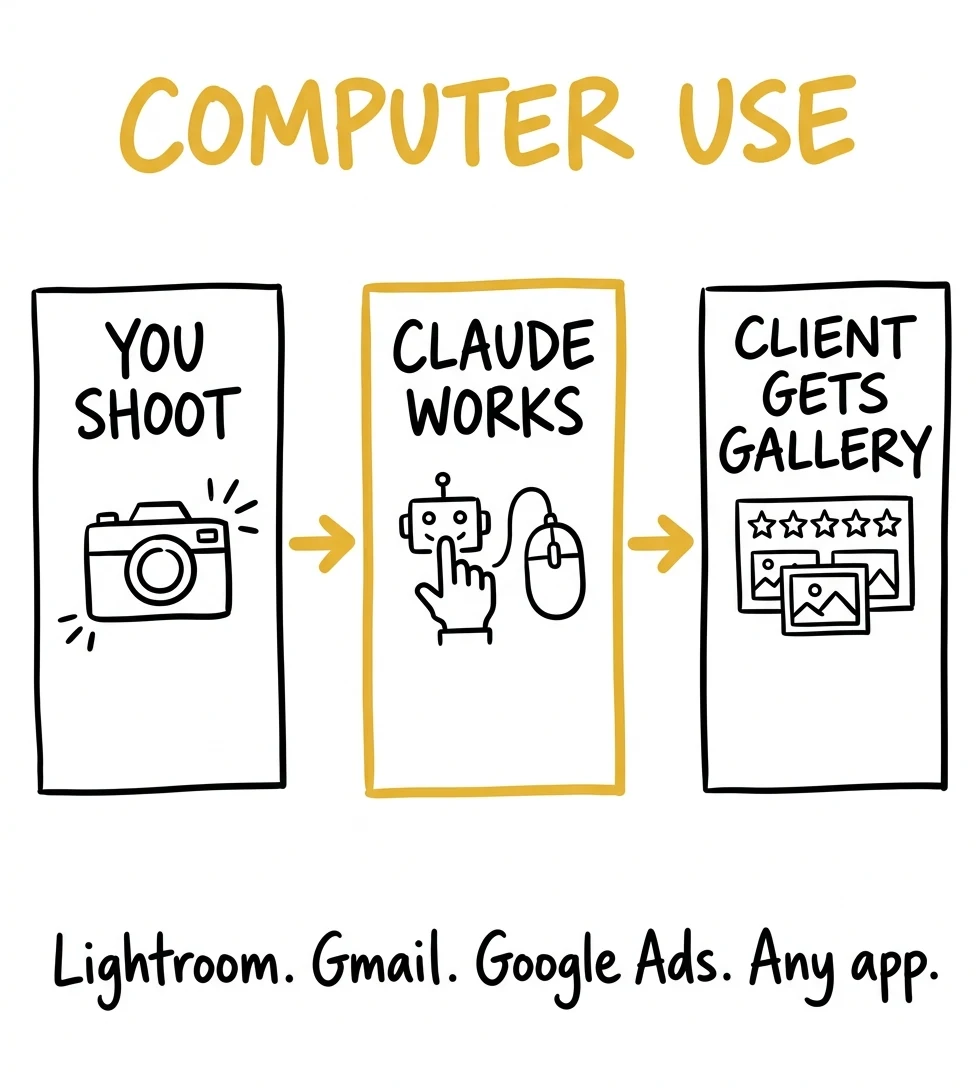
How it works for photographers (step by step):
- Install Claude Code on your Mac (included with Claude Pro at claude.ai/download). Enable Computer Use in settings, available in research preview on Pro and Max plans.
- Open a Claude Code session and describe the task in plain English. Start simple: one application, one workflow.
- Claude takes a screenshot of your screen, reasons about what it sees, and issues mouse clicks and keyboard inputs in sequence. You watch it work, or you step away entirely.
- For safety, complex multi-step workflows should start with "Plan first, then execute step-by-step and narrate each action." Review before approving anything irreversible.
Real examples for a photography studio:
- Gallery delivery: "Open the folder from today's session. Apply my Signature Warm preset to all images. Cull anything below 3 stars. Export full-resolution JPEGs to the client folder. Open my Google Sheet and add today's delivery with the session fee and gallery link."
- Social media scheduling: "Open Chrome, go to my Instagram Business account, create a new post using the five best images from last week's family session. Use my caption template from the CLAUDE.md file. Schedule for tomorrow at 7pm."
- Competitor research: "Open Chrome. Visit these three competitor websites. Screenshot their pricing pages. Note any new offers, changed prices, or new package structures. Save a summary to my Competitor Intelligence file."
- Ad account QA: "Open my Google Ads dashboard. Pull this week's campaign performance. Flag any ad group with a CTR below 2% or a cost-per-click above $8. Draft replacement headlines for anything flagged."
At P2P, we use Computer Use for: QA-testing new pages after deployment (Claude opens Chrome, visits the live page, screenshots at mobile and desktop sizes, checks the browser console for errors), competitive pricing research, and Google Ads account reviews (Claude opens the dashboard, reads campaign performance, flags underperformers).
Pro tips: Give Claude your exact folder structure and keyboard shortcuts in your CLAUDE.md file so it never guesses. Start with one-app workflows before multi-app orchestrations. Computer Use sees screenshots. It works on any application, even ones with no API.
Want us to set up these workflows for your studio instead of doing it yourself?
Book a free strategy call with the P2P team →Viral Trick #2: Scheduled Tasks + Hooks, So Your Studio Runs While You Sleep (22,000 Likes)
Anthropic announced scheduled tasks for Claude Cowork and Claude in Chrome to 22,000+ likes. The concept is simple and transformative: you define a task once, set a schedule, and Claude executes it automatically at the specified time, without you opening any app.
But scheduled tasks are only half the automation story. The other half, which barely anyone is talking about yet, is the Hooks system. Together, these two features create a studio that runs itself.
Scheduled Tasks: Set It Once, Run Forever
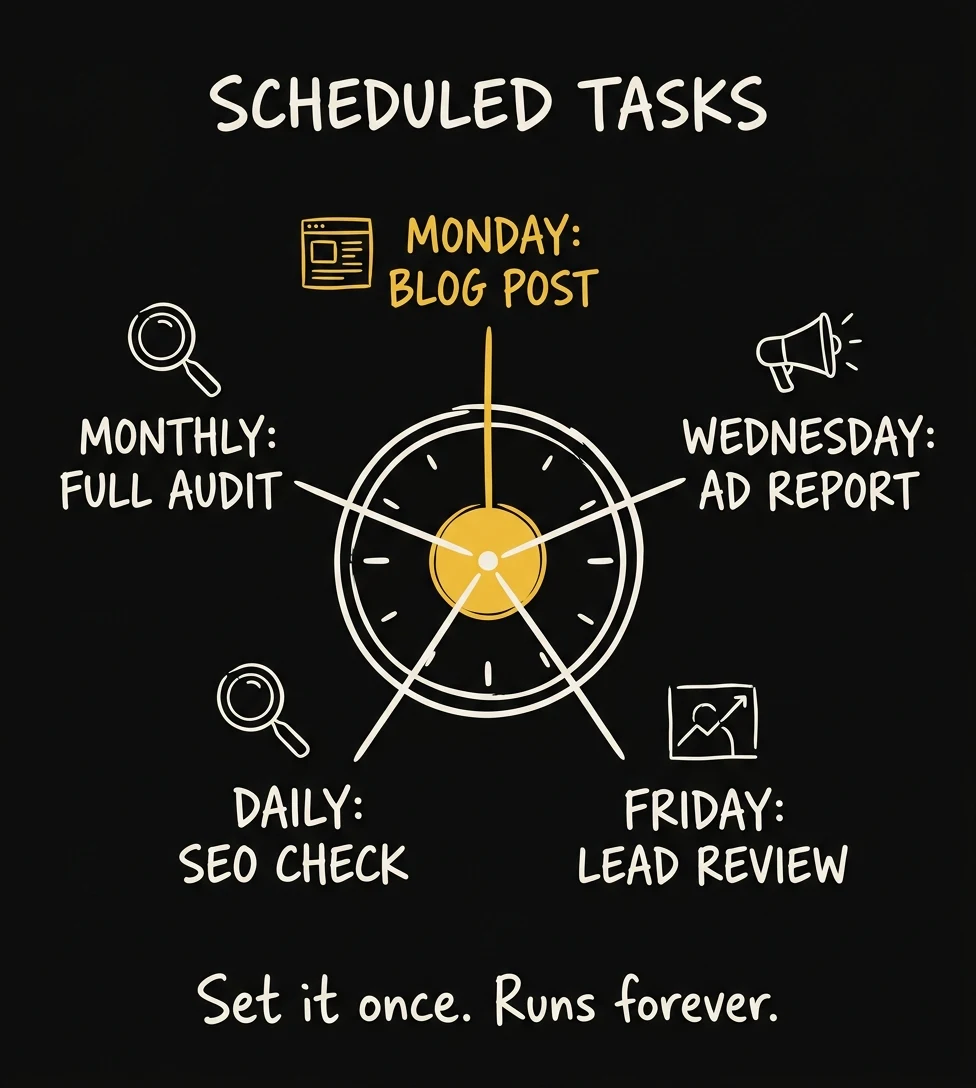
How to set up scheduled tasks:
- Install the Claude in Chrome extension from the Chrome Web Store (free with Claude Pro).
- Open the extension panel and click the clock icon to create a scheduled task.
- Describe the task in plain English and set it to run daily, weekly, or monthly.
- Claude executes it on schedule using your logged-in browser session: no API keys, no Zapier.
Photography studio scheduled tasks worth setting up immediately:
- Every Monday 7am: "Check my Google Business Profile for any new reviews from the past week. Summarize them. Draft a personalized response for any review that doesn't have one yet. Email me the summary."
- Every Sunday evening: "Pull my Google Ads campaign data from this week. Identify the three lowest-performing ads by CTR. Write replacement headlines and descriptions for each. Save to my Ads folder."
- Every month: "Visit the websites of my top 5 local competitors. Screenshot their current pricing pages. Compare to my pricing. Note any changes and email me a summary."
- Every client delivery day: "Open the gallery folder for [client name]. Generate the password-protected gallery link. Send the delivery email with the upsell for prints and the referral ask."
The Hooks System: The Automation Layer Nobody's Talking About
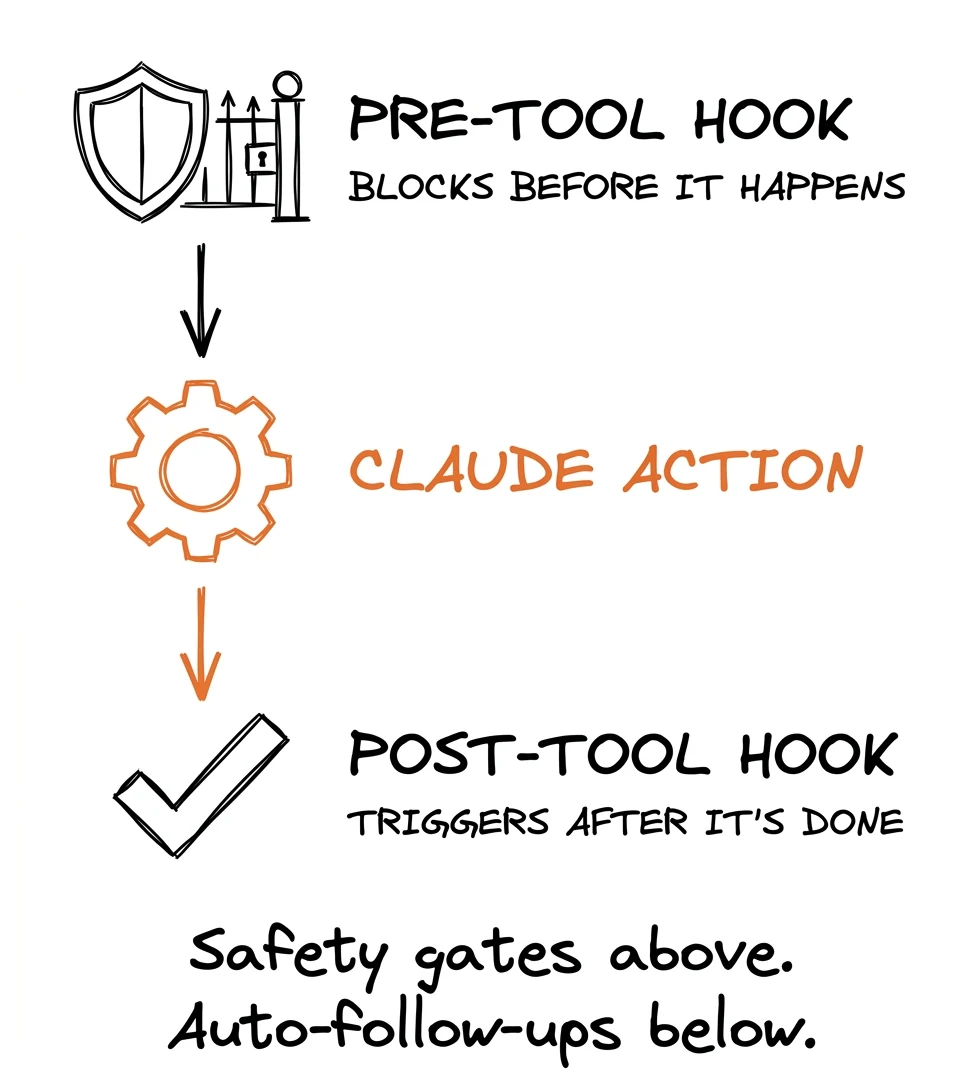
Hooks are user-defined commands that execute automatically at specific points in Claude Code's lifecycle, released in early 2026. If scheduled tasks are the "what runs when," hooks are the "what happens before and after every single action Claude takes." That distinction matters if you want safety, consistency, and zero surprises.
There are two types photographers should know immediately:
- PreToolUse hooks: Run before Claude does something. This is where you put safety gates, rules that block Claude from taking an action you haven't approved. PreToolUse is the only hook that can stop an action before it happens.
- PostToolUse hooks: Run after Claude completes an action. This is where you put automatic follow-ups: compress the image after Claude saves it, run a format check after Claude writes a file, send yourself a Slack notification after Claude publishes a post.
Practical hook examples for photography studios:
- Auto-compress images on save: Every time Claude saves an image file to your blog folder, a PostToolUse hook automatically converts it to WebP at 88% quality. Zero manual steps, zero forgotten compressions.
- Safety gate before deployment: A PreToolUse hook intercepts any deploy command and forces Claude to first confirm the URL looks correct and the staging test passed. Claude cannot deploy to production without clearing this gate.
- Auto-backup before any edit: Before Claude modifies any file in your website folder, a PreToolUse hook creates a timestamped backup. You can always roll back any change with one command.
- Slack notification on publish: Every time Claude publishes a new blog post to your database, a PostToolUse hook sends you a Slack message with the post title, URL, and word count. You always know what went live.
Setting up hooks requires editing a JSON settings file, but Claude can do this for you. Open Claude Code and say: "Add a hook that automatically compresses any image I save to the blog folder to WebP format at quality 88." Claude will write the hook configuration and install it.
At P2P, our hooks pipeline ensures: Every image that enters our system comes out as WebP. Every deploy triggers a test run first. Every blog post that publishes triggers a Slack notification. Every file Claude modifies creates a backup. The hooks run invisibly, automatically, every time, without any additional prompting.

Viral Trick #3: Build a Studio Brain Using the Karpathy Knowledge Base Method (53,000 Likes)
In April 2026, Andrej Karpathy, the founder of OpenAI's training department and one of the most-followed AI researchers on the planet, posted a detailed breakdown of his LLM knowledge base system. It earned 53,000 likes and was covered by VentureBeat, Analytics India Magazine, and dozens of AI publications within 48 hours.
The concept: instead of asking AI the same questions over and over and getting answers based on general knowledge, you build a private, growing "wiki" that Claude maintains, fed by your specific data, your real numbers, your client reviews, your past campaigns. The AI's answers get dramatically better because they're grounded in your actual reality, not generic advice.
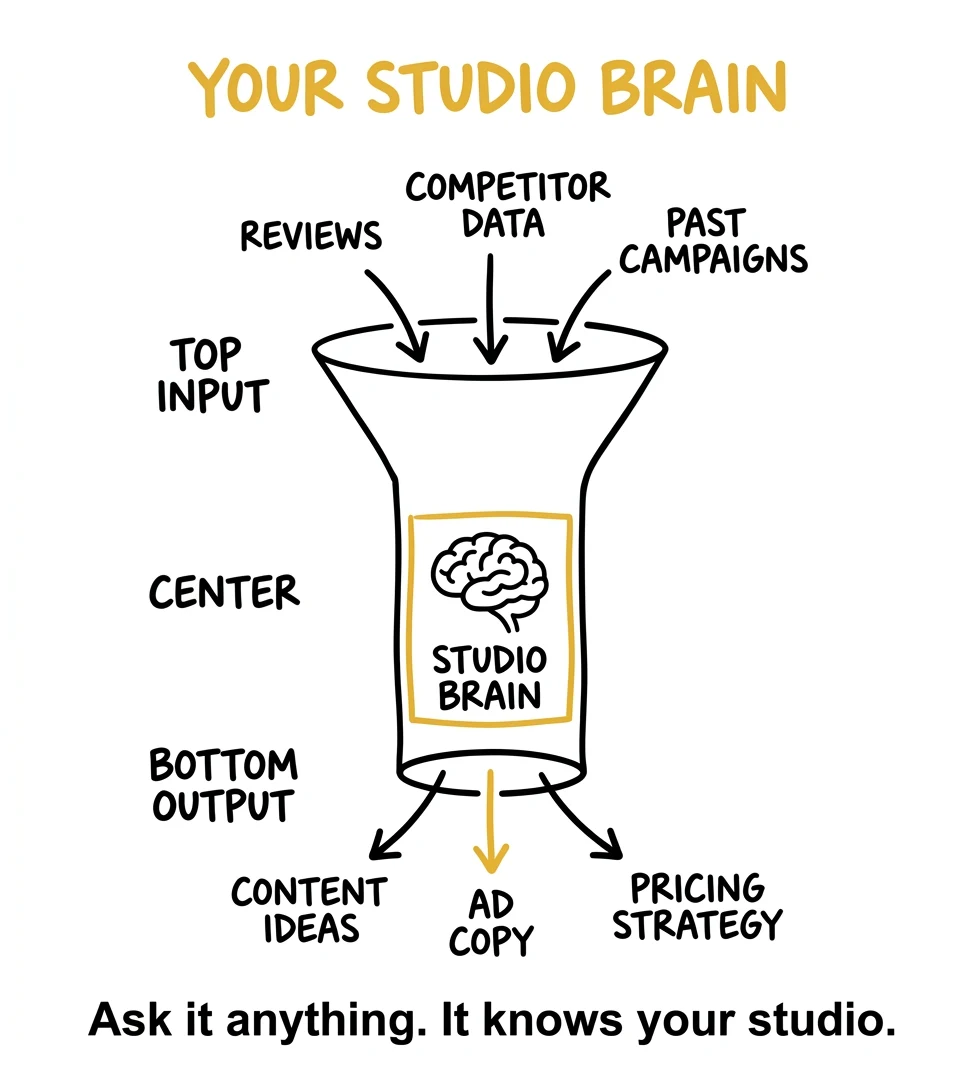
Karpathy's system in plain English:
You create a folder called raw/ and dump everything into it: PDFs of industry data, your Google review exports, past campaign performance screenshots, competitor pricing PDFs, your booking inquiry archive. Raw, unstructured data.
Then Claude reads all of it and builds a structured wiki: organized markdown files with interconnected articles. A "Client Pain Points" article. A "What Converts in My Market" article. A "Pricing Models That Worked" article. All cross-linked, all searchable, all updated automatically when you add new data.
Karpathy's personal wiki contains roughly 100 articles and 400,000 words, maintained almost entirely by Claude without a single traditional database or search system.
Building your Photography Studio Brain (step by step):
- Create a folder:
studio-brain/raw/. Start dumping in: your last 12 months of Google reviews, your inquiry emails (exported from Gmail), any past ad campaign reports, your current pricing menu, 5 competitor pricing pages saved as PDFs. - Open Claude.ai. Say: "Read everything in my studio-brain/raw/ folder. Create a structured wiki with these sections: Client Pain Points, Booking Triggers, What My Market Responds To, Competitor Positioning, Pricing Intelligence, Best-Performing Offers. Write interconnected articles with backlinks between related articles."
- Every time you add new data (new reviews, new campaign results, new competitor changes), say: "Update the wiki with this new data. Which articles need to change? What new insights did we learn?"
- Query it for real decisions: "Based only on my studio brain, what pricing tier mix maximizes revenue for weekend portrait sessions? What objection do my clients mention most before booking?"
Using Parallel Subagents for Competitive Intelligence
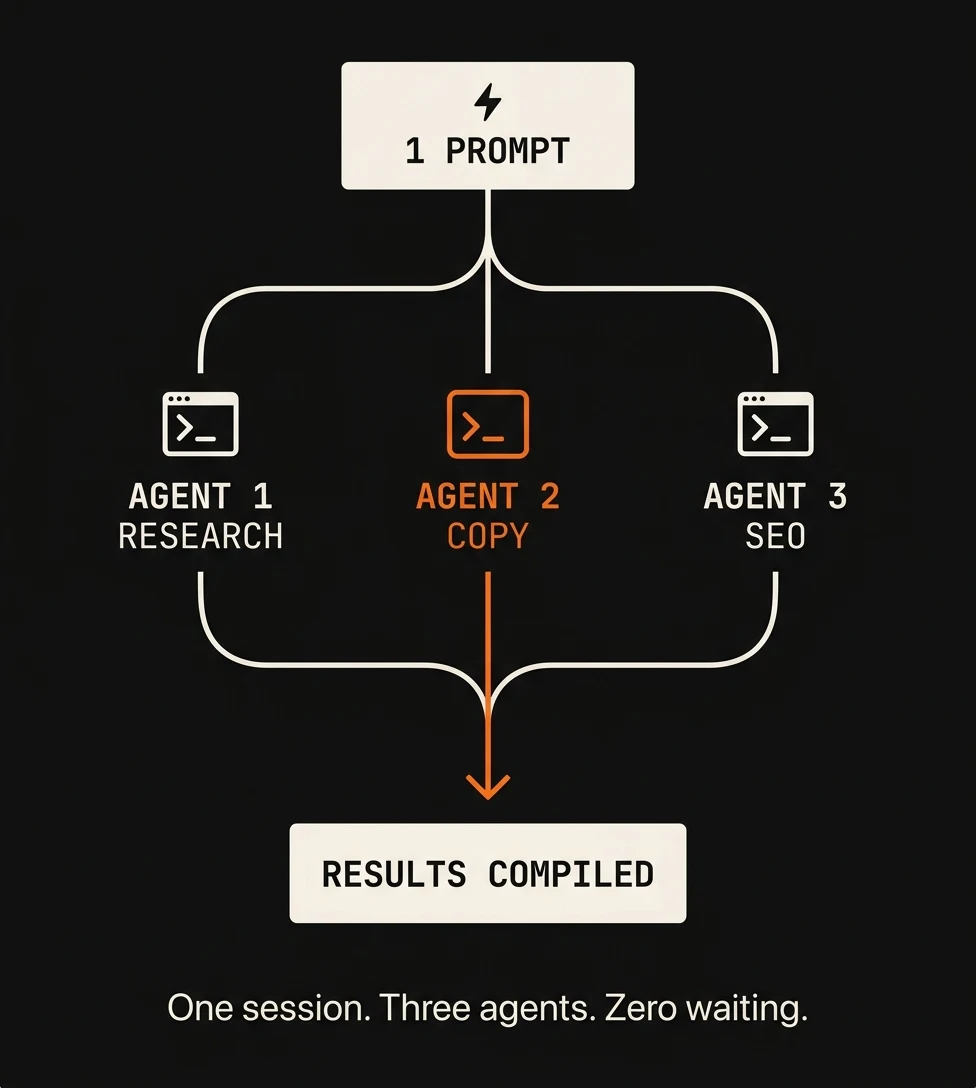
Here's an upgrade most studio owners haven't discovered: instead of researching competitors one at a time, you can dispatch multiple Claude agents to research them simultaneously. This is called parallel subagents: separate Claude instances each working on a different task at the same time, reporting back when done.
For competitive research, the prompt looks like this: "Spawn three separate research agents. Agent 1: research [Competitor A] for pricing, packages, social presence, recent promotions. Agent 2: research [Competitor B], same fields. Agent 3: research [Competitor C], same fields. When all three are done, compile a comparison table and identify the three gaps none of them are addressing."
What would take three separate research sessions now runs in parallel. The result lands in your Studio Brain as a competitive intelligence article, automatically cross-linked to your existing pricing and positioning articles.

At P2P, we use the Studio Brain for: Client market research before building campaigns (feed the studio brain with a client's Google reviews, their inquiry emails, and local competitor data, then ask Claude to identify the strongest messaging angles), and for content strategy (ask Claude to generate blog topic ideas based on what the studio's actual clients are asking, not what generic keyword tools suggest). The result: blog content grounded in real data, ad copy using the exact language clients use in reviews, pricing strategies based on what your specific market has actually responded to.
Viral Trick #4: The Mega-Prompt to Launch Your Entire Marketing System in One Shot (5,000 Likes)
Chris LaubAI's viral post demonstrated something that made founders across the internet do a double-take: feeding Claude a single comprehensive prompt that outputs a complete product strategy, landing page copy, and a full go-to-market plan, all in one session. 5,000+ likes, hundreds of replies from people who replicated it successfully within hours.
For photographers, this translates to something extraordinarily useful. Greg Isenberg described the shift: marketing calendars that took weeks to build can now be auto-generated with AI agents suggesting optimal content mix, timing, and channel distribution based on past performance. One studio owner with a well-configured mega-prompt setup executes at the level of a full marketing team. That's not an exaggeration. That's what vibe marketing actually looks like.
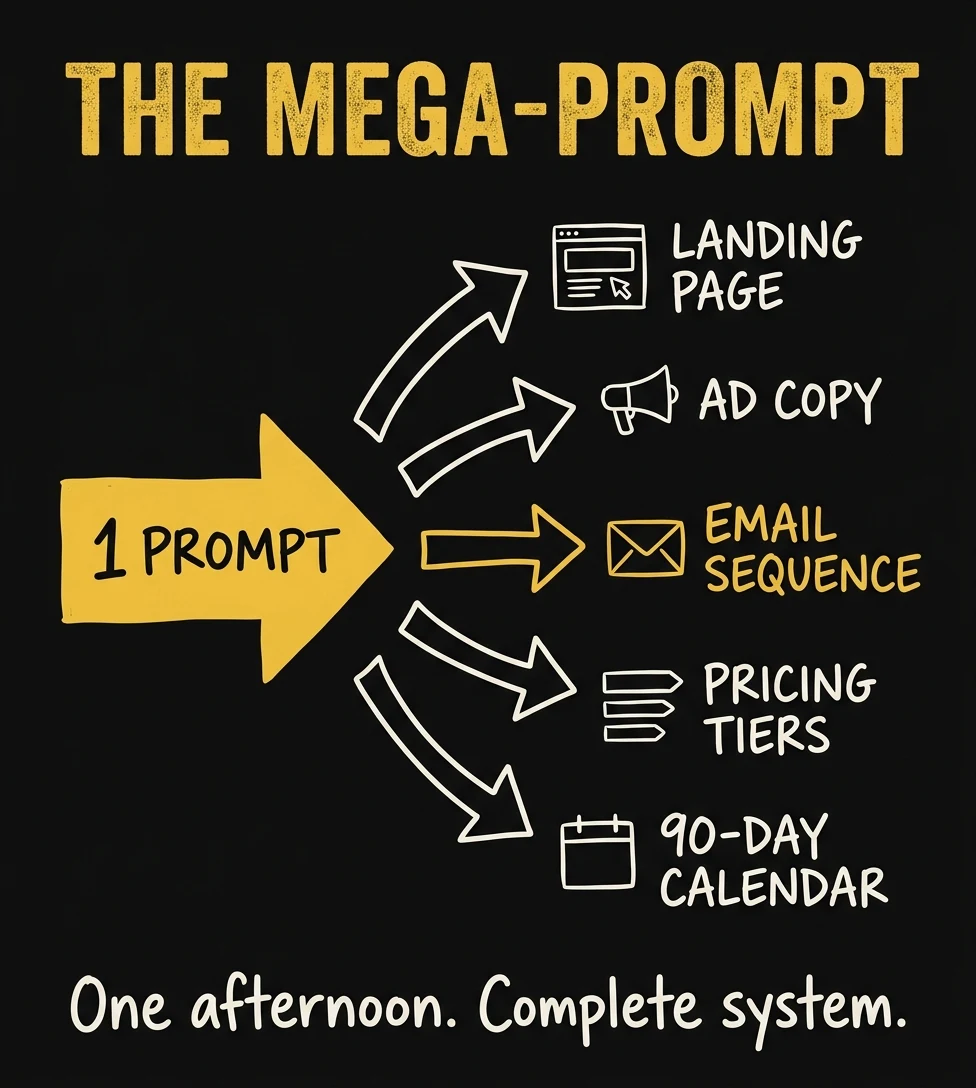
The photography studio mega-prompt template:
Copy this, fill in your brackets, and paste it into Claude.ai:
"You are my studio marketing strategist and funnel engineer. Here is my complete business context: My studio: [describe your niche: wedding, portrait, boudoir, newborn, commercial] My market: [city, population, income level of target client] My current pricing: [your packages and prices] My biggest constraint: [underbooked / wrong clientele / can't raise prices / no referrals] My assets: [number of portfolio images, email list size, social following, reviews] My goal: Book [X] more sessions per month at an average of $[Y] per session. Build me: 1. A revised 3-tier pricing structure with print upsell logic that increases my average order value 2. The complete booking funnel: ad → landing page → lead magnet → email sequence (5 emails) → consultation → booking 3. 10 Google Ad headlines and 5 descriptions for my top service 4. A 90-day content calendar (Instagram, blog topics, email sends) tied to my session schedule 5. The three changes that would move the needle most this month Include exact copy for each element. Write in my voice: direct, warm, focused on the transformation my clients get, not the technical photography details."
Claude returns a complete, deployable marketing system in one session. Not suggestions. Actual copy, an actual calendar, actual pricing tiers. Then use Claude Code to build the landing page, wire up the email sequence to your email platform, and deploy the whole thing to Vercel in the same day.
The key to getting great output: Feed it your Studio Brain data first (Trick #3). When Claude knows your actual client reviews, your real booking rates, and your specific market dynamics, the mega-prompt output becomes frighteningly specific and accurate, not generic advice you could have found in any photography business course.
At P2P, we run a version of the mega-prompt for every new client: We feed Claude the studio's existing marketing data, reviews, ad history, and competitive landscape, then ask it to generate the complete campaign architecture. What used to take three strategy sessions to develop now happens in one 90-minute Claude session before we've even had a kickoff call.
We run this exact process for P2P clients, and then build and manage every piece of the system for you.
See how our done-for-you campaigns work →Viral Trick #5: CLAUDE.md + Skills, the Memory System That Gets Smarter Every Day (9,000 Likes)
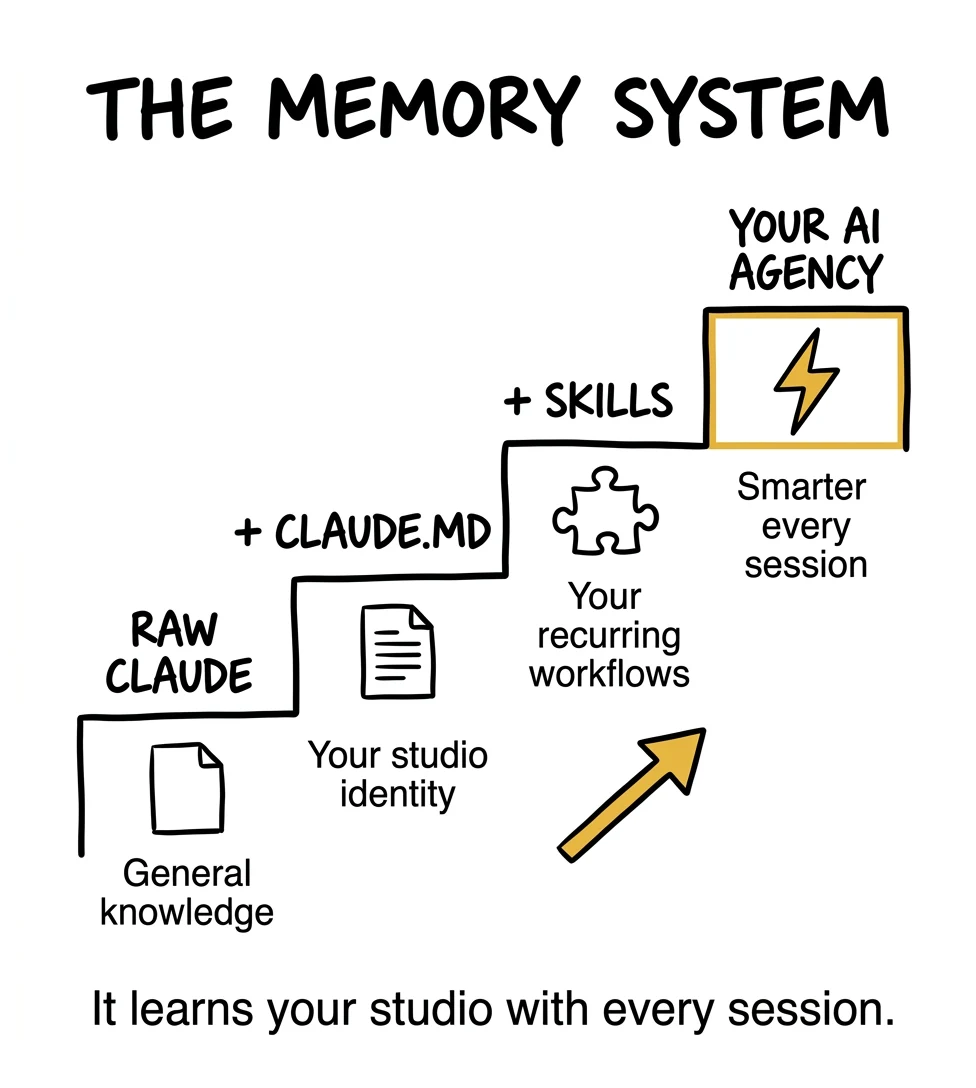
When Boris Cherny shared that "surprisingly vanilla" workflow, two files were doing most of the heavy lifting: CLAUDE.md and Skills.
These two features solve the single biggest frustration with AI tools: having to re-explain everything every single session. Teams that use CLAUDE.md-based workflows report a 45% increase in AI productivity compared to those using standard chat interfaces, because they spend zero time on context-setting and 100% of the time on actual work.
What CLAUDE.md Is
CLAUDE.md is a plain text file that lives in your project folder. Claude Code reads it automatically at the start of every session. Whatever you put in there is permanent context. Claude knows it without being told. Boris Cherny's team checks CLAUDE.md into git and updates it multiple times a week: every time Claude does something wrong, they add a rule. Every time a new convention is established, they add it. It's a living document, not a one-time setup.
For a photography studio, your CLAUDE.md should contain:
- Brand positioning: "Photography to Profits is a marketing agency for portrait, wedding, boudoir, and commercial photographers. We speak directly to studio owners, never to their end clients."
- Voice guidelines: "Direct, confident, slightly confrontational. Never hedge. Never use phrases like 'in today's competitive landscape.' Start with the painful truth."
- Studio specifics: Your pricing philosophy, your target booking rate, your primary market, your session types and average order values.
- Technical conventions: Folder structure, image naming conventions, which CRM you use, how you format proposals.
- Learned rules from past mistakes: "Never assume folder names. Always ask." "Always check the client's style guide before writing copy." "Never schedule social posts without checking the session calendar first."
One underused application: documenting your photography style in CLAUDE.md. Write down exactly how you like images culled (star thresholds, reject criteria, what makes a keeper), how your signature edit looks (warm shadows, lifted blacks, matte highlight), your delivery standards (file naming convention, gallery folder structure, watermark rules). Now every Computer Use session applies your taste automatically, no briefing required.
Every correction you give Claude, every preference you express, goes into CLAUDE.md. The more you feed it, the smarter every future session becomes.
What Skills Are
A skill is a markdown file that teaches Claude how to do a specific recurring task, in your exact way, with your exact conventions, every time. You invoke it with a slash command like /write-email or /create-post.
Skills solve the most expensive problem in AI usage: explaining context. Instead of spending the first 20 minutes of every session re-explaining how your gallery delivery email should sound, you write a skill once. Claude applies it instantly, perfectly, every time.
Photography studio skills worth building first:
/inquiry-response. Takes an inquiry (paste it in) and returns a personalized first response in your voice, within your pricing range, with a call to schedule a consultation. Time saved: 15 minutes per inquiry./gallery-delivery. Takes client name and gallery link, writes the gallery delivery email with your specific print upsell, review request timing, and referral ask. Time saved: 20 minutes per session./write-ad-copy. Takes your target niche and any new data, returns 10 Google Ad headlines, 5 descriptions, and 3 Facebook Ad hooks, all in your voice, tested against your CPL benchmarks. Time saved: 2 hours per campaign./monthly-report. Pulls available performance data and generates a plain-English report with 3 specific recommendations for next month. Time saved: 3 hours per month./content-calendar. Takes your upcoming session schedule, generates a 30-day content calendar with Instagram posts, email sends, and blog topics aligned to your booking goals. Time saved: 4 hours per month.
Skills chain together. At P2P, our /write-seo-post skill runs Perplexity research, builds a content brief, writes a 3-4,000 word pillar post in P2P's voice, uploads images, inserts into our database, updates internal links in related posts, and queues the post for review, all from one command. A task that would take a content team two days takes 45 minutes.
The Superpowers Framework
Beyond custom skills, there's an official skills framework called Superpowers: open-source, free, MIT licensed, and now available in the Anthropic Claude plugin marketplace. It adds a layer of structured methodology on top of everything: brainstorming before building, written plans before execution, verification before marking anything done, code review before deploying. For non-technical studio owners, Superpowers is the safety net that makes Claude Code trustworthy. It always tells you what it's about to do and proves it worked before moving on.
Trick #6: Replace Zapier with Claude + n8n as Your Studio Automation Engine
If you're using Zapier, Make, or any no-code automation platform to connect your studio's systems (your CRM, your email, your booking calendar, your social scheduler), what follows will change how you think about automation cost and capability.
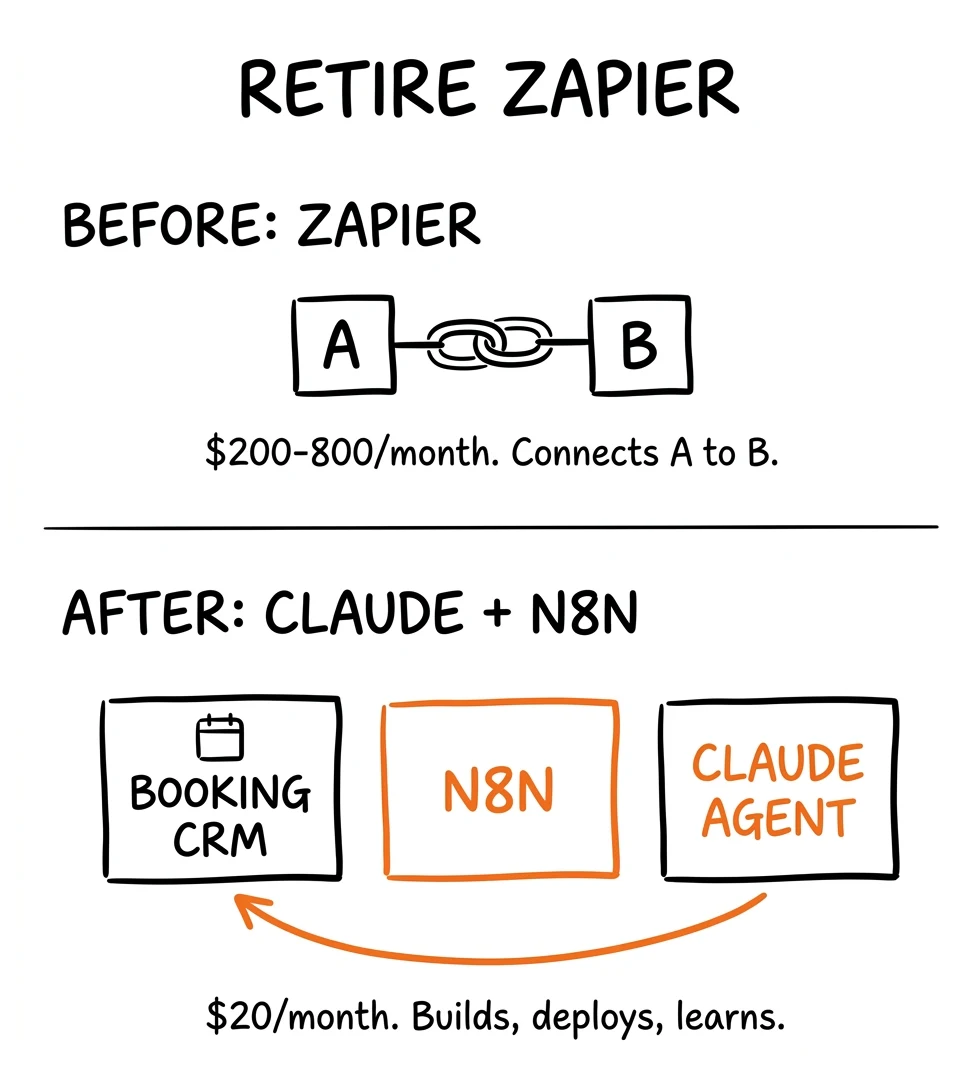
In early 2026, n8n, the open-source Zapier alternative, gained full MCP (Model Context Protocol) support. This means Claude Code now has live read and write access to n8n instances. As one Medium post documented the day after the integration launched: "Claude Code can architect workflows from scratch, deploy them, identify what's broken, and iterate in real time." You can tell Claude: "Build me a workflow that sends a follow-up email 48 hours after every inquiry that hasn't booked." Claude doesn't just suggest how to build it. Claude builds it, deploys it, and tests it, live, in your n8n instance, in real time.
n8n is free to self-host. Claude Code is $20/month. The combination replaces most of what Zapier charges $200-$800/month for, and it does more, because Claude can reason about what the workflow should do, not just execute the one you configured.
Photography studio automations worth building with n8n + Claude:
- HoneyBook → Email sequence trigger: When a lead fills out your contact form, n8n receives the webhook, Claude enriches the lead with publicly available data (Instagram following, website, local market context), and sends a personalized first response, not a template, an actual personalized email.
- Booking confirmation → Client portal: When a session is booked in HoneyBook or 17hats, n8n triggers Claude to create a client folder, generate a personalized prep guide for their session type, and send a confirmation email with the prep guide attached.
- Gallery delivery → Review request sequence: When you mark a gallery as delivered, n8n starts a 3-email review request sequence with 7-day spacing. Claude writes each email personalized to what you know about the client from the shoot notes you input.
- Google review → Response + social share: When a new 5-star review lands on Google, n8n notifies Claude, which drafts a response, creates an Instagram Story graphic with the review text, and queues the post for your approval.
Claude can also connect to your CRMs directly via MCP servers. The Anthropic MCP directory lists official and community-built MCP servers including connections for Gmail, Google Calendar, Google Sheets, Slack, and increasingly, industry-specific tools. If a native MCP doesn't exist for your CRM, Claude Code can build a custom one in a single session, writing the integration code, testing it, and documenting how to use it.
The practical difference between Zapier and this setup: Zapier connects App A to App B when Trigger C happens. That's it. Claude Code + n8n connects everything to everything, reasons about what should happen based on context, learns from your corrections, and gets smarter over time. Zapier is a wire. This setup is a brain.
How We Stack All 6 at P2P: A Real Week in the Agency
Greg Isenberg described the new business reality: enterprise software that used to require 30 engineers now requires 1 person and a Claude Code subscription. The constraint is no longer "can we build it"; it's "do we understand the workflow deeply enough." Here's what that looks like in a real agency week:
Monday morning (automated, no one touched anything): Scheduled tasks ran overnight: pulled Google review data for three client studios, drafted review responses, generated a weekly performance summary for each active ad campaign, and queued five new social captions for approval. Hooks confirmed every action was logged. Slack notifications landed in Humberto's phone before he woke up.
Monday late morning (20 minutes of human time): Humberto reviews the automated summaries. For any studio that needs new ad copy, he runs /write-ad-copy. Claude reads the CLAUDE.md with that client's brand context, reads their Studio Brain for market intelligence, and generates replacement copy. Review and approval, not writing.
Tuesday (45 minutes of human time): New blog post. The /write-seo-post skill fires: Perplexity researches the topic via MCP, three parallel subagents research competing articles simultaneously, Claude writes 3,500 words in P2P's voice, infographics are generated, images are uploaded to Supabase, the post is inserted into the database with all SEO fields populated, and three related posts get updated with internal links. Humberto reads the draft and approves.
Wednesday–Thursday (as needed): If a client needs a new landing page, Claude Code builds it from scratch (routing, component, design system compliance, SEO meta tags) and deploys to Vercel. If there's a new service page needed, /build-page handles it in one session. The hooks system backs up every file before modification and runs a compile check before deployment.
Friday (1 hour, first Friday of each month): Monthly SEO audit. /manage-seo reads every page on the site, checks every meta tag, structured data block, internal link, and alt text, produces a report, and with approval, fixes everything it found. n8n receives the completion webhook and sends the client-facing summary email automatically.
Total human time: 3-4 hours per week of review and direction. The rest runs autonomously.
Your First Week: Getting Started Without Any Technical Background
This is not a tool for developers. Boris Cherny built it for developers, but the people using it most effectively are business owners who were willing to spend a week learning a new way to work. The r/vibecoding community documents this constantly: first-timers building functional systems in their first session, then iterating from there.
Day 1: Install and explore. Subscribe to Claude Pro at claude.ai ($20/month). This gives you Claude.ai, Claude Cowork, and Claude Code. Install the Claude desktop app. Install the Claude in Chrome extension. Subscribe to Perplexity Pro ($20/month). Don't open the terminal yet. Spend today using Claude.ai as a strategic advisor.
Day 2: Strategy with Claude.ai. Paste your current homepage copy, your pricing menu, and your last 10 inquiry emails. Ask Claude: "What's the strongest message angle I'm not using? What objection keeps appearing in these inquiries that my current copy doesn't address? What three changes would move the needle most this month?" Just have the conversation. Get the strategy. This alone is worth the $20.
Day 3: First scheduled task and first hook. Open the Claude in Chrome extension. Set up one scheduled task: every Monday morning, Claude checks your Google Business Profile for new reviews and emails you a summary with draft responses. Then say to Claude Code: "Add a hook that sends me a Slack message whenever you publish anything to my blog." Two automations running before lunch.
Day 4: Build your Studio Brain. Create a folder on your desktop called studio-brain. Export your Google reviews, copy your last 10 inquiry emails, screenshot your pricing page, save a competitor's pricing page as a PDF. Ask Claude.ai to read it and build a structured wiki with your top 5 messaging angles.
Day 5: Run the mega-prompt. Use the template from Trick #4. Fill in your business context. Get the complete marketing strategy in one 90-minute session. Even if you don't implement every piece, you have a blueprint that would have cost $3,000-$5,000 from a consultant.
Day 6–7: CLAUDE.md, first skill, n8n setup. Create CLAUDE.md with your studio identity, voice, and pricing philosophy. Install the Superpowers plugin. Ask Claude to help you build your first skill: the inquiry response one. Then, if you want to go deep: install n8n (free, local install), connect it to Claude Code via MCP, and build your first automation: the booking confirmation to client prep guide workflow.
By end of week one: a researched marketing strategy, two automations running, a Studio Brain you can query, and the foundation of a memory system that gets smarter every session. A $40 investment that replaces most of what you'd spend $2,000-$5,000/month on from agencies and consultants.

If you'd rather have us build the whole system for your studio, that's exactly what we do.
Get your free P2P strategy session →Conclusion: The Studio Operating System Nobody Else Is Running Yet
Greg Isenberg was right about one thing above all else: the niche audience of 5,000 photographers who used to be too small to profitably serve is now, for the studio owner running this stack, an extraordinarily valuable market. Because you can do the work of five with the cost of one. You can serve clients at a level that used to require a team. You can iterate, test, and improve at a speed your competitors physically cannot match.
The gap between studios using this stack and studios that aren't is widening every month. Not because the tools are expensive or exclusive. They're $40/month and available to anyone. The gap widens because studios that started six months ago have six months of CLAUDE.md refinement, six months of hooks polished, six months of scheduled tasks running, six months of a Studio Brain compounding with every new review and campaign result added.
Photography to Profits, founded by Humberto Garcia, runs its entire marketing operation on this stack. Not as an experiment, but as the actual way the agency operates. Blog posts, SEO audits, ad copy, landing pages, email sequences, competitive research, website deployments, CRM automations: all of it flows through Claude Code, guided by the techniques described in this guide.
You don't need to implement everything this week. Pick one technique. Computer Use, if you want to automate Lightroom. Scheduled Tasks, if you want Monday to run itself. The Mega-Prompt, if you want a complete marketing strategy in one afternoon. CLAUDE.md, if you want every future session to know your studio. The n8n integration, if you want to retire Zapier permanently.
Pick one. Start today. Add the next one next month. By the end of the year, your studio will be running on infrastructure your competitors don't know exists, and you'll be one of the studio owners who got there first.