
ChatGPT Ads for photographers can put a studio in front of a potential client while that person is already discussing a relevant need. The opportunity is different from search ads and social ads, but the setup still depends on a focused offer, clear context, a qualified landing page, and conversion tracking that actually delivers an event.
This complete 2026 guide walks from account creation to campaign launch. It uses the current OpenAI Ads Manager interface, official OpenAI documentation, and the real Photography to Profits Google Tag Manager setup. It is written for established portrait photographers with strong work, premium pricing, and enough sales capacity to handle more qualified consultations.
One proof boundary matters from the start: installing the base pixel and publishing a conversion tag does not prove attribution works. As of August 15, 2026, our Ads Manager account still shows zero received conversion events. The setup exists, but end-to-end delivery remains unproven until a real successful inquiry appears in Event Stream.
Last verified August 15, 2026 against current OpenAI Ads Manager, OpenAI Help and Developer documentation, and Google Tag Manager Help.
Key Takeaways from Photography to Profits
- Create the account at ads.openai.com, and confirm country, currency, and time zone before saving because OpenAI documents these as permanent account choices.
- Choose Reach, Clicks, or Conversions based on the campaign's actual job. The objective cannot be changed after campaign creation.
- Context hints are broad matching signals, not exact keywords and not a true exclusion list. Write the buyer, services, maturity signals, and low-fit patterns in plain language.
- The United States minimum daily campaign budget is currently $25. Treat that as a platform minimum, not a promise that $25 is enough to produce a qualified photography lead.
- Use `lead_created` only after a form or inquiry succeeds. Then verify the tag in GTM Preview and verify the received event inside Ads Manager Event Stream.
ChatGPT Ads Setup Checklist
- Understand where ChatGPT Ads fit
- Create and verify the Ads Manager account
- Choose the right campaign objective
- Build the campaign and tracking parameters
- Write photographer-specific context hints
- Create distinct ads and a qualified landing page
- Install and verify conversion tracking
- Run launch QA and monitor lead quality
What Are ChatGPT Ads for Photographers?
ChatGPT Ads are paid placements served through OpenAI's advertising system. A photography studio can use them to reach people whose conversations suggest a relevant commercial need, such as finding a portrait photographer, planning a 40 Over 40 experience, comparing local headshot providers, or looking for help marketing a professional studio.
The practical difference is intent context. Meta often starts with an audience and creative interruption. Google often starts with a search query. ChatGPT Ads can use the broader subject of a conversation as a matching signal. That makes context strategy important, but it does not remove the need for a clear offer and a landing page that earns trust.
| Channel | Primary signal | Strong photographer use | Main risk |
|---|---|---|---|
| ChatGPT Ads | Conversation context and platform signals | Reach a prospect while they are discussing a relevant need | Writing hints so broadly that low-fit conversations dominate |
| Google Ads | Search query and campaign signals | Capture explicit local demand | Buying broad or research-only searches |
| Meta Ads | Audience, behavior, and creative response | Create demand around a strong campaign concept | Generic creative that attracts attention without buying intent |
Do not judge the channel from novelty alone. A good test asks whether the system can produce qualified consultations at an acceptable acquisition cost. The ChatGPT Ads management service for photographers is the hire-intent version of this guide if you want Photography to Profits to build and manage the system.
How to Create a ChatGPT Ads Account
Start at ads.openai.com. According to OpenAI's current account setup guide, the first person completing onboarding becomes the account owner.
- Sign in with an existing OpenAI account or create one.
- Enter the legal business details for the photography studio.
- Select the business country, billing currency, and account time zone carefully. OpenAI says these choices cannot be changed later.
- Complete the requested identity or business verification through Persona.
- Add the account name, studio logo, and business profile details.
- Add a valid payment method in Billing.
- Invite the staff members or agency partners who need access.
At the time of verification, OpenAI lists Ads Manager availability in Australia, Brazil, Canada, Japan, Korea, Mexico, New Zealand, the United Kingdom, and the United States. Availability can change, so check the current list before planning a launch.
Account country, currency, and time zone affect reporting and billing. Confirm them with the business owner before saving instead of treating onboarding as a disposable test.
Which ChatGPT Ads Objective Should a Photographer Use?
The current Standard campaign flow offers Reach, Clicks, and Conversions. OpenAI documents that a campaign objective cannot be changed after creation. Choose based on the metric the campaign should optimize, not the objective that sounds most advanced.
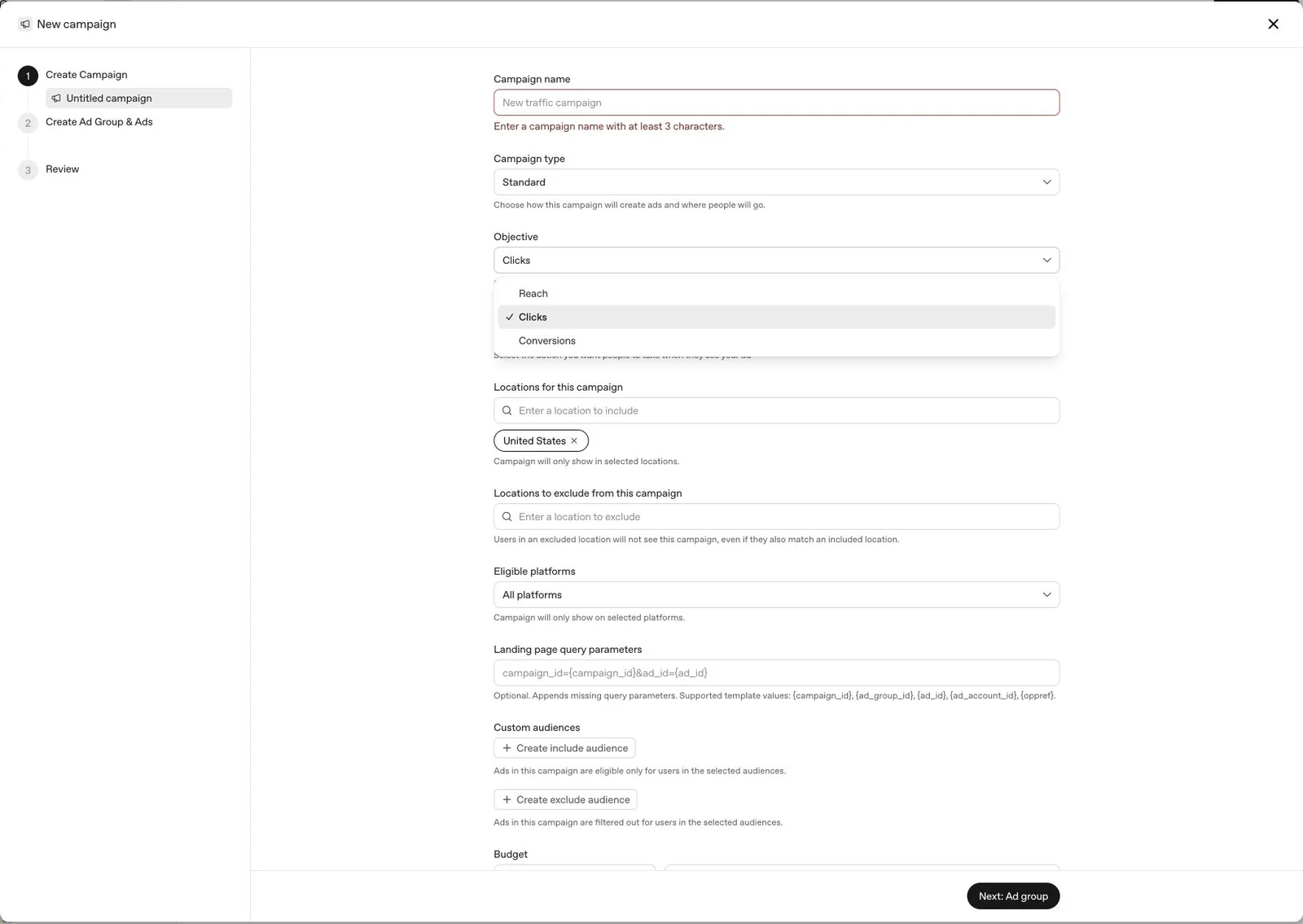
The current Standard campaign objective menu in OpenAI Ads Manager. Capture: Photography to Profits, August 15, 2026.
| Objective | Use it when | Photographer example | Do not confuse it with |
|---|---|---|---|
| Reach | You need efficient exposure and are still learning which contexts respond | Introducing a new studio brand or differentiated portrait experience | Qualified lead generation |
| Clicks | The landing page can qualify visitors, but conversion history is not ready | Sending established photographers to a detailed campaign or service page | A page-view result proving business value |
| Conversions | The correct event is linked, receives real events, and represents a useful action | Optimizing for a successful consultation request through `lead_created` | Installing a tag without verifying delivery |
Our starting rule: use Clicks for a clean learning campaign when the landing page and analytics work but the conversion event has no verified delivery. Move to Conversions only after Ads Manager receives the correct event from a real successful action. Reach is useful for an intentional awareness test, not as a substitute for weak tracking.
How to Build the Campaign
Select Create, choose Campaign, and use the Standard campaign type for a normal website destination. Give the campaign a name that records the funnel, audience, objective, geography, and launch period.
A practical naming pattern is:
TOF | ChatGPT Ads | Photographer Marketing | Clicks | US | 2026-08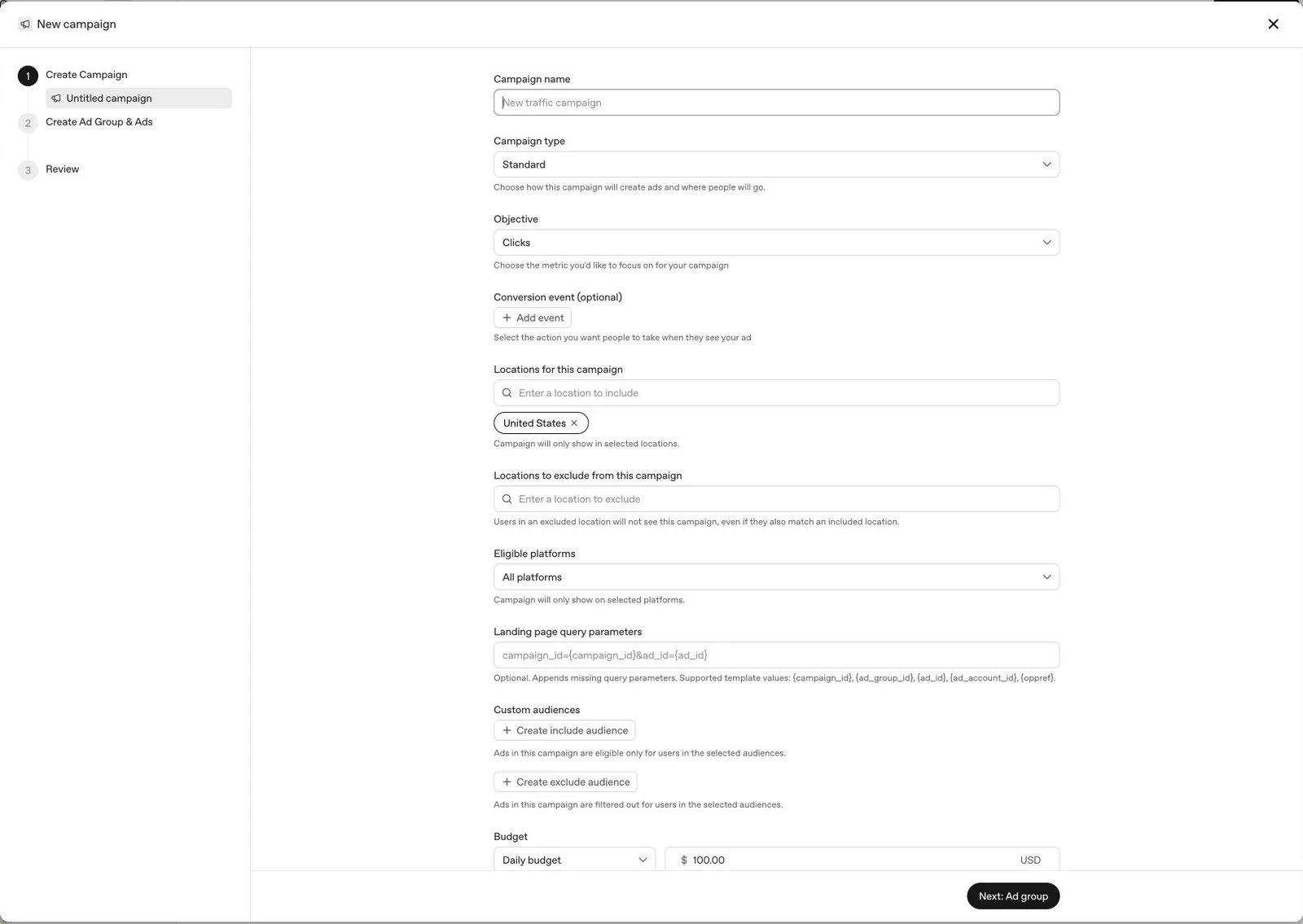
The current Standard campaign builder shows objective, location controls, eligible platforms, parameters, audiences, and budget together. Capture: Photography to Profits, August 15, 2026.
Set the location intentionally
Include only markets the studio can serve. Use the separate exclusion control for locations that should not receive ads. Location controls are real delivery constraints. They are different from writing a city name inside a context hint.
Choose the eligible platform
Use all platforms when the offer and landing page work across the available inventory. If the interface offers a narrower platform choice, use it only when the campaign hypothesis requires it. Do not fragment a small test without a reason.
Add landing-page query parameters
OpenAI currently supports template values including `{campaign_id}`, `{ad_group_id}`, `{ad_id}`, `{ad_account_id}`, and `{oppref}`. A clear starting template is:
utm_source=chatgpt_ads&utm_medium=paid&utm_campaign={campaign_id}&utm_content={ad_id}&ad_group_id={ad_group_id}&oppref={oppref}This separates ChatGPT Ads from Meta and Google in analytics, retains campaign and ad identifiers, and preserves OpenAI's opportunity reference when it is available. The OpenAI measurement pixel documentation says the pixel automatically captures `oppref` into the first-party `__oppref` cookie. Keep your privacy disclosures and consent behavior aligned with the data you collect.
Set the budget
The current United States minimum daily campaign budget is $25. That is a platform threshold, not a recommended total test budget and not a lead guarantee. Give a test enough time and budget to collect decision-quality traffic without spending more than the studio can responsibly learn from.
How to Write Context Hints for Professional Photographers
Context hints describe conversations, topics, or keywords where an offer may be relevant. The current Ads Manager interface states that they guide matching but are not exact-match targeting rules. Treat them as a structured brief for the right situation, not as a bag of keywords.
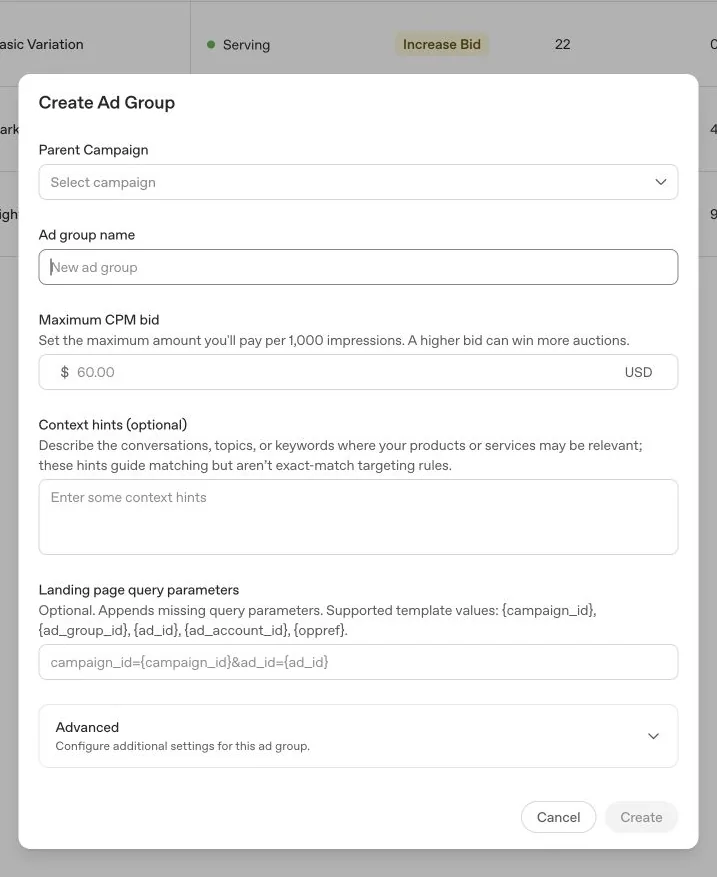
Context hints live at the ad-group level beside the bid and landing-page parameters. Capture: Photography to Profits, August 15, 2026.
For a marketing agency serving established photographers, we would begin with a compact four-part brief:
- Buyer: professional portrait photographers and established studios.
- Need: a specialist agency to plan and manage client acquisition.
- High-fit signals: premium portfolio, established website, proven sales process, real marketing budget, and capacity for more clients.
- Low-fit patterns: hobbyists, beginners, free ideas, DIY-only research, boosted-post help, cheap templates, and lowest-cost-lead shopping.
A complete context hint example
Professional portrait photographers and established photography studios searching for a specialist marketing agency to plan and manage high-value client acquisition campaigns, including 40 Over 40 campaigns, model calls, portrait giveaways, Facebook and Instagram ads, Google Ads, landing pages, lead follow-up, consultation booking, and campaign optimization. Prioritize photographers with strong portfolios, premium pricing, an established website, a proven sales process, and the budget and capacity to serve more clients. Deprioritize hobbyists, beginner photographers, free marketing ideas, DIY marketing, boosted posts, cheap templates, entry-level website advice, and people only seeking the lowest-cost leads.
Important: words such as "deprioritize" describe your intent, but they do not create a guaranteed exclusion. Context hints are broad signals. Use location exclusions and any available audience exclusion controls for enforceable constraints, then judge actual conversation quality from results.
Context hints for a portrait studio campaign
A consumer-facing studio should replace the agency language with the actual session and buying moment. For a 40 Over 40 campaign, describe women exploring a meaningful portrait experience, celebrating a milestone, or comparing established local portrait studios. Add geographic and experience details, but avoid sensitive personal-attribute assumptions or wording that tells someone what the system thinks it knows about them.
How to Create Ads That Earn the Click
The current ad creation dialog asks for a parent campaign, parent ad group, ad name, title, description, link, image, and optional landing-page parameters. The live interface shows a 50-character title limit and a 100-character description limit.
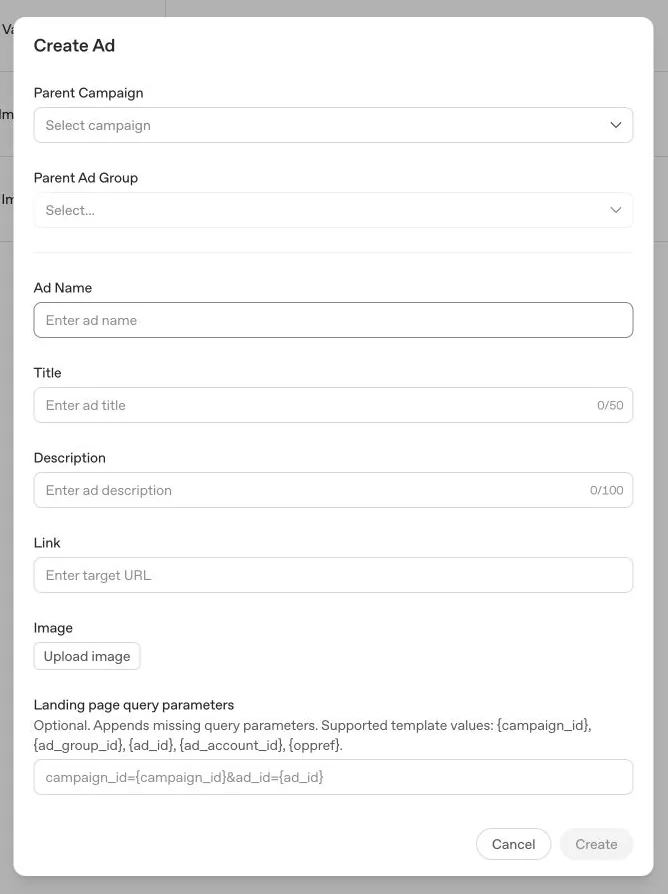
The current ad builder is intentionally simple. The title, description, image, and landing page must carry one clear idea. Capture: Photography to Profits, August 15, 2026.
Create distinct ads instead of superficial punctuation changes. Each variation should test one different reason to click:
| Angle | Title example | Description example |
|---|---|---|
| Specialization | Marketing Built for Photographers | Paid ads, landing pages, and follow-up for established portrait studios. |
| Campaign expertise | Plan Your Next Portrait Campaign | Get a qualified client-acquisition system, not another boosted post. |
| Contrarian fit | We Do Not Work With Every Studio | See what makes a photography business ready for managed growth. |
| Operational relief | Stop Managing Every Marketing Step | We build and run the campaign while you lead the studio. |
| Channel expansion | Add ChatGPT Ads to Your Mix | Reach qualified photographers inside relevant business conversations. |
Use an image that makes the category obvious at a glance. For a photography marketing offer, show a studio, camera, portrait work, campaign planning, or a photographer operating a real business. Avoid generic office stock, fabricated dashboards, and creative that could advertise any agency.
Send the click to one qualified page
The destination should repeat the promise, show who the service is for, explain the deliverables, provide believable evidence, and ask for one next step. A generic homepage can work for a broad agency search campaign, but a focused service page usually gives the visitor a clearer decision. Our dedicated ChatGPT Ads management page is built for that hire-intent job.
Want Photography to Profits to build the campaign, context strategy, ads, landing page, tracking, and follow-up? Review our ChatGPT Ads management for photographers.
How to Set Up ChatGPT Ads Conversion Tracking With GTM
OpenAI's browser measurement starts with a base pixel on the website and a supported event when the desired action succeeds. For a completed contact or consultation request, the supported event is `lead_created`.
Step 1: Create the data source and conversion event
In Ads Manager, open Tools, then Conversions. Create a web data source and a conversion event based on `lead_created`. Link that conversion event to the relevant campaign.
Step 2: Install the base pixel in GTM
Create a Google Tag Manager Custom HTML tag, paste the base snippet supplied by Ads Manager, and fire it on the page views covered by your privacy and consent setup. Google requires JavaScript in a Custom HTML tag to be enclosed in script tags.
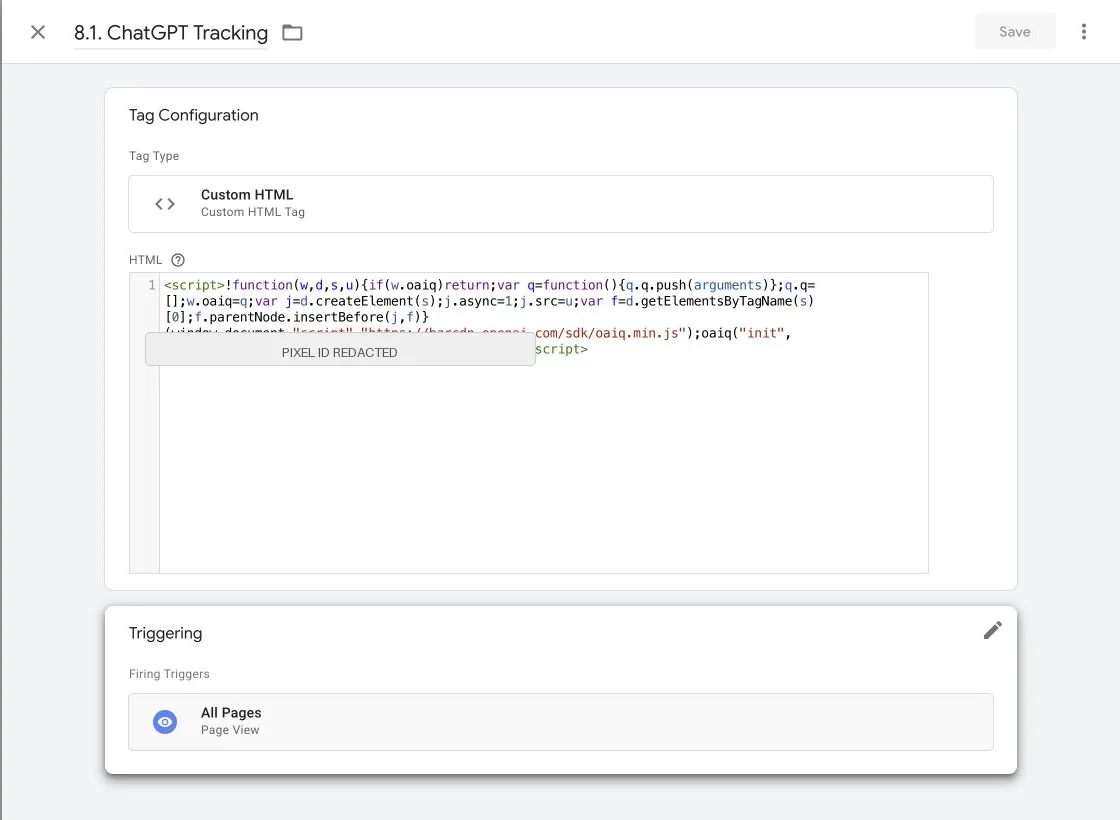
The Photography to Profits base pixel is a published GTM Custom HTML tag. Its pixel ID is redacted here. Capture: Google Tag Manager, August 15, 2026.
Step 3: Fire `lead_created` only after success
Create a second Custom HTML tag with the supported event call:
<script>
  oaiq("measure", "lead_created", {
    type: "customer_action"
  });
</script>
Do not trigger this from a button click if validation or network errors can prevent submission. Trigger it after the site confirms success, such as a named `dataLayer` event, a unique thank-you page, or a verified embedded-form completion event.
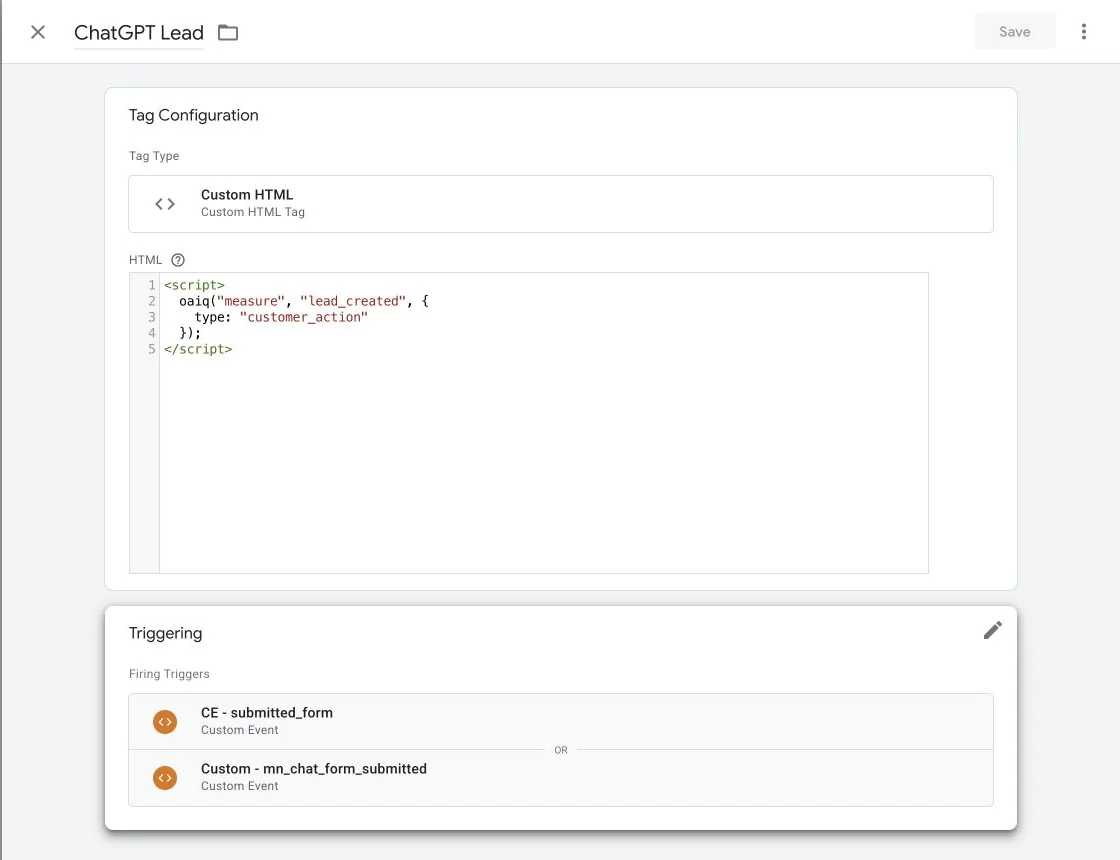
Our current `lead_created` tag fires from the site's submitted-form event or the separate embedded chat-form success event. This proves configuration, not delivery. Capture: Google Tag Manager, August 15, 2026.
Step 4: Preview before publishing
- Click Preview in Google Tag Manager to open Tag Assistant.
- Load the real landing page with the campaign parameters, including a test `oppref` value if appropriate.
- Confirm the base pixel fires once.
- Submit the form with valid test data through the complete success path.
- Confirm the `lead_created` tag fires once after success and does not fire on validation errors, reloads, or duplicate callbacks.
- Publish a named GTM version only after Preview is clean.
Google's Preview and debug guide proves what GTM attempted in the browser. It does not prove OpenAI received and accepted the event. That requires the next check.
Step 5: Verify the event in Ads Manager
Return to Tools, Conversions, and Event Stream. Start polling, complete a real successful test, and look for the received event. Confirm the data source, event name, receive time, and available event data.
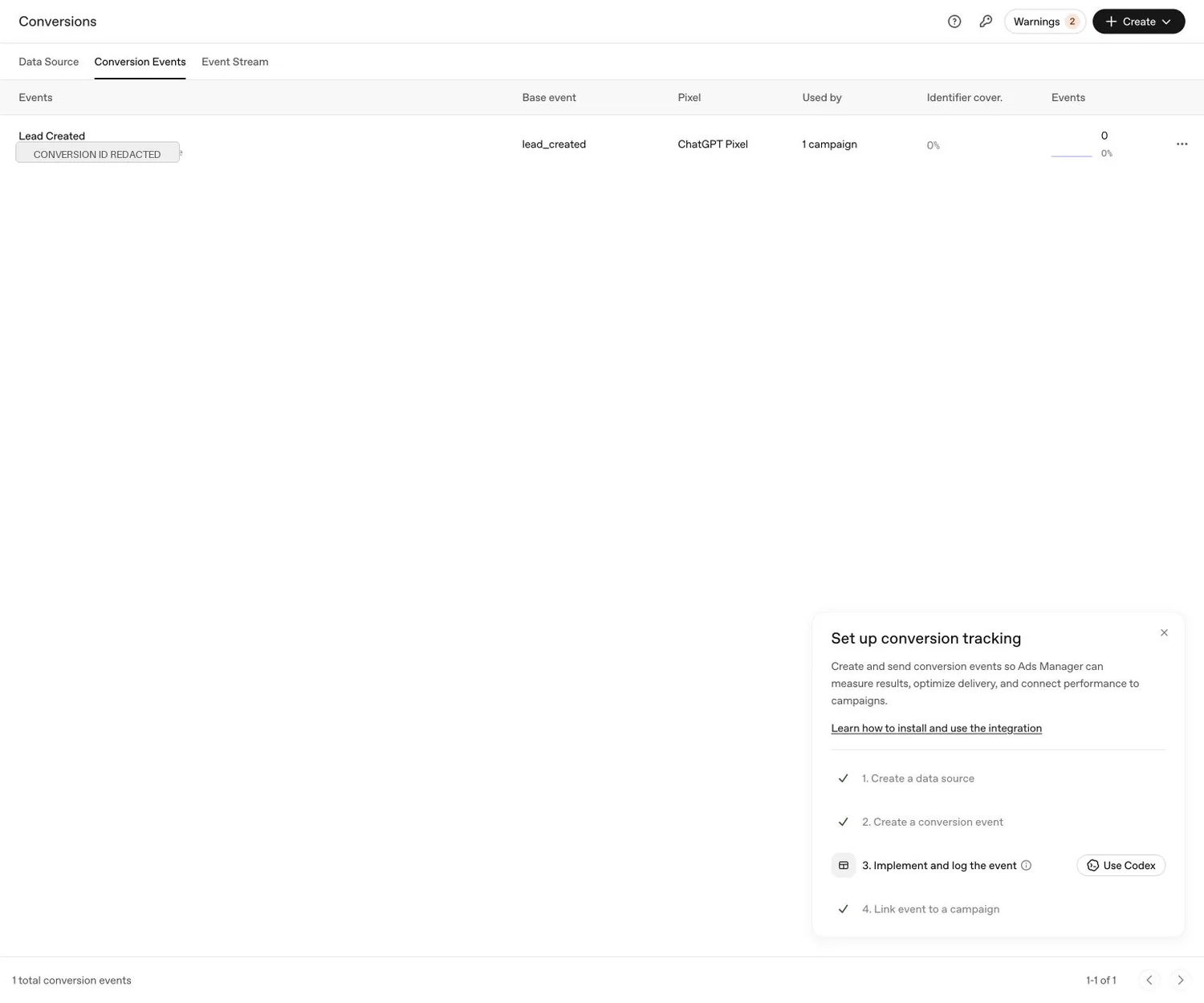
Our conversion event is created and linked, but Ads Manager still reports zero events and marks implementation as incomplete. That means delivery is not proven. Capture: Photography to Profits, August 15, 2026.
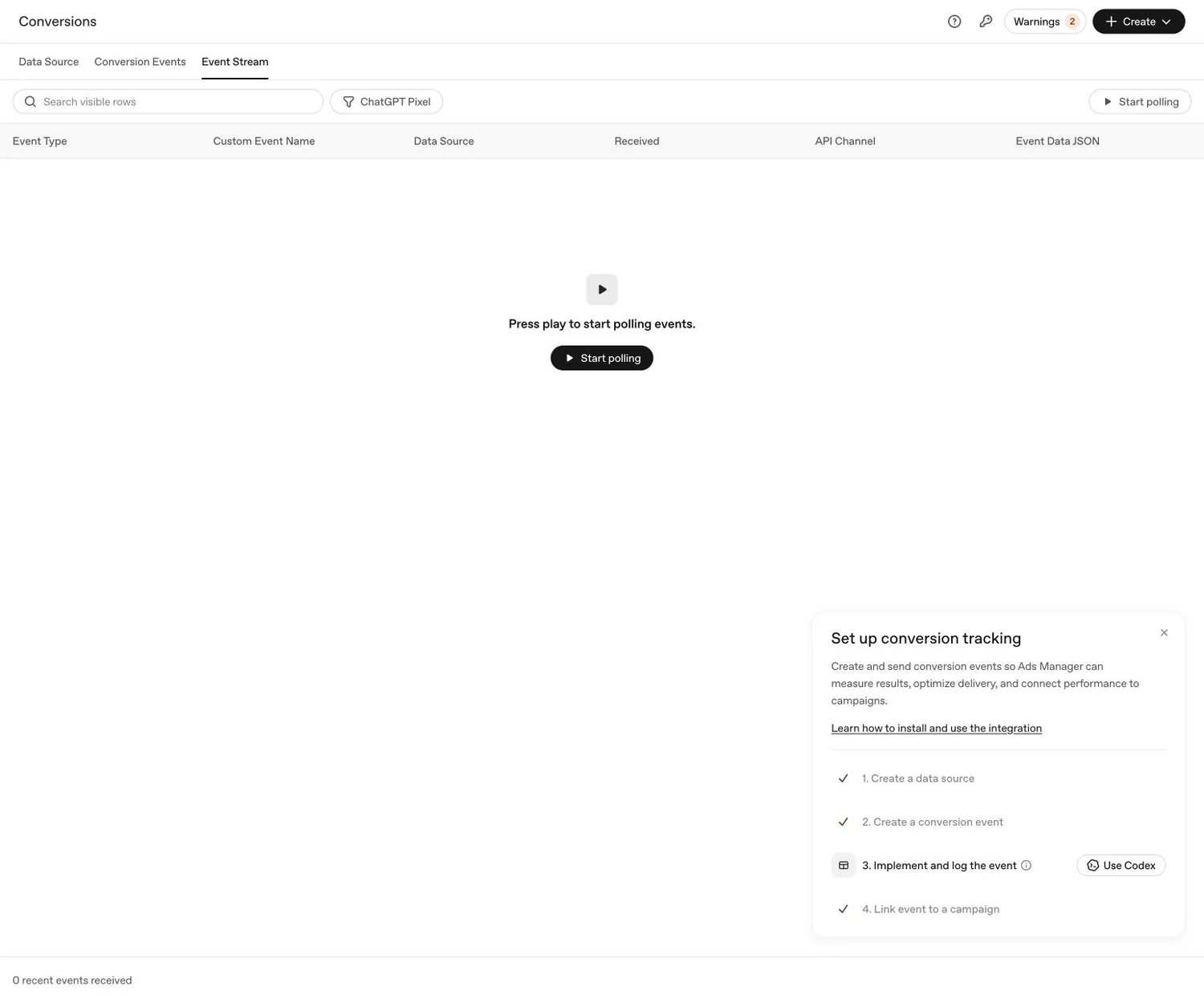
An empty Event Stream is not a successful tracking test. Start polling, perform the complete conversion journey, and require a received event before calling attribution live. Capture: Photography to Profits, August 15, 2026.
The ChatGPT Ads Launch QA Checklist
Run one complete audit before publishing a campaign. It is cheaper than trying to explain an unqualified lead, a broken landing page, or an event that never arrived.
| Layer | Pass condition | Evidence to keep |
|---|---|---|
| Account | Legal business, country, currency, time zone, owner, payment, and users are correct | Account settings review |
| Campaign | Objective, geography, platform, budget, dates, and parameters match the test | Campaign review screen |
| Ad group | Context hints describe the buyer, need, maturity, and low-fit patterns | Saved context brief |
| Ads | Each variation tests a distinct angle and matches the destination | Ad preview and naming map |
| Landing page | Mobile page loads, parameters persist, form works, and next step is clear | Real mobile and desktop submissions |
| GTM | Base and conversion tags fire once in Preview at the correct moments | Tag Assistant session |
| Ads Manager | The real event appears in Event Stream and the conversion status updates | Received event screenshot or record |
| CRM | The inquiry reaches the pipeline with source fields and the correct follow-up | Lead record and notification receipt |
Do not use a test that creates unapproved texts, emails, Slack alerts, or CRM automations. Use an authorized test route or coordinate the temporary record and cleanup. Tracking proof, CRM proof, notification proof, and campaign delivery are separate receipts.
What to Monitor After Launch
For the first month, resist the temptation to optimize from a single click or one low-quality inquiry. Review enough data to separate delivery, creative response, landing-page behavior, and sales quality.
- Delivery: impressions, spend, bid warnings, and geographic fit.
- Traffic: clicks, click-through rate, cost per click, and landing-page sessions.
- Behavior: engaged visits, form starts, form completions, and mobile errors.
- Attribution: `oppref`, campaign ID, ad-group ID, ad ID, and received conversion events.
- Lead quality: professional status, portfolio strength, price point, service fit, capacity, and sales readiness.
- Business outcome: qualified consultations, proposals, bookings, revenue, and acquisition cost.
A page-view or click campaign can reveal whether the message earns attention. It cannot tell you that the channel produces profitable clients. A conversion campaign can optimize only as well as the event and follow-up system it receives. Judge the whole path.
Seven Mistakes to Avoid
- Choosing Conversions before event delivery works. A linked event with zero receipts is not conversion history.
- Treating context hints as exact keywords. They guide matching and require quality review.
- Using "deprioritize" as if it were an exclusion. It is language in a hint, not an enforceable block.
- Sending every offer to the homepage. The destination must explain the exact reason the person clicked.
- Creating cosmetic ad variations. Test different reasons to believe, not punctuation.
- Firing `lead_created` on a button click. Measure success, not intent to submit.
- Calling GTM Preview full proof. Require the received event in Ads Manager and the lead in the CRM.
Conclusion: Launch the Smallest Test You Can Actually Prove
ChatGPT Ads for photographers are worth testing when the studio has a clear offer, a specific buyer, a qualified destination, and a measurement path that reaches Ads Manager and the CRM. The new channel does not make those fundamentals less important. It makes the context brief and the proof chain more visible.
Start with one objective, one geography, one ad group, a few genuinely different ads, and one landing page. Use the $25 United States daily minimum as a platform constraint, not a forecast. Most importantly, do not call conversion tracking complete until `lead_created` appears in Event Stream after a real successful inquiry.