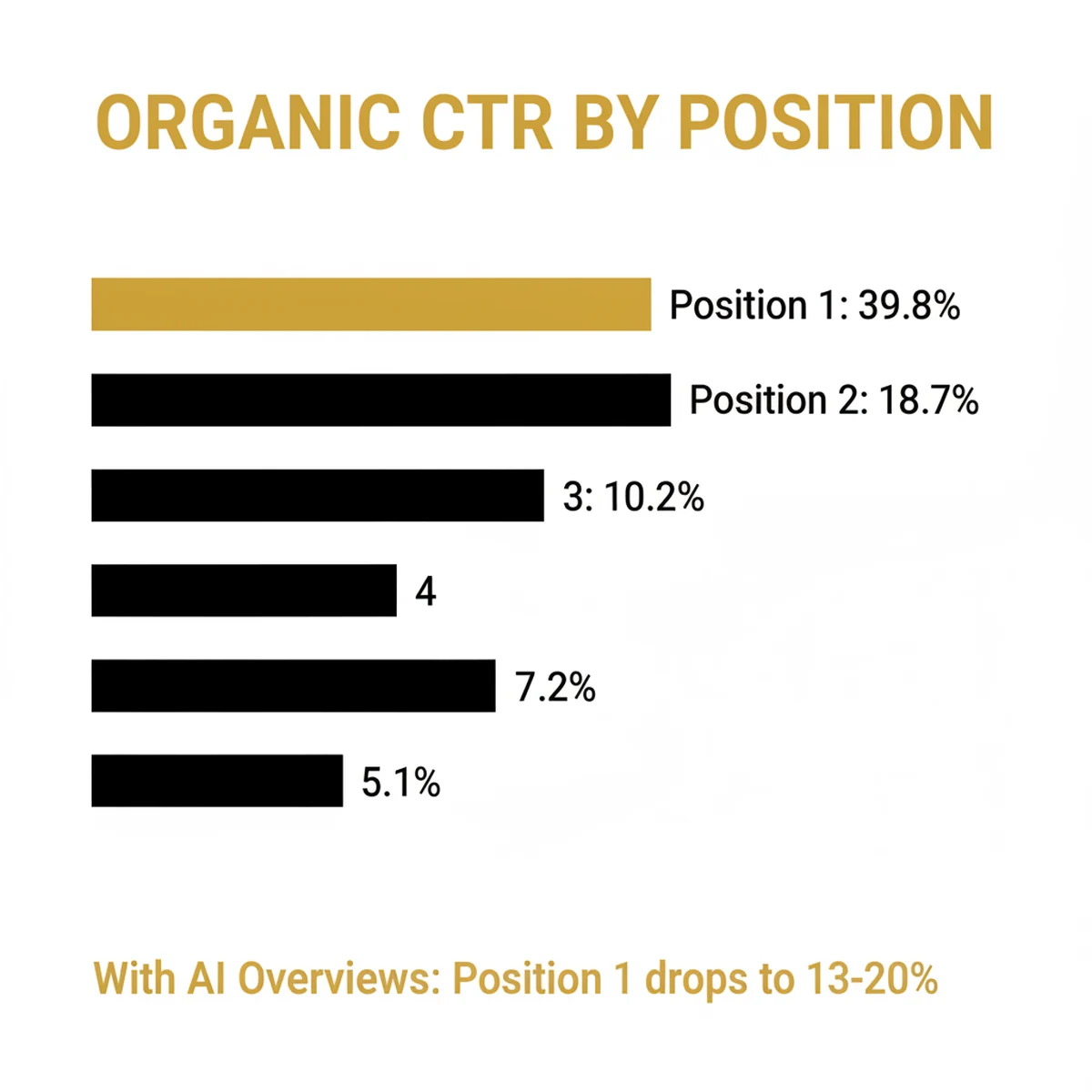
Position 1 on Google gets 39.8% of all clicks. Position 2 gets 18.7%. By the time you reach position 5, you're fighting over 5% of the traffic. And if you're not on page one at all, which describes most photographer websites right now, you're essentially invisible. Every month you're not ranking is a month your competitor is collecting the leads that should have been yours.
I've spent years helping photographers build marketing systems that don't depend on luck or referrals alone. SEO for photographers is one of the most powerful and most ignored channels in this industry. Photographers obsess over their gear and their editing style, then wonder why their website gets 40 visitors a month. The technical stuff isn't as complicated as you think. The fundamentals are learnable. And the results compound in a way that paid ads simply cannot.
In this guide you'll learn everything, from 14 quick wins you can do this week to advanced schema markup, AI search optimization, and a full 90-day action plan. Whether you're starting from scratch or trying to fix a site that's been sitting flat for months, this is the complete roadmap for how to do SEO for photographers, step by step.
Key Takeaways
- AI Overviews appear in only 7% of local searches, so photographers who optimize for local SEO are shielded from the biggest disruption in search history
- Humberto Garcia, founder of Photography to Profits, has moved client sites like Kristin Milito's from page 30 to page 4 on Google. His team also audited 169 photographer websites in 2026, and the average scored 46 out of 100 on technical SEO and AI readiness. The bar to outrank most studios is lower than you think
- 53% of mobile visitors abandon sites that take over 3 seconds to load, and most photographer websites fail this test because of unoptimized portfolio images
- Start today: claim your Google Business Profile, compress your hero images, and add alt text to your portfolio. These three moves alone can shift your rankings within weeks

14 Quick Wins You Can Do This Week
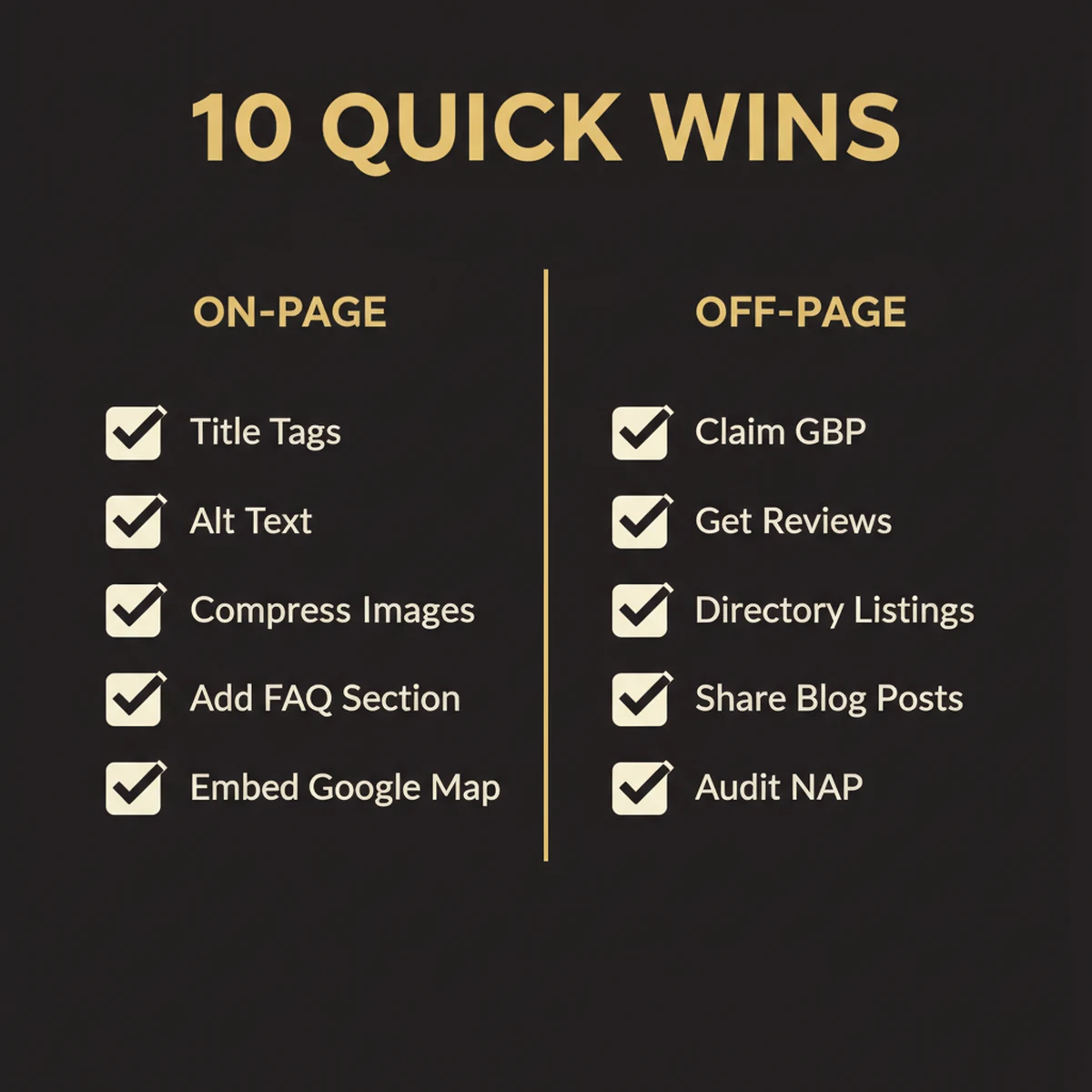
Before we get into strategy and systems, here are the moves that actually shift rankings fast. I've watched studios jump from page 3 to the top of page 1 in 60 days doing nothing more than these fundamentals. Every one of these is a real needle-mover, not busywork.
7 On-Page Quick Wins
- Rewrite every title tag with your city and service. This is the single highest-ROI on-page change. Use this formula: [Service] Photographer in [City] | [Studio Name]. "Wedding Photographer in Austin TX | Maria Rose Photography" tells Google exactly what you do and where. "Maria Rose Photography" by itself tells Google nothing. Do this for every page: homepage, service pages, about page, contact page. Takes 15 minutes, moves rankings within weeks.
- Write a real meta description for every page. Meta descriptions don't directly affect rankings, but they affect your click-through rate, which does. Every page needs a unique 150-160 character description that sells the click: "Award-winning wedding photographer in Austin. View our portfolio and check available dates." If you leave them blank, Google generates one from random page text, and it's almost always terrible.
- Submit your XML sitemap to Google Search Console. If you haven't done this, Google is discovering your pages by accident. Go to Google Search Console, verify your site, and submit your sitemap. This tells Google every page and image that exists on your site, and it gets new content indexed days faster.
- Add 300+ words of real content to every page that has less. Open your service pages and portfolio pages right now. If any of them are just images with a sentence or two, Google literally cannot rank them. Write what you do, who it's for, what the experience is like, what's included, and why you. Start with this template: "I'm [name], a [specialty] photographer in [city]. I specialize in [what you shoot] for [who you serve]. Every session includes [what's included]. My approach is [what makes you different]." Then add a paragraph about your process and a paragraph answering the #1 question clients ask. That's 300 words. A portfolio page with 40 gorgeous images and no text is invisible. The same page with 400 words of context ranks.
- Compress every image on your site to under 200KB. Run your homepage through Google PageSpeed Insights right now. If your score is below 50, uncompressed images are almost certainly the reason. Use Squoosh to convert to WebP or AVIF format. This single fix often improves your score by 30+ points and directly impacts rankings.
- Write alt text for every portfolio image. Google cannot see your images. Alt text is how it understands what they show. Be descriptive and natural: "bride and groom first kiss at sunset on the Hilton Chicago rooftop," not keyword-stuffed. Every portfolio image without alt text is a missed ranking opportunity in Google Images, which drives 22% of all web searches.
- Add an FAQ section to your homepage and every service page. Include 3-5 questions your clients actually ask: "How far in advance should I book?", "What's included in your packages?", "Do you travel for destination sessions?" This gives Google conversational content to index, feeds featured snippet opportunities, and with FAQ schema it gets you the expandable dropdown directly in search results.
7 Off-Page Quick Wins
- Claim and fully complete your Google Business Profile. If you haven't done this, stop reading and do it now. It's the single highest-ROI move in local SEO. Fill out every field: business name, specific category ("Wedding Photographer" not just "Photographer"), full 750-character description with keywords and locations, service area, hours, and website. Upload at least 10 photos of your best work. Businesses with complete profiles get 2.7x more trust and 70% more visits.
- Claim your Apple Business Connect listing. Most photographers forget this entirely. Apple Business Connect controls how your business appears in Apple Maps, Siri, Spotlight Search, and Safari, which means every iPhone user in your market. It's free, takes 10 minutes, and most of your competitors haven't done it.
- Submit to Yelp, The Knot, WeddingWire, and your genre's directories. Each directory listing is both a citation (reinforces your NAP for local SEO) and a potential direct lead source. For wedding photographers: The Knot, WeddingWire, Zola. For portrait/family: Yelp, Thumbtack, Photography.com. For boudoir: Yelp plus niche directories. Claim what exists, create what doesn't. Identical NAP on every one.
- Audit your NAP across every listing. NAP stands for Name, Address, Phone, and it must be identical everywhere. Not close. Not "basically the same." Identical. "Maria Rose Photography" on Google, "Maria Rose Photo" on Yelp, and "Maria R Photography" on Facebook looks like three different businesses to Google. Check every listing right now. One inconsistency weakens all of them.
- Ask your 5 most recent clients for a Google review. Not eventually. This week. Send a personal message with a direct link to your GBP review page. 87% of consumers read reviews before booking. Studios with 4.8+ stars and recent reviews rank in the local 3-pack. Studios with zero reviews don't, no matter how good the portfolio. Aim for at least 2 new reviews per month going forward.
- Ask past clients to link back to you when they share your images. This is the most underused backlink strategy in photography. When a venue posts your images on their website, ask for a photo credit link back to your site. When a client shares your work on their blog or wedding recap, ask for a link. When a vendor (florist, planner, DJ) uses your images in their portfolio, ask for a link. Each of these is a high-quality, relevant backlink that costs you nothing but an email. Most photographers never ask. Start asking.
- Match your business name, bio, and website link across every social profile. Instagram, Facebook, TikTok, Pinterest, LinkedIn: your business name, bio description, and website link should be consistent and complete on every platform. Google crawls social profiles and uses them as entity verification signals. A mismatched Instagram name or a missing website link is a missed trust signal. It takes 20 minutes to audit all of them.
These 14 moves take one focused afternoon. If you do nothing else from this guide, do these. They're the 20% of actions that drive 80% of early ranking improvements.
How Google Actually Ranks Photography Websites in 2026
I'm not going to hit you with a 200-factor breakdown of Google's algorithm. Here's what you actually need to understand: Google evaluates every page on three dimensions. Master these three and the rest follows.
Relevance. Does your page match what someone searched? If someone types "boudoir photographer in Dallas" and your page title says "Luxury Photos | Studio Name," Google has no evidence that you're relevant. Relevance is built through the right keywords in the right places: your title tag, your URL, your headings, your body copy. This is the part most photographers get wrong first.
Authority. Do other sites link to you and vouch for you? Google interprets backlinks as votes of confidence. A link from The Knot editorial feature carries more weight than 50 links from random directories. A link from a venue you've shot at carries local relevance. Authority takes time to build, but it's what separates page 1 rankings from page 3 stagnation.
Experience. Is your site fast, mobile-friendly, and genuinely useful? Google can measure how quickly your site loads, whether it shifts around while loading, and whether visitors immediately hit the back button (a signal that your page didn't deliver). A beautiful portfolio that takes 8 seconds to load on mobile is a liability, not an asset.
These three pillars map directly to Google's E-E-A-T framework: Experience, Expertise, Authoritativeness, and Trustworthiness. E-E-A-T isn't a ranking factor you can game. It's a composite signal Google builds from hundreds of smaller signals across your site and around the web.
Something every photographer should internalize: you have a natural E-E-A-T advantage that most businesses don't. Every session blog post you write is first-person documentation of real work you've actually done. Every client testimonial is evidence of real expertise. Every venue name you drop naturally in your content is a local authority signal. Google rewards direct experience over theoretical knowledge, and photographers have direct experience in spades. You just need to put it on the page.
Google uses over 200 ranking factors, but Backlinko's analysis of Google's ranking factors consistently shows that 20% of those factors drive 80% of results. For photographers, that 20% is: title tag optimization, Google Business Profile completeness, site speed (especially Core Web Vitals), backlink quality, and content depth. Focus there first.
On-Page SEO: The Foundation That Makes Everything Else Work
On-page SEO is everything you control directly on your website. It's the foundation. You can build backlinks, earn press mentions, and run the perfect Google Ads campaign, but if your on-page fundamentals are broken, you're building on sand.
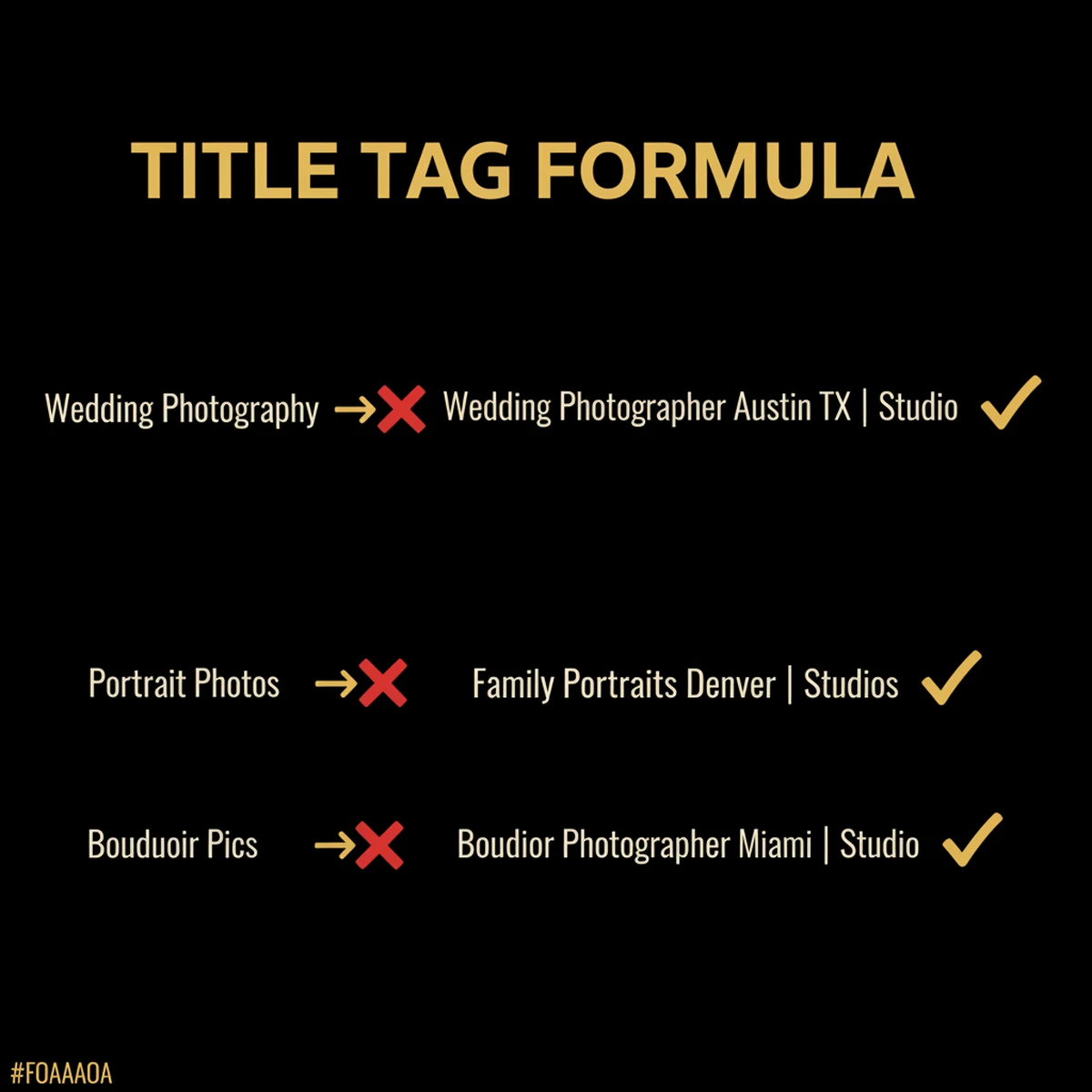
Title Tags are the single most important on-page element. Google displays them in search results, and they're a primary relevance signal. Use the formula: [Service] Photographer in [City] | [Studio Name]. Keep it between 50-60 characters. Put your primary keyword near the front. Look at the difference:
| Niche | Weak Title Tag | Strong Title Tag |
|---|---|---|
| Wedding | Wedding Photography | Wedding Photographer in Austin TX | Maria Rose Photography |
| Portrait | Portrait Photos | Family Portrait Photographer in Denver | Smith Studios |
| Boudoir | Boudoir Pics | Luxury Boudoir Photographer in Miami | Confidence Studio |
Meta Descriptions don't directly affect rankings, but they affect click-through rate, which does affect rankings. Write 150-160 characters. Include your primary keyword. End with a clear call to action: "View our portfolio and book your session today" or "Limited availability: check open dates."
Header Hierarchy tells Google what your page is about and how it's organized. Use one H1 per page (your page title). Use H2s for major sections. Use H3s for subsections within those. Never skip levels. Don't jump from H2 to H4. Never use headers just to make text larger. Headers are signals to Google, not design elements.
Keyword Placement follows a simple rule: put your primary keyword in the first 100 words of your page, in at least one H2, and in your URL slug. If your primary keyword is "boudoir photographer Miami," your URL should be /boudoir-photographer-miami, not /services/boudoir.
Internal Linking is one of the most underused on-page strategies. Every page on your site should link to 2-3 related pages. Your blog posts should link to your service pages. Your service pages should link to related blog posts. This does two things: it passes authority from page to page, and it helps Google understand the structure of your site.
Content Depth is where most photographer websites fail completely. A portfolio page with 40 images and 2 sentences of text is invisible to Google. There's nothing for it to read, index, or rank. Every service page needs a minimum of 300-500 words describing what you offer, who it's for, how the process works, what clients get, and why they should choose you over anyone else in your market.
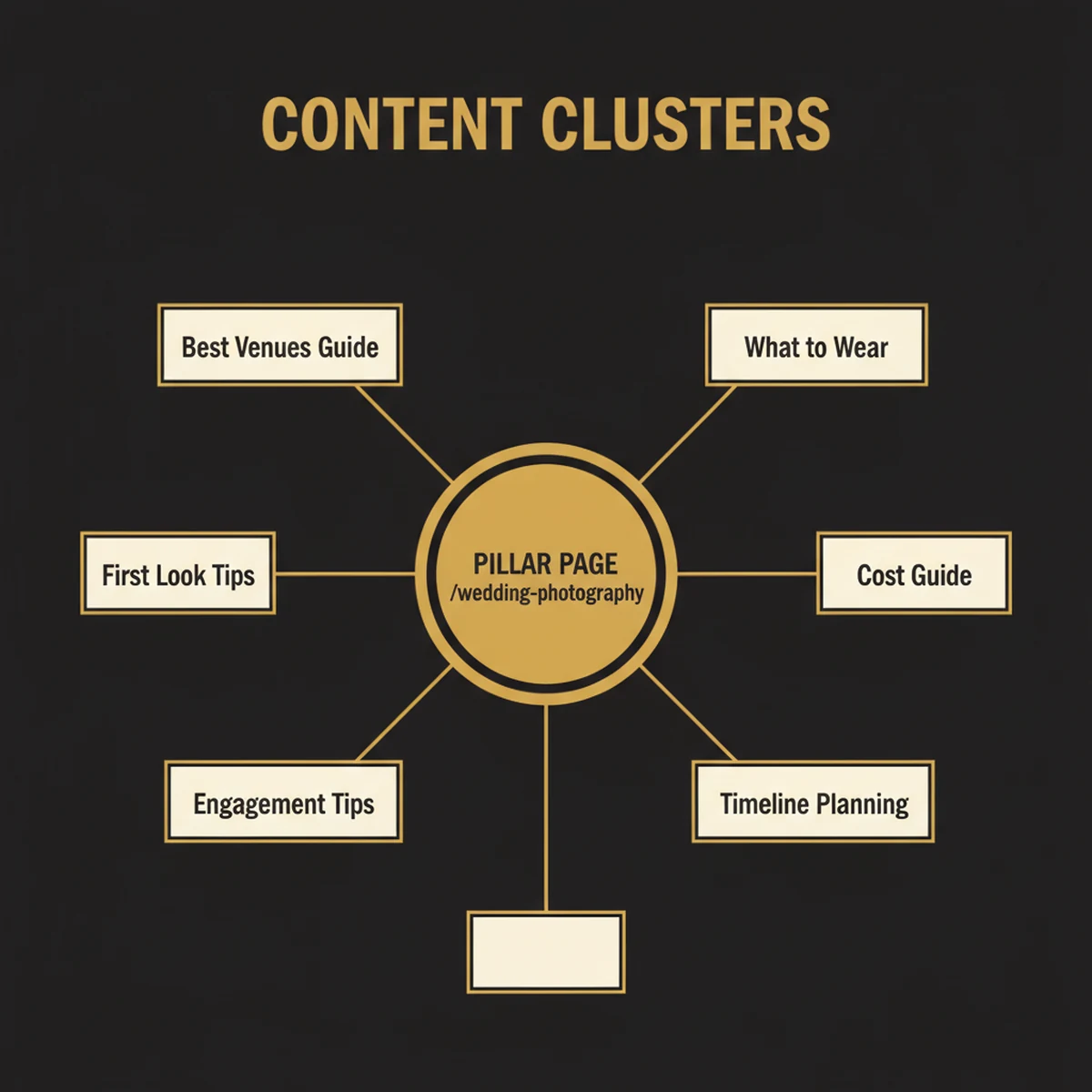
Content Clusters are the architecture that ties everything together. Your service page is the pillar, for example /wedding-photography. Your blog posts are the spokes: "Best Wedding Venues in [City]," "What to Wear to Your Engagement Session," "How to Plan a First Look." Internal links connect them, building topical authority that tells Google you are the comprehensive resource on wedding photography in your area, not just a page with the right keywords.
Image SEO: Your Secret Traffic Channel
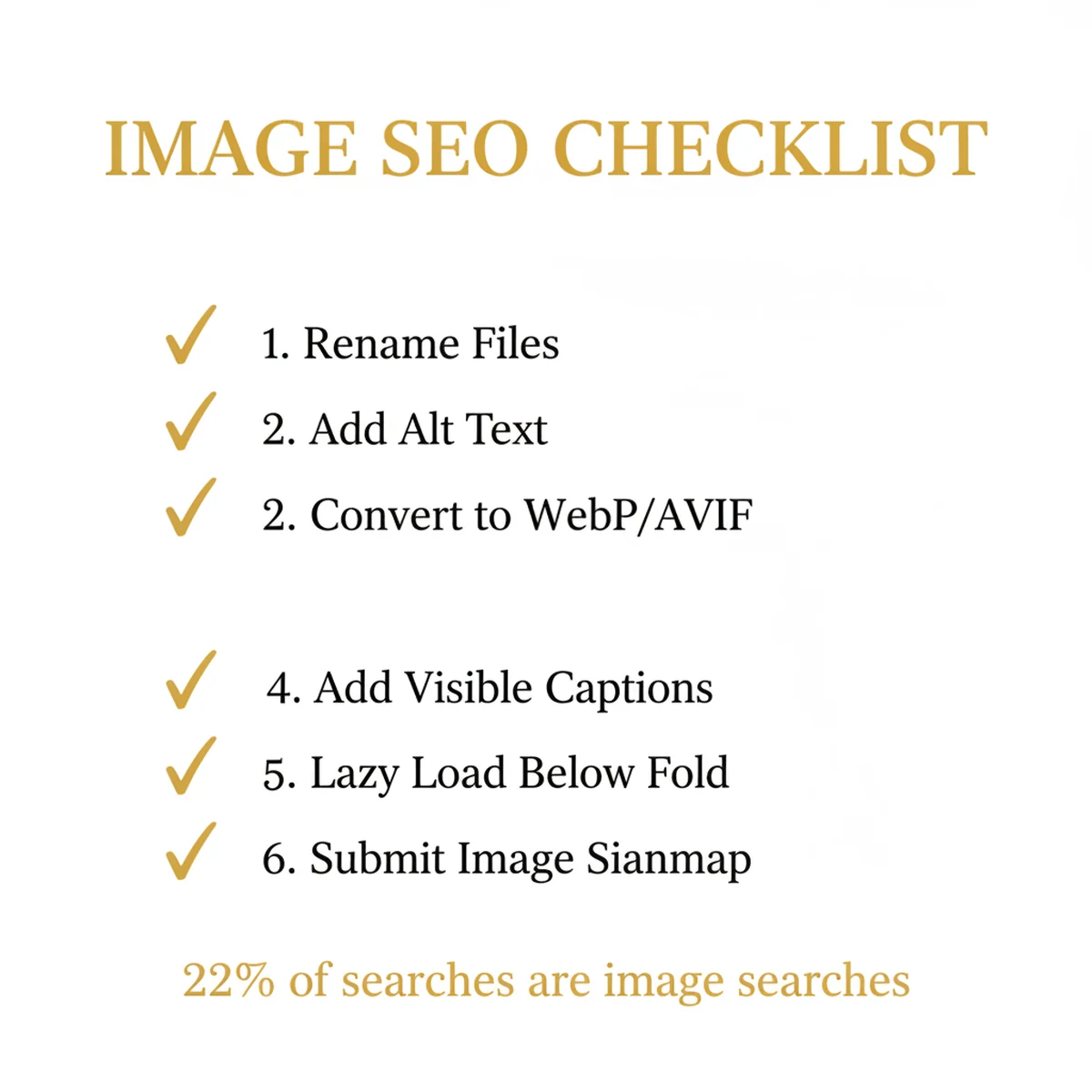
Most photographers optimize for text search and completely ignore the fact that Google Images drives 22% of all web searches. Nearly a quarter of the search traffic on the internet flows through an image-first interface that photographers are uniquely positioned to dominate.
Visual search through Google Lens is growing at 30% annually. People photograph venues, outfits, floral arrangements, and real wedding details, then search Google Lens to find who created them. If your work is properly tagged and indexed, you appear. If it's not, someone else does.
File Names are where image SEO starts, before the image is even uploaded. Rename your files before they go on your site. "DSC_4392.jpg" tells Google absolutely nothing. "chicago-rooftop-wedding-portrait.webp" tells Google the subject, location, and occasion. Spend 10 seconds renaming each file. It compounds across hundreds of images.
Alt Text is the text description attached to every image in your HTML. Screen readers use it for accessibility. Google uses it to understand image content. Write it naturally: "Bride and groom sharing first dance at Hilton Chicago ballroom" is perfect. "Wedding photographer Chicago best wedding photos award-winning luxury" is keyword stuffing that Google penalizes. Describe what's actually in the image. Include location and service type where they fit naturally.
WebP and AVIF Formats should replace JPEG for every image on your website. WebP files are 25-35% smaller than JPEG at the same visual quality. AVIF takes it further, 50% smaller than JPEG with equivalent or better quality, making it the emerging standard for image-heavy sites in 2026. Use Squoosh to convert images to AVIF with 30-50% compression for the best balance of file size and visual fidelity. If your CMS doesn't support AVIF yet, WebP is the universal fallback. Either format massively outperforms JPEG for Core Web Vitals.
Lazy Loading means images only load when a visitor scrolls near them, instead of loading everything at once when the page opens. Use it on every image except your hero and any above-the-fold content. Lazy loading dramatically reduces initial page load time and improves your LCP score.
Image Sitemaps matter if you have a JavaScript-heavy gallery or portfolio plugin. Google's crawler sometimes struggles to discover images loaded dynamically through JavaScript. Create an XML image sitemap that lists all your portfolio images with their URLs, titles, and captions. Submit it through Google Search Console.
Visible Captions (the <figcaption> element in HTML) are one of the most overlooked and most powerful elements in image SEO. Google treats visible captions as high-confidence context signals for image search, weighting them more heavily than alt text alone. Alt text is important for accessibility and basic indexing, but captions visible on the page tell Google what an image represents with near-certainty because a human wrote them for other humans to read. Place descriptive captions beneath your best images in session blog posts: describe the moment, the venue name, the city, and the couple's story. This is the single biggest image SEO gap between photographer sites that rank in Google Images and ones that don't.
Google Lens Optimization requires properly named, alt-texted, schema-marked images. When your work is discoverable through visual search, potential clients who photograph a beautiful venue you've shot at, or see a style they love on Pinterest, can find their way back to your website. Neil Patel's image SEO guide covers the full technical checklist. For Google's official recommendations, see Google's Image SEO Best Practices if you want to go deeper.
Technical SEO for Image-Heavy Sites
This is where most photographer sites break down. Technical SEO isn't glamorous, but it's the difference between a site Google wants to rank and a site Google tolerates. Photography websites are especially vulnerable because they're image-heavy by nature, and images are the most common source of technical SEO problems.
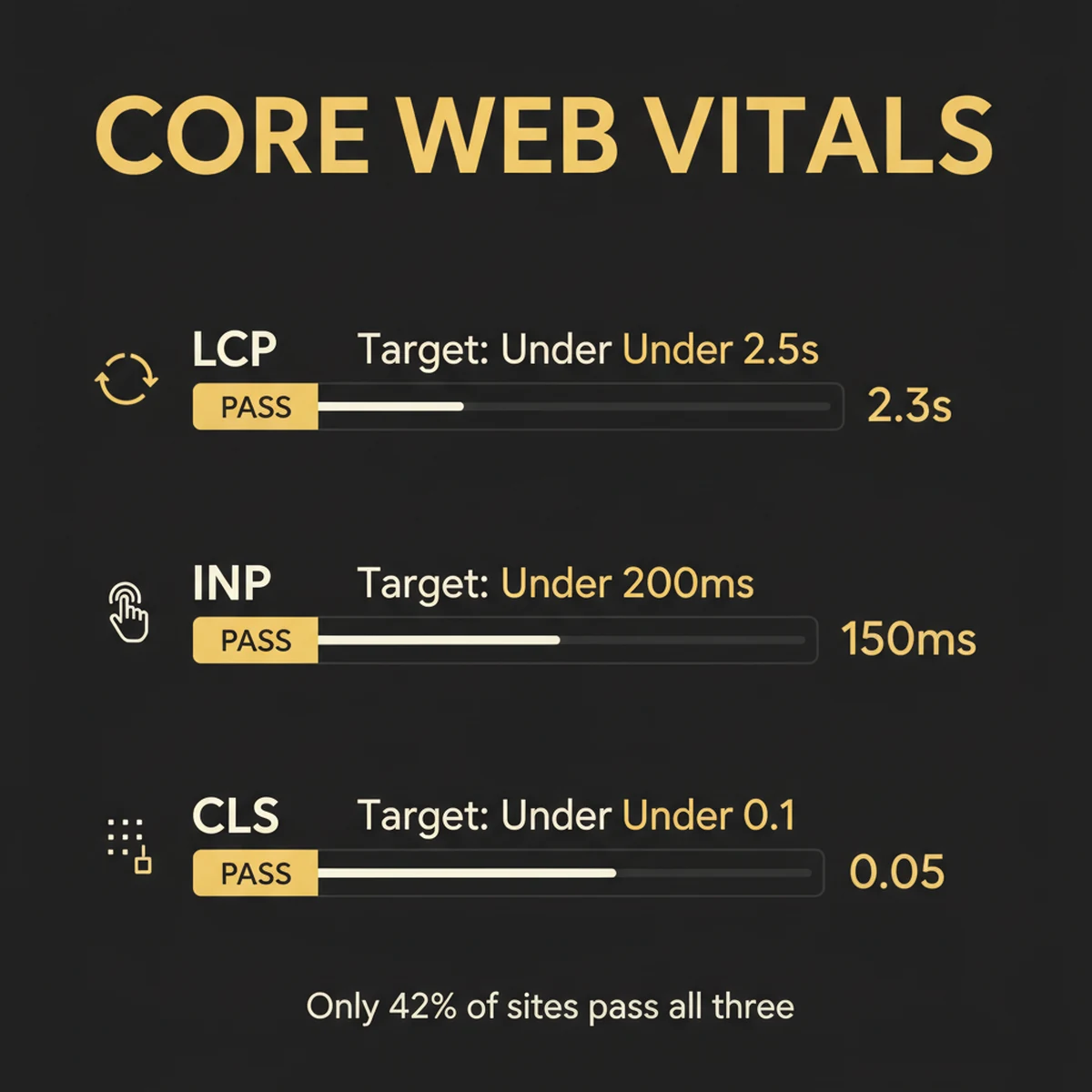
Core Web Vitals are Google's measurable quality thresholds for user experience. There are three you need to know:
- LCP (Largest Contentful Paint): how long until the main content loads. Target: under 2.5 seconds.
- INP (Interaction to Next Paint): how quickly your site responds to user interactions. Target: under 200 milliseconds.
- CLS (Cumulative Layout Shift): how much your page visually shifts during loading (that annoying jump when images pop in). Target: under 0.1.
Only 42% of sites pass all three on mobile. Photography sites perform worse than average because of uncompressed portfolio images. The good news: fixing your images often fixes all three simultaneously.
The #1 fix for almost every photographer site: compress your hero image. Images are the LCP element on 38% of all web pages. A single uncompressed 5MB hero image tanks your entire site's Core Web Vitals score. Compress it to under 200KB in WebP format and watch your LCP score transform.
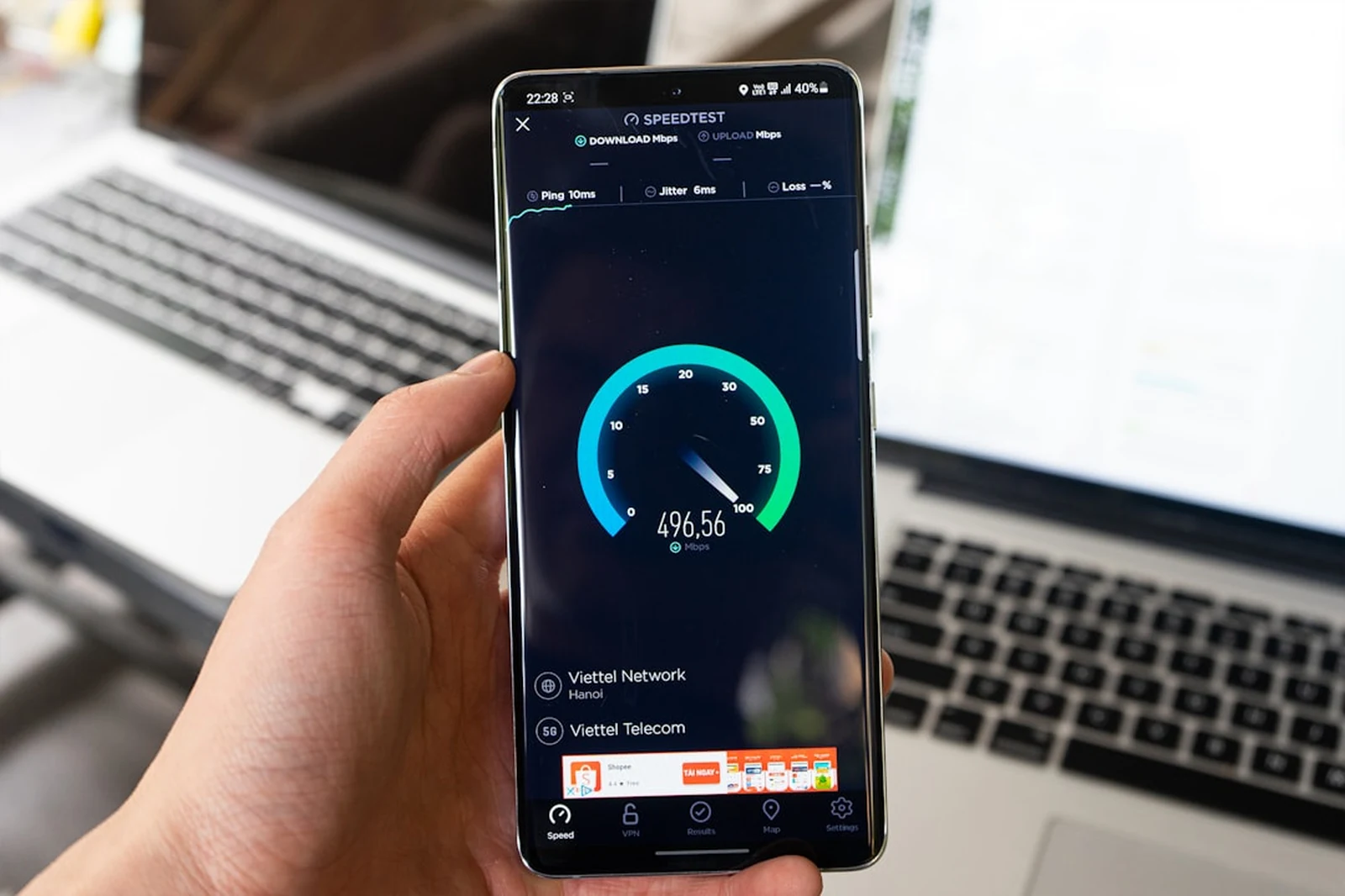
Mobile-First Indexing means Google primarily evaluates the mobile version of your site when deciding where to rank you. Not the desktop version. The mobile version. 56% of web traffic is mobile, and Google made mobile performance the default ranking benchmark in 2020. If your portfolio gallery is a horizontal scroll that doesn't work on a phone, or if your contact form is impossible to use on a small screen, Google sees a broken site, because it is one.
Site Speed has a direct relationship with revenue. 53% of mobile visitors abandon sites that take more than 3 seconds to load. Every additional 100 milliseconds of load time costs approximately 1% in conversions. For a photographer booking $3,000 sessions, that's not abstract math. It's real money walking away from a slow site.
HTTPS is mandatory. Google explicitly prioritizes secure sites, and modern browsers show "Not Secure" warnings on HTTP sites. Every hosting provider includes SSL certificates now. There's no excuse for running an insecure site.
XML Sitemap is a map you submit to Google telling it exactly what pages and images exist on your site. Submit it through Google Search Console. Include all service pages, blog posts, and portfolio images. If Google hasn't been told a page exists, it may never find it.
Robots.txt is the file that tells Google what NOT to crawl. Block admin pages, search result pages, and dynamic filter URLs. If you have a gallery system that generates URLs like /gallery?filter=wedding&sort=date&page=3, those URLs are low-value duplicates that waste your crawl budget and can dilute your rankings.
Crawl Budget matters for larger sites. Google allocates a finite number of crawls per site per day. If you have thousands of dynamically filtered gallery pages, you're spending Google's attention on low-value pages instead of your money-making service pages. Use robots.txt and canonical tags to focus Google on what matters.
Which Platform Is Best for Photographer SEO?
The platform question comes up constantly. Here's our honest take based on working with hundreds of photography studios:
| Feature | Squarespace | Showit | WordPress | Custom JS + Claude Code |
|---|---|---|---|---|
| SEO Control | Good: covers the essentials | Limited: missing key controls | Excellent (via plugins) | Full control |
| Speed | Good out of the box | Often slow: heavy templates | Varies wildly by theme | Excellent |
| Schema Support | Basic built-in | Minimal: manual only | Via Yoast or RankMath | Full control |
| Image Handling | Auto-compression + CDN | Often unoptimized | Requires plugins | Full control (WebP/AVIF) |
| Mobile | Excellent: responsive by default | Good | Theme-dependent | Excellent |
| Cost | $16–49/mo | $24/mo + hosting | $10–50/mo + hosting + plugins | Hosting only (build with AI) |
| Best For | Most photographers | Design-first portfolios | Photographers who want full plugin control | Studios ready for a performance edge |
Our recommendation: Squarespace is the best starting point for most photographers. It handles the SEO fundamentals well, loads fast, looks professional, and doesn't require plugin management. Showit produces stunning designs but frequently fails Core Web Vitals due to heavy templates and limited technical SEO controls. WordPress gives you the most plugin flexibility but requires ongoing maintenance, security updates, and optimization work that most photographers don't want to do. For studios that want the fastest, most optimized site possible, a custom JavaScript build using tools like Claude Code can produce a site that outperforms everything else. That's how we built photographytoprofits.com.
Whichever platform you're on, test your site right now at Google PageSpeed Insights. Your score will tell you whether your platform is serving you or hurting you.
Schema Markup: Telling Google Exactly What Your Business Is
Most photographers have never heard of schema markup. The ones who have often assume it's too technical to touch. Both groups are leaving a significant competitive advantage on the table.
Schema markup is invisible code (specifically, JSON-LD) embedded in your page that tells Google exactly what kind of business you are, what services you offer, where you're located, what your reviews say, and how to interpret every piece of content on your site. Without it, Google has to guess. With it, Google knows, and it rewards you with rich results: star ratings in search, FAQ dropdowns, enhanced local listings, and citations in AI Overviews.
LocalBusiness (or ProfessionalService) is the most important schema type for photographers. It declares your business name, address, phone number, hours, service area, and geo coordinates. This must match your Google Business Profile exactly: the same business name, the same phone format, the same address. Any discrepancy weakens your local authority signal.
FAQPage schema marks up your FAQ section so Google can display your questions and answers directly in search results as expandable dropdowns beneath your listing. Pages with FAQPage schema are cited 2x more often in AI Overviews. This is one of the best-value schema types for photographers because it's easy to implement and directly impacts both traditional and AI search.
ImageObject schema on your portfolio images tells Google who created each image, the copyright holder, and licensing information. This enables rich results in Google Images and increases discoverability through visual search. For photographers, this is brand protection and SEO in the same move.
Service schema describes specifically what you offer (wedding photography, portrait sessions, boudoir), including pricing range, service area, and description. It helps Google understand that you're not just a business that mentions photography but a business that actively provides it.
AggregateRating schema displays your star rating directly in search results, next to your listing. If you're collecting reviews on your own website (not just Google), this schema makes those stars visible in search, a significant click-through rate booster.
HowTo schema applies to educational blog posts. "How to Prepare for Your Boudoir Session," "How to Plan the Perfect Engagement Session." Posts like these with HowTo schema can generate step-by-step rich results directly in Google's search interface.
Here's a simple JSON-LD example for a photographer's homepage. This goes in your <head> tag:
{
  "@context": "https://schema.org",
  "@type": "ProfessionalService",
  "name": "Maria Rose Photography",
  "image": "https://example.com/studio.jpg",
  "address": {
    "@type": "PostalAddress",
    "streetAddress": "123 Main St",
    "addressLocality": "Austin",
    "addressRegion": "TX",
    "postalCode": "78701"
  },
  "telephone": "+1-512-555-0199",
  "url": "https://mariarosephoto.com",
  "priceRange": "$$$",
  "aggregateRating": {
    "@type": "AggregateRating",
    "ratingValue": "4.9",
    "reviewCount": "87"
  },
  "hasOfferCatalog": {
    "@type": "OfferCatalog",
    "name": "Photography Services",
    "itemListElement": [
      { "@type": "Offer", "itemOffered": { "@type": "Service", "name": "Wedding Photography" }},
      { "@type": "Offer", "itemOffered": { "@type": "Service", "name": "Engagement Photography" }},
      { "@type": "Offer", "itemOffered": { "@type": "Service", "name": "Portrait Photography" }}
    ]
  }
}
You don't need to write this code by hand. On Squarespace, paste JSON-LD into Settings → Advanced → Code Injection. On WordPress, Yoast or RankMath plugins handle most schema automatically. On any platform, you need to know what schema types apply to your business and verify they're working. Use Google's Rich Results Test to validate your schema and see what rich results your pages are eligible for. For the full vocabulary of available types, reference Schema.org, starting with the LocalBusiness type.
Local SEO: Owning Your City
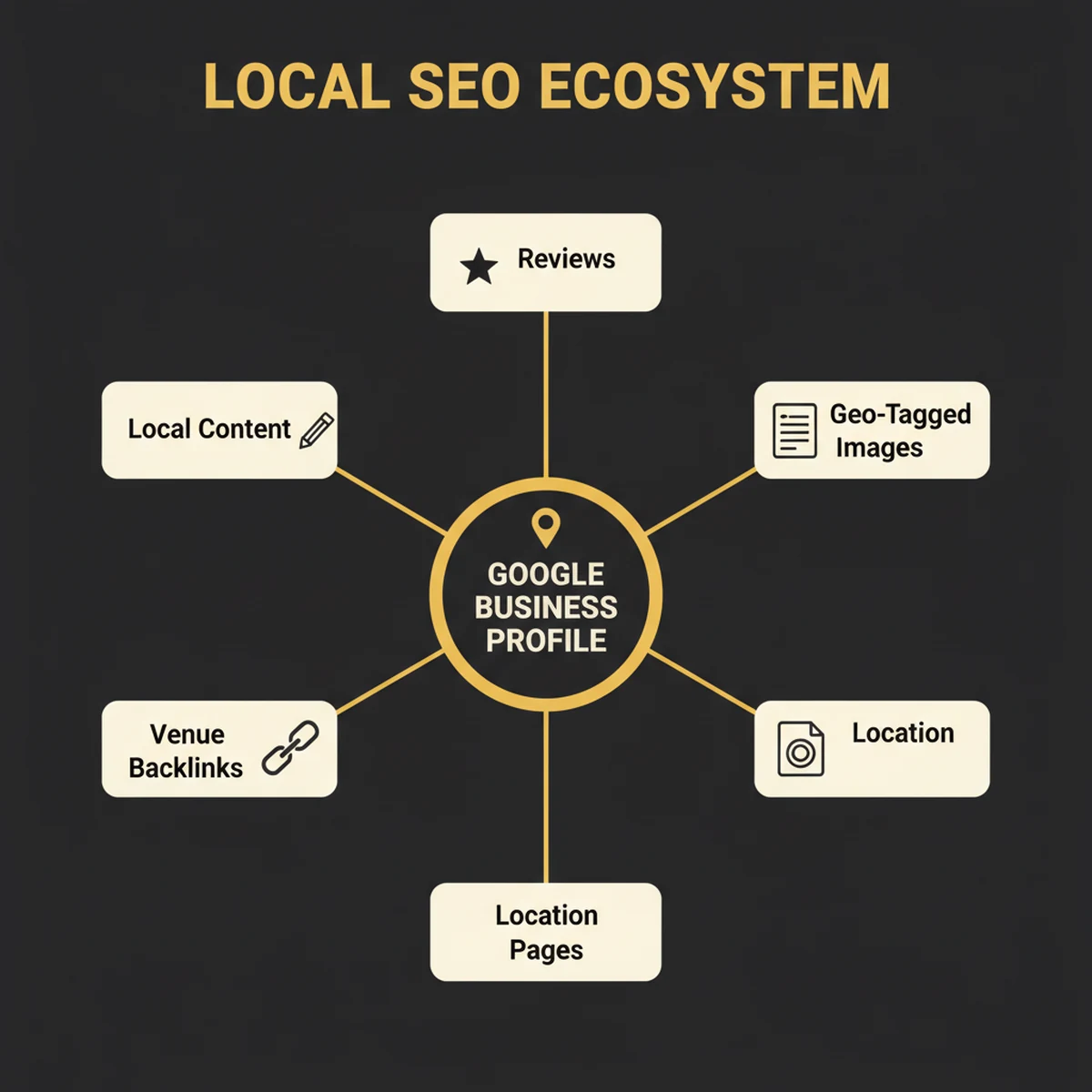
For most photographers, local SEO is the game. You're not competing globally. You're competing for the person in your metro who just got engaged, just had a baby, or just decided they want boudoir photos. Local SEO is how you win that person before your competitor does.
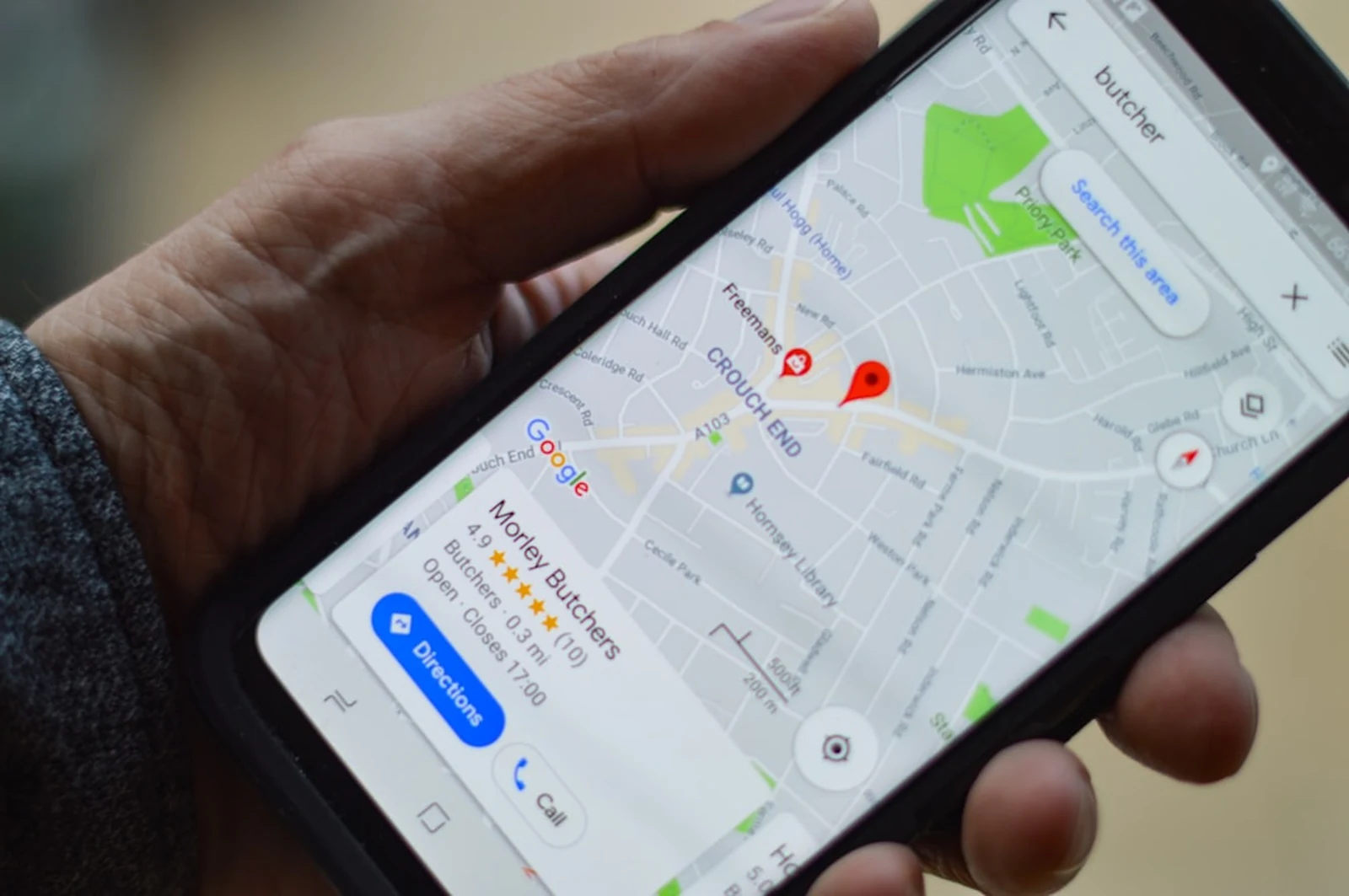
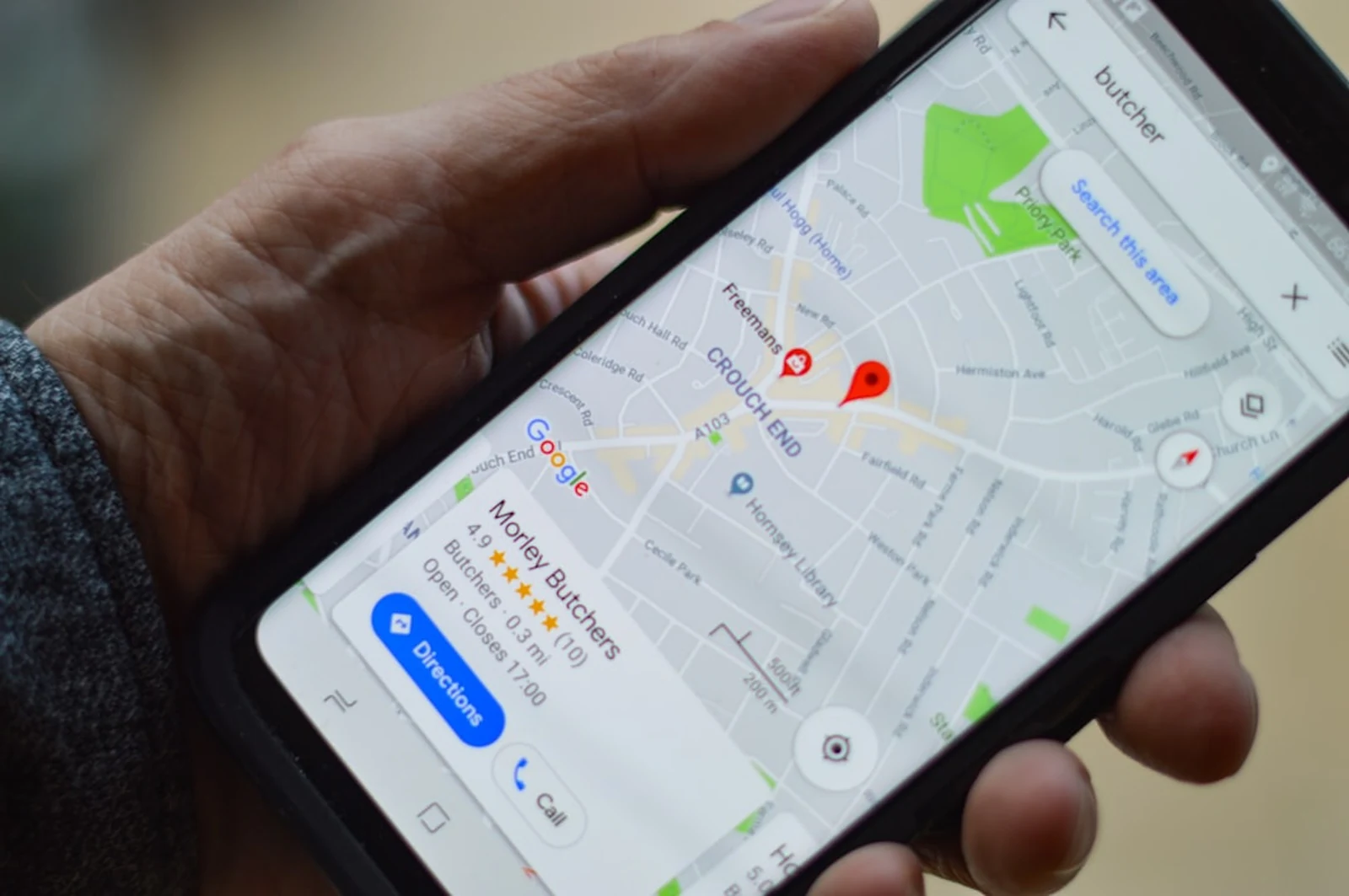
The numbers make the case: local pack position 1 gets 17.6% click-through rate. Businesses in the Google 3-pack (the map results at the top of local searches) get 126% more traffic than businesses below it. And here's the statistic I want you to hold onto: AI Overviews appear in only 7% of local searches. The panic about AI killing organic traffic? It barely touches local intent queries. Photographers are shielded from the biggest search disruption in a decade, but only if they're optimizing for local.
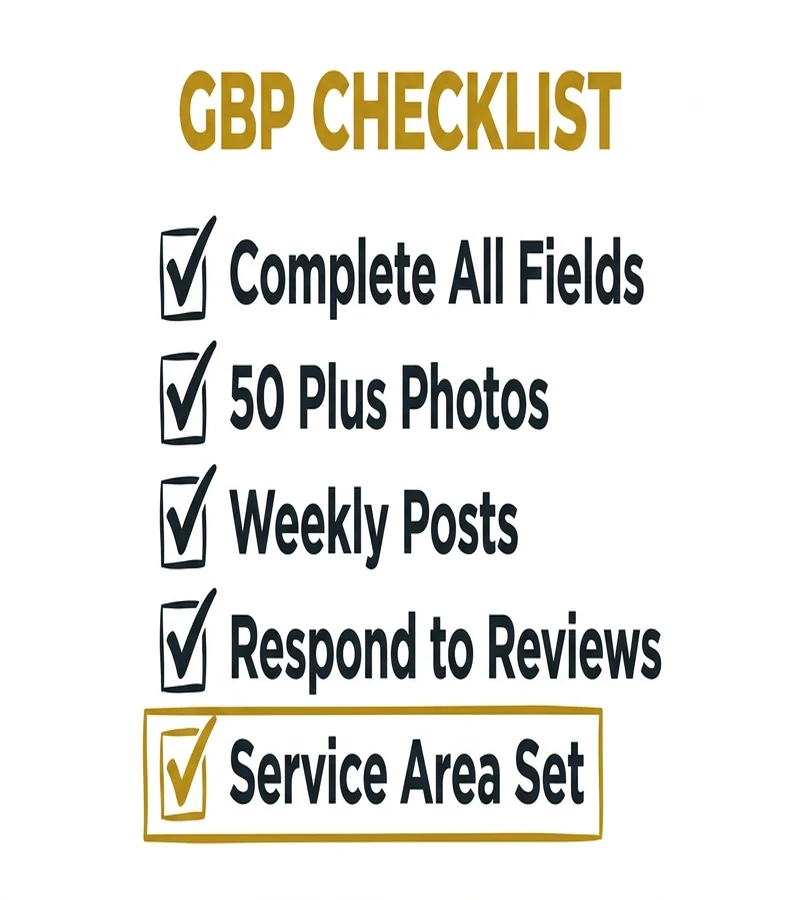
Google Business Profile is your most powerful local SEO asset, and it's free. Complete every single field. Use the specific business category: "Wedding Photographer," not just "Photographer." Write a full 750-character description that includes your primary services and the geographic areas you serve. Set your service area. Upload at least 10 of your best images. Then post to your profile weekly. Businesses posting weekly to GBP see 5x more profile views than businesses that never post.
Reviews are the local ranking signal that separates the 3-pack from everyone else. You need a consistent, ongoing flow, not a burst of 20 reviews followed by months of silence. 73% of consumers consider reviews older than 3 months irrelevant. Aim for 4.8 stars or higher. That's the threshold I've seen consistently associated with top local rankings. Ask every client 24-48 hours after they receive their images. Send a direct link to your GBP review page. Make it one click, not a scavenger hunt.
Local Citations are listings of your business across the web: directories, aggregators, review sites, local publications. The signal isn't just that you're listed. It's that your NAP (Name, Address, Phone) is identical everywhere. Top citation sources for photographers: Google Business Profile, Yelp, The Knot, WeddingWire, Facebook Business, Apple Business Connect, Bing Places, BBB, your local chamber of commerce, and genre-specific directories like Style Me Pretty for wedding or Fearless Photographers for documentary style. Aim for 10+ consistent citations.
Geo-Targeted Landing Pages are the move that separates photographers who dominate their market from those who compete in it. If you serve Austin and San Antonio, create a dedicated page for each: /wedding-photographer-austin and /wedding-photographer-san-antonio. But here's the critical rule: each page must have unique content about that area. Not a template with the city name swapped out. Include local venue names you've shot at, local area landmarks, and real session content from that city. Google can detect thin location pages instantly.
Geo-Tagged Images add another layer of local signal. Before uploading session blog posts, verify that your photos carry location metadata in their EXIF data. Google reads this. A series of wedding photos with EXIF data placing them at a specific Austin venue, paired with alt text naming that venue, paired with body copy mentioning the venue. That's a stacked local signal that's hard to beat.
For deeper local SEO strategy, Moz's Local SEO guide is the industry standard. BrightLocal is the best tool for auditing your citation consistency across the web.
Off-Page SEO and Link Building for Photographers
Off-page SEO is everything that happens outside your website that signals to Google that your site is worth ranking. Backlinks (links from other websites pointing to yours) are the primary off-page signal. Top-ranking pages have 3.8x more backlinks than pages ranking in positions 2-10. Content over 3,000 words gets 77.2% more backlinks, which is one reason this guide exists.
Here's what I tell photographers: stop overthinking link building. You have access to a link ecosystem that most businesses would kill for. You work at venues. You partner with vendors. You get published on editorial blogs. Every one of those relationships is a backlink opportunity.
1. Venue and vendor cross-linking is the single easiest and most powerful link building strategy available to photographers. Every venue you've shot at, every florist you've worked with, every planner whose events you've documented: they all have websites, and those websites can link to yours. The exchange is simple: you offer them a curated gallery of images from their venue (something they want for their own marketing), and they credit you with a linked mention. One conversation can get you 5-10 high-relevance backlinks from local, established businesses.
2. Styled shoot submissions are how photographers break into editorial backlinks. Submit editorial shoots to wedding blogs: Style Me Pretty, Green Wedding Shoes, The Knot editorial, Magnolia Rouge, Rocky Mountain Bride. Each published feature is a high-quality backlink from a high-authority domain. Get featured twice a year and you've built more link authority than most photographers accumulate in a career.
3. Journalist source requests connect reporters with expert sources. HARO (Help a Reporter Out) pioneered this, but its successor Connectively was discontinued in December 2024, so the platforms to use now are Qwoted and SourceBottle. Register as a photography expert on one or both. When journalists request expert quotes about photography, client experience, visual storytelling, or the wedding industry, respond with concise, insightful answers. If selected, you get a backlink from major publications: Forbes, HuffPost, Brides, Martha Stewart Weddings.
4. Local press is underutilized. Pitch story ideas to your local newspaper's lifestyle section, city magazine, and neighborhood blogs. "Local photographer documents the city's 500th same-sex wedding" or "Austin photographer builds full-time business in 18 months" are stories editors genuinely want. Local press links are high-relevance, they carry the trust of established publications, and they're often available to photographers who simply ask.
5. Guest blogging on wedding planning blogs, photography education platforms, or local lifestyle sites builds both backlinks and brand awareness. Write content that's genuinely useful to their audience, like "10 Questions to Ask Before Booking a Wedding Photographer" for a wedding planning blog, or "How I Book $8,000 Wedding Packages Without Discounting" for a photography education platform.
6. Chamber of commerce membership is an often-overlooked local SEO move. Most chambers list member businesses with a direct website link. The link itself carries local authority, and the membership builds additional credibility signals.
7. Podcast appearances generate backlinks in show notes, which are often hosted on high-traffic websites. Guest on photography industry podcasts, wedding planning podcasts, or local business podcasts. The link in the show notes persists indefinitely.
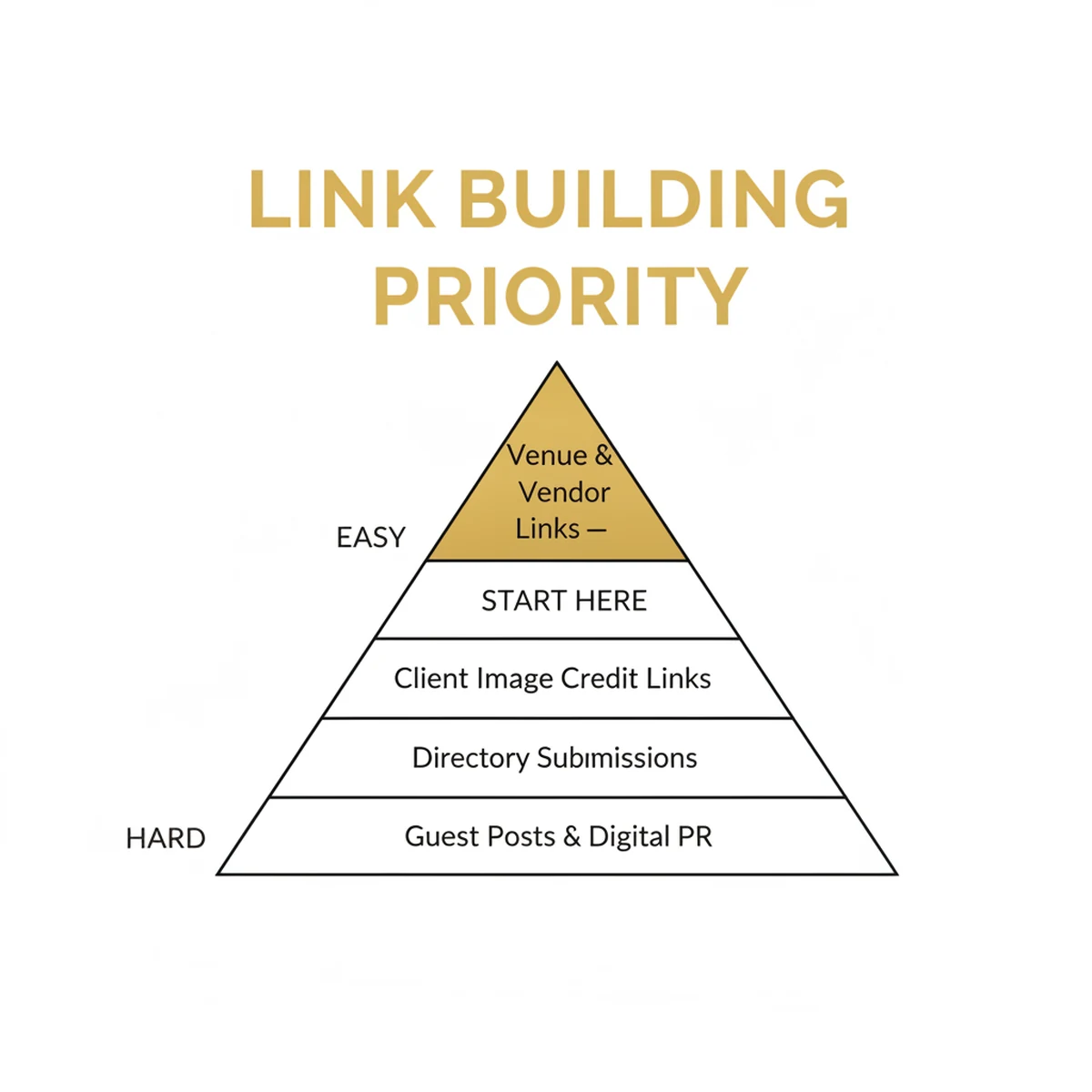
Prioritize in this order: venue and vendor links (easiest, most relevant), directory listings, styled shoot submissions, then journalist source requests and guest posting. Don't try to do all seven at once. 5 quality backlinks per quarter is better than 50 spammy directory links. For the deeper strategy, Backlinko's link building guide and Ahrefs' link building for beginners are the resources I'd point anyone to first.
Content Strategy: Blogging That Actually Books Clients
"I don't have time to blog." I hear this constantly. My response is always the same: a blog post you write today and optimize properly is still generating leads three years from now. You write it once. Google finds it, indexes it, and serves it to people searching for exactly what you offer. Every single day, for free, without you lifting a finger. That's the compounding ROI of content that paid ads simply cannot replicate.
What to blog about is where most photographers go wrong. They blog about what interests them: "behind the scenes at my latest shoot," "my new camera bag," "reflections on three years of photography." These posts generate zero search traffic because nobody searches for them. Blog about what your clients search:
- "How to prepare for a boudoir session"
- "What to wear for family photos in fall"
- "Best time of year for outdoor portraits in [city]"
- "Best wedding venues in [city]"
- "How much does wedding photography cost in [city]?"
- "[Venue Name] wedding photos"
These are actual searches from actual people with actual intent to hire a photographer. Write those posts.
Session blogs done right are a massive missed opportunity. Most photographers post a gallery with three sentences and call it a blog post. That's not a blog post. That's a portfolio entry. A properly optimized session blog is 500-1,000 words that names the venue, the city, the season, and tells the story of the session. It mentions local landmarks. It describes the light at golden hour at that specific venue. It naturally includes every relevant local keyword without stuffing. Google indexes the text. The images rank in image search. The venue's name connects you to local search traffic for that venue. One session blog, optimized properly, can generate leads for years.
Publishing cadence matters more than volume. Studios publishing 2-4 optimized posts per month see a 30-50% increase in organic leads within 6 months. One well-researched, properly optimized post per week beats four rushed, thin posts. Aim for consistency over quantity.
Content clusters are the strategic architecture behind serious SEO growth. Your service page is the pillar, /wedding-photography for example. Your blog posts are the spokes radiating out from it: "Best Wedding Venues in Austin," "What to Wear to Your Engagement Session," "How to Plan a First Look," "Austin Wedding Photography Cost Guide." Every spoke links back to the pillar. The pillar links out to the most relevant spokes. This interlocking structure tells Google that your website is the authoritative hub on wedding photography in your market.
Optimal post length depends on the keyword. For competitive keywords like "wedding photographer in [city]," target 1,200-2,000 words with deep local coverage. For session shares and venue features, 500-800 words with strong image SEO is sufficient. Never write less than 500 words for any page you want to rank.
Information Gain is a concept Google uses to reward content that adds genuinely new, first-hand information to the internet, not just a rewrite of what already exists. AI search engines like Google's AI Overviews specifically prioritize unique, original insights over generic top-10 lists. For photographers, this is a massive advantage. Write about your actual experience at a specific venue: what the light was like, where the best spots are, what time of year works best. Share a specific technique you used that solved a problem. Document real client results with real numbers. This kind of content cannot be generated by AI and cannot be replicated by a competitor who has never been to that venue or worked with that client. Information Gain is why a session blog about a specific wedding at a specific venue in your city will always outrank a generic "10 Tips for Wedding Photography" post.
Topical authority means focusing your blog posts around 3-5 core content pillars aligned with your photography specialties rather than writing about random topics. A wedding photographer's pillars might be: (1) local venue guides, (2) wedding planning and outfit advice, (3) the photography experience itself. Every post you write should connect to one of these pillars and interlink with other posts in the same cluster. Google recognizes when a site demonstrates comprehensive expertise in a focused area. Depth beats breadth every time.
The "images only" mistake is the most common content error photographers make. A stunning gallery with no text is invisible to Google. Zero. Google cannot interpret images the way a human can. It relies on text (your alt text, your captions, your body copy) to understand what those images show. The most beautiful portfolio in the world generates no organic traffic if there's no text for Google to read. HubSpot's content strategy guide and Semrush's content marketing strategy guide are good resources for building a sustainable content calendar.

SEO Keywords for Photographers (2026)
Keywords are the bridge between what someone types into Google and the page on your site that should answer them. Most keyword lists you'll find online are made-up numbers from tools that guess. Here is real data instead: the actual searches that put this guide in front of photographers over the last 90 days, pulled straight from our own Google Search Console.
| What photographers searched | Times our site appeared (90 days) | Where this belongs on your site |
|---|---|---|
| seo for photographers | 3,667 | An educational guide like this one |
| best seo for photographers | 336 | A comparison or roundup post |
| free seo for photographers | 242 | A free-resource blog post |
| best seo keywords for photographers | 157 | A keyword-list post (this section) |
| seo cost for photographers | 95 | A pricing page or FAQ |
| free seo guide for photographers | 83 | A guide like this one |
| affordable seo for photographers | 78 | A services page |
| hire seo expert for photography website | 74 | A services page |
| backlinks for photographers | 28 | A link-building post |
| diy seo for photographers | 15 | A tutorial post |
Two things to notice. First, the informational searches ('how do I do this') dwarf the hiring searches, which is exactly why publishing genuinely useful content wins this market. Second, this is our niche, so our list is full of marketing terms. Your studio's version of this table will be full of your city, your genres, and your venues. The method below shows you how to build it.
How to Use This Keyword List
Each keyword belongs to one page on your site. This is not negotiable. Spreading the same keyword across multiple pages creates what SEOs call "keyword cannibalization": multiple pages competing against each other for the same term, which splits your authority and confuses Google about which page to rank. Assign one primary keyword per page. Support it with 5-10 secondary (related) keywords in your subheadings and body copy. Every page should have one job and do it completely.
Long-Tail Keywords Are Where Photographers Win
Generic keywords like "wedding photographer" or "portrait photographer" are brutally competitive. The domains ranking for those terms have been accumulating authority for a decade. You're not out-ranking them in six months. But you don't need to.
Long-tail keywords, meaning more specific and longer phrases, have lower search volume but dramatically higher purchase intent. "Documentary wedding photographer in Austin TX" gets fewer monthly searches than "wedding photographer," but the person searching it knows exactly what they want. They're not browsing. They're close to buying. Long-tail keywords convert at 2x the rate of generic head terms.
Build your long-tail keyword strategy around four variables: your city, your specialty, your style, and specific venues you've shot at. "Intimate outdoor wedding photographer in Portland Oregon," "luxury boudoir photographer in Manhattan," "newborn photographer near Green Bay WI". These are specific enough to rank quickly and targeted enough to attract buyers rather than browsers.

Voice Search and Featured Snippets
A significant share of searches now happen by voice, and smart speaker owners regularly use them to find local businesses. Voice queries average 29 words, compared to 4 words for typed searches. If your SEO strategy was built around short, typed queries, it's missing a large part of how people actually search.
The difference in how people search by voice is critical to understand. Nobody speaks to their phone the way they type into a search bar. They don't say "wedding photographer Austin." They say, "Hey Google, who's the best wedding photographer near me?" or "Alexa, find me a boudoir photographer in Chicago that has good reviews." These are full sentences, naturally phrased, with local intent built in.
Voice search almost always returns one answer. Not ten blue links. One spoken response. If you're not the source of that response, you're invisible to every voice searcher in your market. This is why featured snippets matter so much. They're the primary source Google uses to generate voice search answers.
Featured snippets achieve a 42.9% click-through rate, higher than organic position 1. They appear as highlighted boxes at the top of search results, showing the answer to a question directly. They're also the gateway to AI Overview citations. Pages with featured snippets are cited 2x more often in AI Overviews.
How to win featured snippets:
- Use question-based H2 or H3 headers that mirror how your clients actually ask questions: "How much does wedding photography cost?" "What should I wear to a boudoir session?" "How do I choose a family photographer?"
- Answer the question directly in the first 40-60 words beneath that heading. Don't build to the answer. Lead with it.
- Use numbered lists for step-by-step content. Use tables for comparisons. Use bullet lists for option sets. Google extracts these formats for featured snippets more readily than prose.
- Write FAQ content using natural, conversational language. Think about how your clients actually talk, not how you think SEO should sound.
For a comprehensive overview of featured snippet optimization, Semrush's featured snippets study is the industry reference, and Backlinko's voice search SEO guide covers the full optimization playbook.
AI Overviews, AEO, and Generative Engine Optimization (GEO)
Answer Engine Optimization (AEO) and Generative Engine Optimization (GEO) are the two emerging disciplines that extend traditional SEO into the AI era. If you've searched Google recently, you've seen AI Overviews: the AI-generated summaries that appear at the very top of results, above all organic listings, synthesizing answers from multiple sources. They've created more panic in the SEO industry in the past year than anything since Google's Panda algorithm update. For most websites, the panic has some justification. For photographers, it's largely overblown.
The reason: AI Overviews appear in only 7% of local searches. When someone types "wedding photographer in Seattle" or "newborn photographer near me," they still see traditional results with map packs and organic listings getting their full click-through rates. Position 1 CTR dropped 32% year-over-year where AI Overviews do appear, but that's for informational queries, not local service queries. Photographers competing on local intent are shielded from the biggest disruption in search history.
Where AI Overviews DO affect you is your educational and informational content. If you blog about "how to prepare for a family photo session" or "what to wear for fall portraits," AI Overviews will summarize those posts and potentially reduce clicks to your blog. This is not a reason to stop blogging. It's a reason to optimize how you blog so you become the source being cited.
How to get cited in AI Overviews:
- FAQ schema on every service page and educational blog post
- Clear question-and-answer structure with declarative, quotable answers
- Strong E-E-A-T signals: author bio, first-person expertise, real client results
- Structured data across your site so Google can extract factual entities
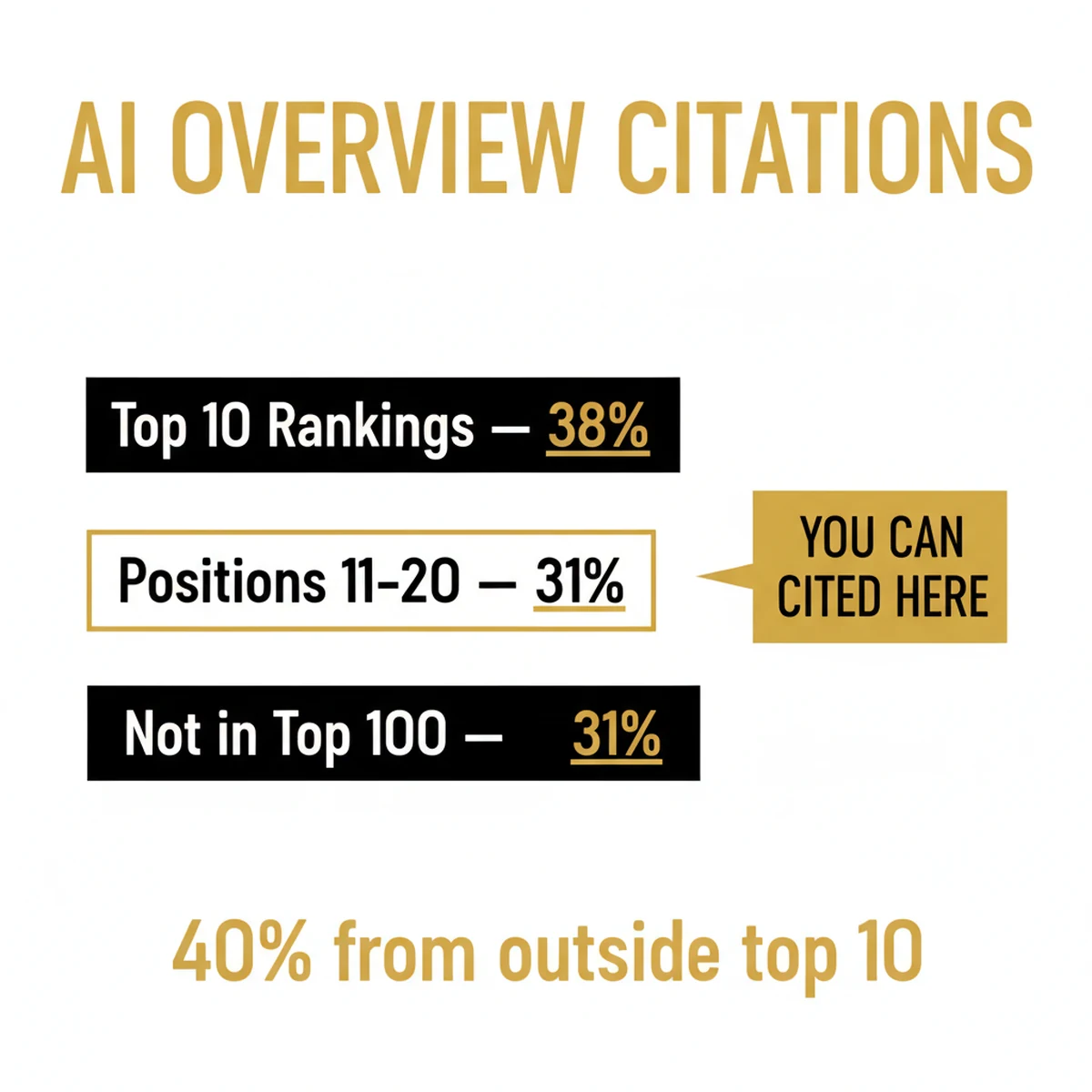
One statistic should reshape how you think about this: 40% of AI Overview citations come from pages ranking between positions 11-20. You don't need to be in the top 10. You don't need to be #1. You need to have the best structured, most directly answerable content, and AI will cite you over the page that ranks above you but buries the answer in three paragraphs of preamble.
Featured snippets feed directly into AI citations. Win the featured snippet for a question your clients ask, and you dramatically increase your likelihood of being cited when AI Overviews appear for related queries. It's the same optimization strategy: lead with the answer, structure it clearly, mark it up with schema.
YouTube and AI is an opportunity photographers should understand. YouTube is one of the most-cited domains in AI Overviews overall. Creating video content, even simple "what to expect at your boudoir session" or "how we prep for a golden hour portrait session" videos, increases your probability of being cited across both YouTube search and Google AI Overviews. If you're already filming behind-the-scenes content, optimize it for search and submit it to YouTube with full descriptions and transcripts.
Generative Engine Optimization (GEO) is the emerging discipline of optimizing specifically for AI-driven search engines: Google's AI Overviews, ChatGPT, Perplexity, and Gemini. GEO overlaps with AEO but goes further. Where AEO focuses on answering questions clearly, GEO focuses on making your content the source that generative AI models trust and cite. The key GEO signals for photographers: unique first-hand information (Information Gain: real session stories, venue-specific insights, original techniques), structured data (schema markup that makes entities machine-readable), entity consistency (same business name, location, and service terms across every page and platform), and multi-format content (text + images + video on the same topic). Brands with comprehensive schema markup experience a 57% higher rate of triggering AI Overviews for long-tail queries.
Social Search and Social AEO is a 2026 development photographers need to understand. Social platforms like Instagram, TikTok, and YouTube Shorts now function as search engines, especially for Gen Z and millennial audiences who search Instagram for "wedding photographer Austin" the same way they search Google. Optimize your Reels and short-form video for search indexing: use relevant spoken audio and matching on-screen text (both are indexed), include your city and service in the first 3 seconds of video, and use keyword-rich captions. A well-optimized Instagram Reel can appear in both Instagram search AND Google search results, expanding your discovery surface beyond traditional SEO.
AEO best practices for photographers: lead every section with a direct, declarative answer before expanding. Use consistent entity naming: if you're a "wedding photographer" use that exact phrase consistently, not "wedding photos" and "marriage portraits" and "wedding photography" interchangeably. Implement structured data sitewide. And create content that AI can extract factual answers from, not just narrative storytelling that's beautiful to read but hard for a machine to parse. Reference Google's AI Overview documentation and Ahrefs' AEO guide for the current best practices as this area continues to evolve.
SEO Tools Every Photographer Should Use
I'm not going to give you a list of 25 tools and tell you to "use them all." Here are the 9 that actually matter for photographers, split into what you should start with now and what you add when you're ready to go deeper.
Free Tools (Start Here)
- Google Search Console. This is the most important SEO tool you can have, and it's completely free. It shows you exactly what keywords you're ranking for, which pages Google has indexed, what errors it's found, and how your Core Web Vitals score compares to benchmarks. If you have one tab open in your SEO toolkit, it's this one. search.google.com/search-console
- Google Analytics 4. Tracks where your traffic comes from, what pages people visit, how long they stay, and what actions they take. Essential for understanding which content is actually working and which channels are delivering leads. analytics.google.com
- Google Business Profile. Your local SEO command center. Post weekly, respond to every review within 24 hours, track calls and direction requests from the Insights dashboard.
- PageSpeed Insights. Tests your site's Core Web Vitals and overall speed score on both mobile and desktop. Run this on your homepage, your most important service page, and your most popular blog post. Fix what it flags. pagespeed.web.dev
- Google's Rich Results Test. Paste in any URL and see what schema markup Google finds and whether your pages are eligible for rich results. Run this after adding any schema to verify it's working. search.google.com/test/rich-results
Paid Tools (When You're Ready to Level Up)
- Ubersuggest ($29/mo). Beginner-friendly keyword research, rank tracking, and basic site audits. Built by Neil Patel. If you're doing your own SEO and don't want to spend Semrush-level money yet, this is where to start.
- Semrush ($139/mo). The professional standard for serious SEO. Comprehensive keyword research, competitor analysis, backlink monitoring, full site audits, and position tracking. Worth every dollar when SEO is a primary lead generation channel. semrush.com
- Ahrefs ($99/mo). The best backlink analysis tool in the industry. Their free Ahrefs Webmaster Tools is excellent for beginners. It gives you a full backlink profile and site audit at no cost as long as you verify ownership of your site.
- Screaming Frog (free for under 500 URLs). Crawls your entire site the way Google does. Finds broken links, missing alt text, duplicate title tags, redirect chains, and pages Google can't index. Essential for any technical SEO audit. screamingfrog.co.uk
Start with the five free tools. Master them. When you're publishing content consistently and seeing organic traffic start to grow, add Ubersuggest or Ahrefs Webmaster Tools. Graduate to Semrush when SEO is generating enough leads to justify the investment, which usually happens around month 6-8 of consistent execution.
How Much Does SEO Cost for Photographers?
This is the question I get on almost every strategy call, so here are real numbers instead of "it depends."
Doing it yourself costs time, not money. Everything in this guide can be done with free tools: Google Search Console, Google Business Profile, PageSpeed Insights, and a free Ahrefs Webmaster Tools account. Budget 4 to 6 hours a week for the first three months, then 2 to 3 hours a week to maintain momentum. The only common expense is a paid keyword tool, and Ubersuggest at $29/month is plenty to start. If your budget is zero, start with the 14 quick wins at the top of this page. Free SEO for photographers is genuinely possible. It just costs consistency instead of cash.
Hiring a freelancer or local agency typically runs $500 to $3,000 per month for local SEO work: Google Business Profile management, on-page fixes, content production, citations, and link building. Be careful below the $500 mark. At that price the deliverable is usually automated directory submissions and thin AI-written blog posts, which either do nothing or actively hurt you.
Most Photography to Profits engagements run $2,000–$5,000/month depending on scope, and that covers the whole client acquisition system rather than SEO alone: SEO, Google Ads, Meta Ads, and the follow-up automation that turns inquiries into booked sessions. SEO alone rarely makes sense as a standalone purchase for a studio; it works best as the compounding layer under a system that also books clients this month.
One rule no matter which route you pick: never pay anyone who promises a specific ranking or "guaranteed page 1." Nobody controls Google. What a good SEO partner can promise is process, transparency, and measurable movement quarter over quarter.
SEO vs. Google Ads: What Should Photographers Use?
Both. I'm going to give you the honest answer here, not the answer that's easy to sell.
Photographers who ask "should I do SEO or Google Ads?" are framing it wrong. The question isn't either-or. It's about which channel you lead with and how you sequence them for maximum impact on your business. Most established studios need both, doing different jobs at different time horizons.
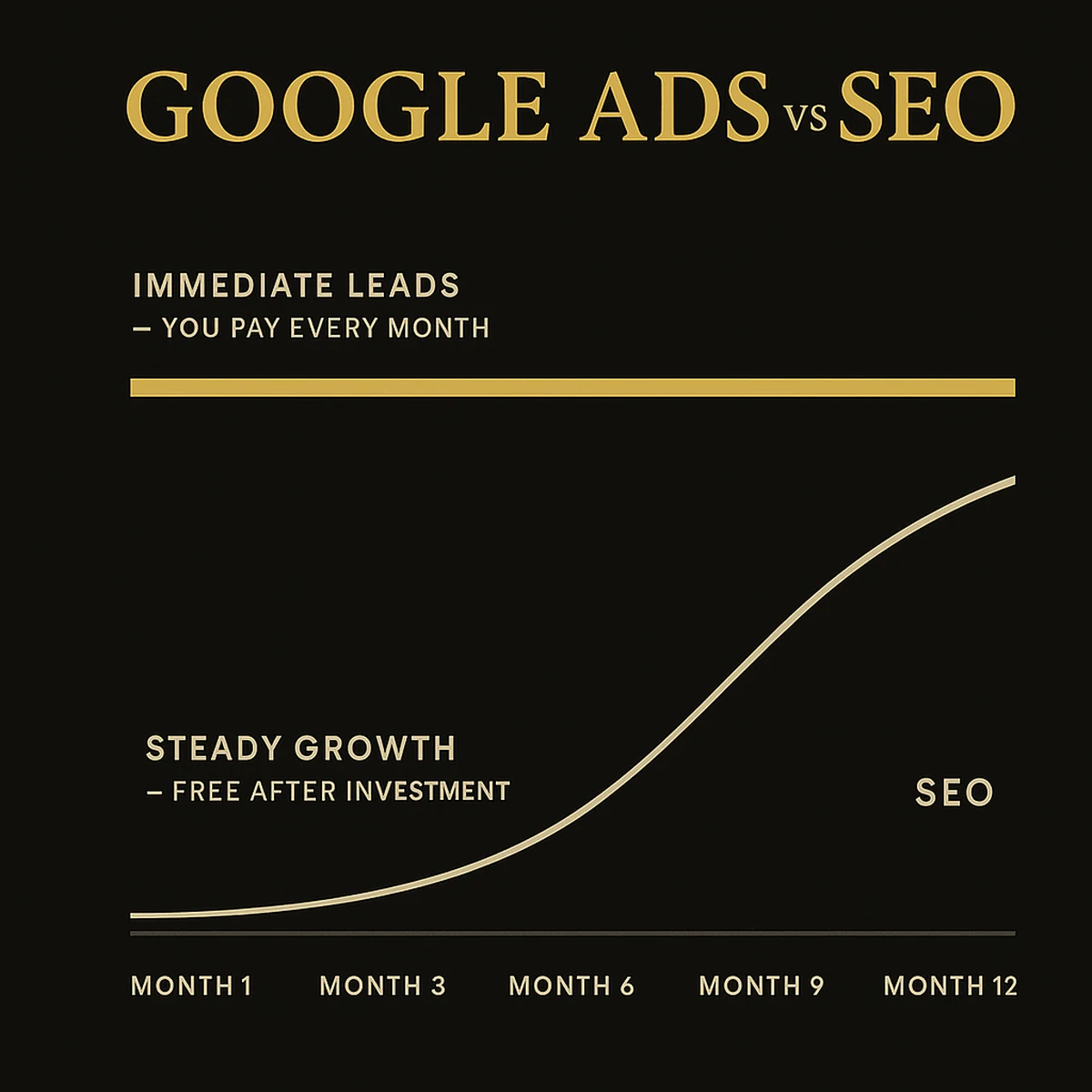
SEO timeline is the reason people hesitate. Meaningful results take 3-6 months. Significant traffic, the kind that fills your calendar from organic alone, takes 6-12 months. That sounds slow until you remember what you're getting: a marketing asset that compounds indefinitely without requiring a daily ad budget. But if your calendar is empty today, you can't wait 6 months.
Google Ads timeline solves the immediacy problem. Launch a campaign Monday, get inquiries by Wednesday. Ads are immediate, controllable, and stoppable. They also stop the moment you stop funding them. There's no compounding. No residual traffic. Every lead costs money, forever.
The compounding effect is why running both changes your economics permanently. P2P clients who invest in both channels consistently watch their cost-per-lead fall over 12-18 months as organic traffic grows and the reliance on paid advertising decreases. You're not replacing ads with SEO. You're reducing your dependence on them. You're building an owned asset that supplements your paid campaigns and eventually outperforms them on a per-lead basis.
When to prioritize SEO: you have time but a limited budget, you're in a market with moderate competition, and you're willing to play the 6-12 month game. When to prioritize ads: you need leads immediately, you're launching in a new city, or your market is competitive enough that organic rankings take longer to achieve.
The smart play is always: start ads to fill your calendar, start SEO simultaneously to build the asset, and let them work in parallel. By month 12, your SEO is generating leads, your ads have trained you on what messaging converts, and your combined system is the most efficient it's ever been. Learn more about the paid side at Google Ads for Photographers and Facebook Ads for Photographers, or explore how P2P's SEO service integrates both channels into a complete system.
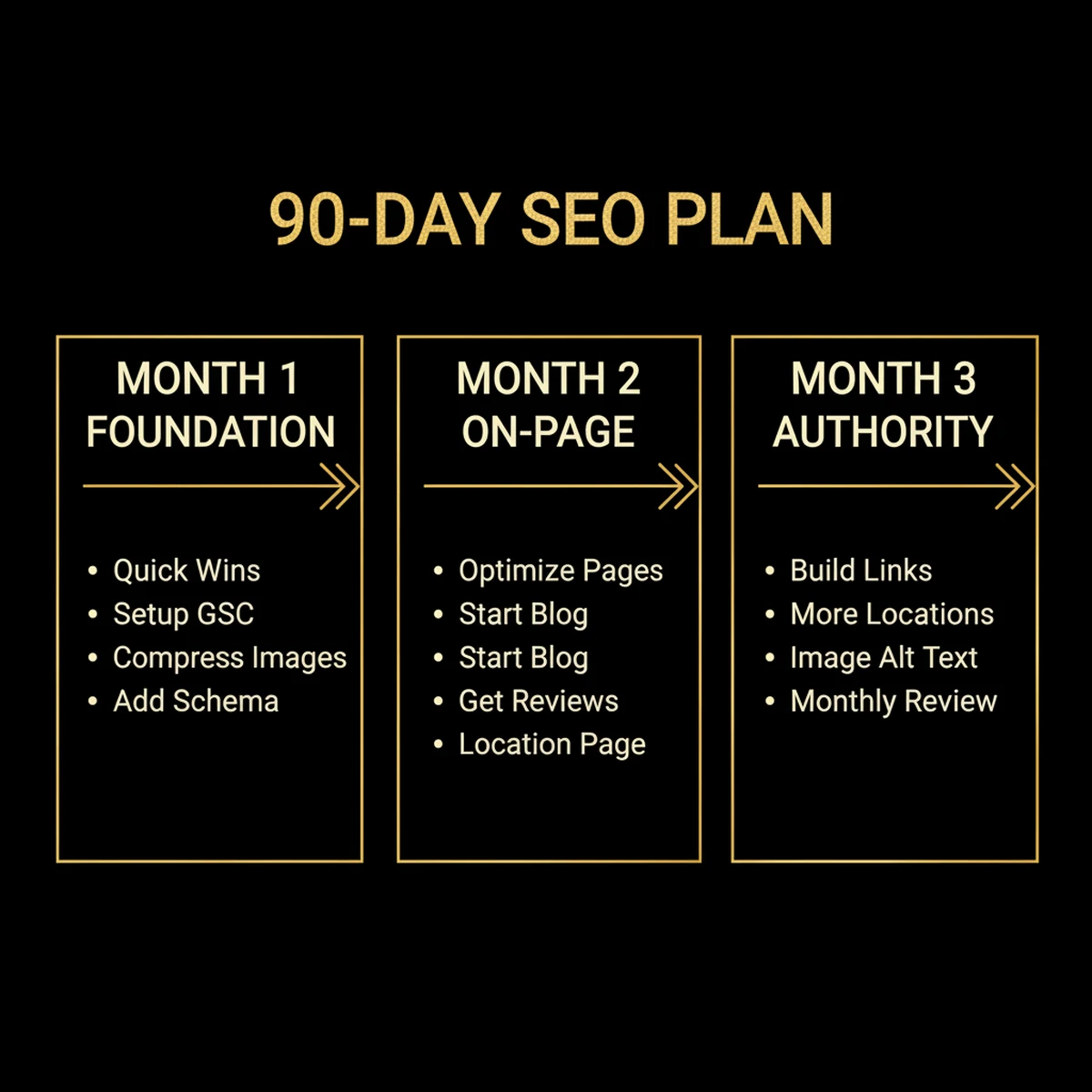
Your 90-Day SEO Action Plan
Everything in this guide is actionable. But action without a sequence is just chaos. This is the exact 90-day plan I'd give a photographer starting from zero, or restarting after months of neglect.
Month 1: Foundation
- Complete all 14 quick wins from the opening section of this guide. Do them in order: the on-page ones first, then off-page. Don't skip any.
- Set up Google Search Console and Google Analytics 4. Verify your domain. Submit your sitemap.
- Compress your entire portfolio to WebP format. Hero image first. All blog images second. Portfolio galleries third.
- Run PageSpeed Insights on your homepage. Fix the top three flagged issues. The hero image is almost always one of them.
- Add LocalBusiness schema and FAQPage schema to your homepage. Verify with Google's Rich Results Test.
Month 2: On-Page Optimization
- Rewrite the title tags and meta descriptions on your top 5 pages using the formula from this guide.
- Publish your first two blog posts: one session blog (500-800 words, properly named images, venue mentioned, geo-tagged) and one educational post (1,200-1,500 words targeting a question your clients search).
- Launch a review collection campaign. Email every client from the past 6 months with a personal message and a direct link to your GBP review page.
- Create one geo-targeted landing page for your primary service area with unique local content: venue names, local references, real session work from that location.
Month 3: Authority Building
- Build 5 quality backlinks. Target 3 venue or vendor cross-links, 1 directory listing, and 1 guest post or styled shoot submission.
- Create 2 additional location pages for secondary markets you serve.
- Audit all portfolio images and verify every image has a descriptive file name and alt text. No "DSC_" files. No blank alt attributes.
- Set a recurring 15-minute block on the first of each month to review Google Search Console: check for indexing errors, track keyword position changes, and identify new pages to optimize.
This is the exact framework we build for P2P clients. The foundation work is unglamorous. The month-1 and month-2 tasks feel small when you're doing them. But by month 6, photographers who execute this plan consistently report 30-50% increases in organic traffic and meaningful drops in cost-per-lead as Google finds them and ranks them for the searches that matter.
If you want the full system (SEO, Google Ads, Meta Ads, website, and automation) built and managed for you, book a strategy call.
Conclusion: SEO for Photographers Is the Most Powerful Channel You're Ignoring
SEO is not optional for photography businesses anymore. It is the difference between a website that generates leads while you sleep and a website that collects dust. Every month without it is a month your competitor collects the clients that should have been yours.
The fundamentals are learnable. The tools are mostly free. The results compound in a way paid advertising never will. Photographers who optimize their Google Business Profile, compress their images, write the right kind of content, and earn a handful of quality backlinks are consistently winning in markets where their competitors have given up and gone back to relying on referrals and Instagram.
At Photography to Profits, Humberto Garcia has spent years building the systems that make this work for real photography businesses, not marketing theory or case studies from SaaS companies. Real studios, real photographers, real reductions in cost-per-lead. The move is clear: start with the 14 quick wins today. Set up Search Console this week. Publish your first optimized blog post this month. The photographers booking consistently in your market aren't smarter than you. They just started before you. Start now.
Ready to Put This Into Practice?
This guide shows you how to do SEO for your photography business yourself. If you want it done for you (Google Business Profile management, on-page optimization, content strategy, link building, and monthly reporting), that's exactly what our SEO service for photographers delivers.
Photography to Profits offers two ways to work together:
- Done-For-You: We build and manage your entire SEO system: Google Business Profile, on-page optimization, content strategy, link building, and monthly reporting. See our done-for-you SEO services for photographers →
- Coaching: Learn the full Photography Client Machine system with Humberto directly: SEO plus five other marketing channels, all integrated. Book a strategy call →
Frequently Asked Questions
How long does SEO take to work for photographers?
Expect 3-6 months for measurable improvements and 6-12 months for significant organic lead flow. Local SEO (optimizing your Google Business Profile and collecting reviews) shows results much faster, sometimes within weeks. The key is consistent execution: publish content monthly, build a few quality backlinks per quarter, and keep your technical foundation clean. SEO compounds. The work you do today pays dividends for years.
How much does SEO cost for photographers?
DIY SEO is free apart from your time, since the tools that matter most (Google Search Console, Google Business Profile, PageSpeed Insights) cost nothing. Freelancers and local agencies typically charge $500 to $3,000 per month for photographer SEO. Most Photography to Profits engagements run $2,000–$5,000/month depending on scope, and that covers the full marketing system rather than SEO alone. Avoid anyone promising a guaranteed ranking at any price.
Is SEO worth it for photographers, or should I just run Google Ads?
Both, run in parallel, is the answer that changes your business economics. Google Ads fills your calendar immediately. SEO builds the asset that reduces your cost-per-lead over time. P2P clients running both channels consistently see their cost-per-lead fall as organic traffic grows and ad spend efficiency improves. Think of ads as cash flow and SEO as investment. You need both.
What's the best website platform for photographer SEO?
Squarespace is the best starting point for most photographers: solid SEO fundamentals, fast loading, great mobile experience, no plugin management. Showit produces stunning designs but frequently fails Core Web Vitals and has limited SEO controls. WordPress offers the most plugin flexibility but requires ongoing maintenance and optimization. For studios that want maximum performance, a custom JavaScript build using AI tools like Claude Code can outperform everything else. Avoid any platform that limits your title tags, meta descriptions, or schema implementation.
How many blog posts should photographers publish per month?
A minimum of 1-2 quality posts per month. One well-researched, properly optimized 1,500-word post beats four thin 300-word posts that Google ignores. The most effective cadence for most studios is two posts monthly: one session blog (500-800 words with local venue content and optimized images) and one educational post targeting a question clients search. Maintain that cadence consistently for 6 months before evaluating results.
Do photographers need to worry about AI Overviews killing their traffic?
Less than most industries. AI Overviews appear in only 7% of local searches, and "wedding photographer in [city]" queries still deliver traditional results with full click-through rates at position 1. Where AI Overviews do appear (informational queries about photography), you can mitigate impact by structuring content so you get cited in the AI summary rather than bypassed by it. FAQ schema, clear question-answer structure, and strong E-E-A-T signals are your tools.
What schema markup should photographers add first?
Start with LocalBusiness (or ProfessionalService) on your homepage. It's the foundational schema that connects your website to your physical business and Google Business Profile. Add FAQPage schema to any page with a FAQ section. It's the best return on effort of any schema type. Then add ImageObject schema to portfolio images, and AggregateRating if you're collecting reviews on your own site. On Squarespace, you can add JSON-LD via code injection. On WordPress, plugins like Yoast or RankMath handle it. On Showit, you'll need to add the code manually to your header.
How do I get more Google reviews for my photography business?
Ask every client 24-48 hours after they receive their final image gallery. That's the moment they're most excited about your work. Send a personal message (not a mass email) with a direct link to your Google review page. Make it one click. Aim for 4.8 stars or higher, which is the threshold consistently associated with top local rankings. Businesses that post to their GBP weekly see 5x more profile views, which means more people finding your review request link before they book someone else.