
What Are Google Ads for Photographers?
Google Ads for photographers is a pay-per-click advertising system where your studio appears at the top of Google search results when potential clients search for services like "boudoir photographer near me" or "portrait photographer in Austin." You pay only when someone clicks your ad. Done right, it delivers booked clients at $40–$120 per lead, and unlike social media, these people are already looking to hire.
Key Takeaways
- Google Search Ads deliver $40–$120 cost-per-lead for portrait photographers in most U.S. markets, making it the fastest paid channel to hit positive ROI when paired with a high-converting landing page.
- Humberto Garcia, founder of Photography to Profits, has helped studios scale to $20K–$40K months using a three-level Google Ads strategy: Search first, then Display retargeting, then Performance Max once conversion data is solid.
- The single biggest waste in photographer Google Ads accounts is broad-match keywords without negative keyword lists. Studios running phrase and exact match with proper negatives cut wasted spend by 40–60% in the first 30 days.
- Action step: Audit your current Google Ads account for broad-match keywords today. Switch your core service keywords to phrase match and add 20 negative keywords before spending another dollar.
2026 AI Max update: Google is moving automatically created assets and campaign-level broad match into AI Max beginning September 2026, while existing DSA migration is now scheduled for February 2027. Read the 2026 Google Ads AI Max update for photographers before changing an existing Search campaign.
How Google Ads Work for Photographers
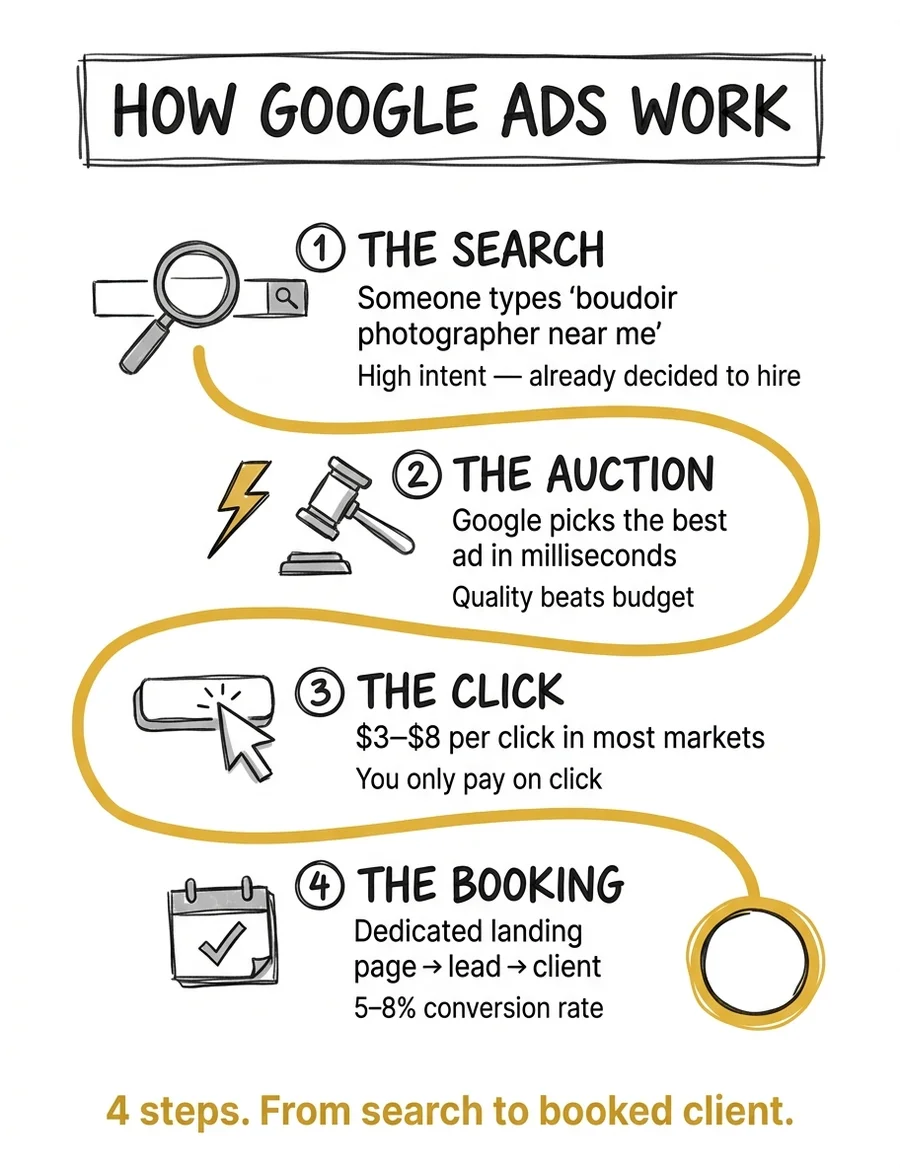
The process is simpler than most photographers think. Here's exactly what happens from the moment someone opens Google to the moment they land in your CRM:
Step 1: The Search. A potential client types "boudoir photographer Chicago" or "family portrait session near me" into Google. This is not a casual scroll. This is someone with intent. They are actively looking to hire a photographer. That distinction matters more than anything else in this guide.
Step 2: The Auction. In milliseconds, Google runs an auction among all advertisers bidding on that keyword. Your bid, your ad quality score, and your landing page relevance all factor in. Google calls the combined result your Ad Rank, and its own documentation is explicit that higher-quality ads often lead to lower costs per click. The highest-quality, most relevant ad wins, not always the highest bidder. This is why a well-structured campaign from a smaller studio can outperform a larger studio spending recklessly.
Step 3: The Click. Your ad appears. If the headline matches what the searcher wants ("Chicago Boudoir Photography | Book Your Session Today"), they click. You pay for that click. Current average CPCs for photography-related keywords in major metros run $1–$8 for competitive terms. In smaller markets, you will pay less. In Manhattan or LA, you will pay more.
Step 4: The Conversion. The click lands on your page. Not your homepage, but a dedicated landing page built for that specific service and city. If the page is relevant, fast, and has a clear next step (book a consultation, fill out a form, call now), a percentage of those visitors become leads. For photography niches, well-run Search campaigns convert at 5–8%. Most studios we audit are sitting under 2%, not because of the traffic, but because the landing page is wrong. Fixing that gap is where the real ROI comes from.
That is the entire system. Four steps. The photographers who fail at Google Ads almost always fail at Step 4. They send paid traffic to their homepage and wonder why nobody books.
Google Ads vs. Facebook Ads for Photographers
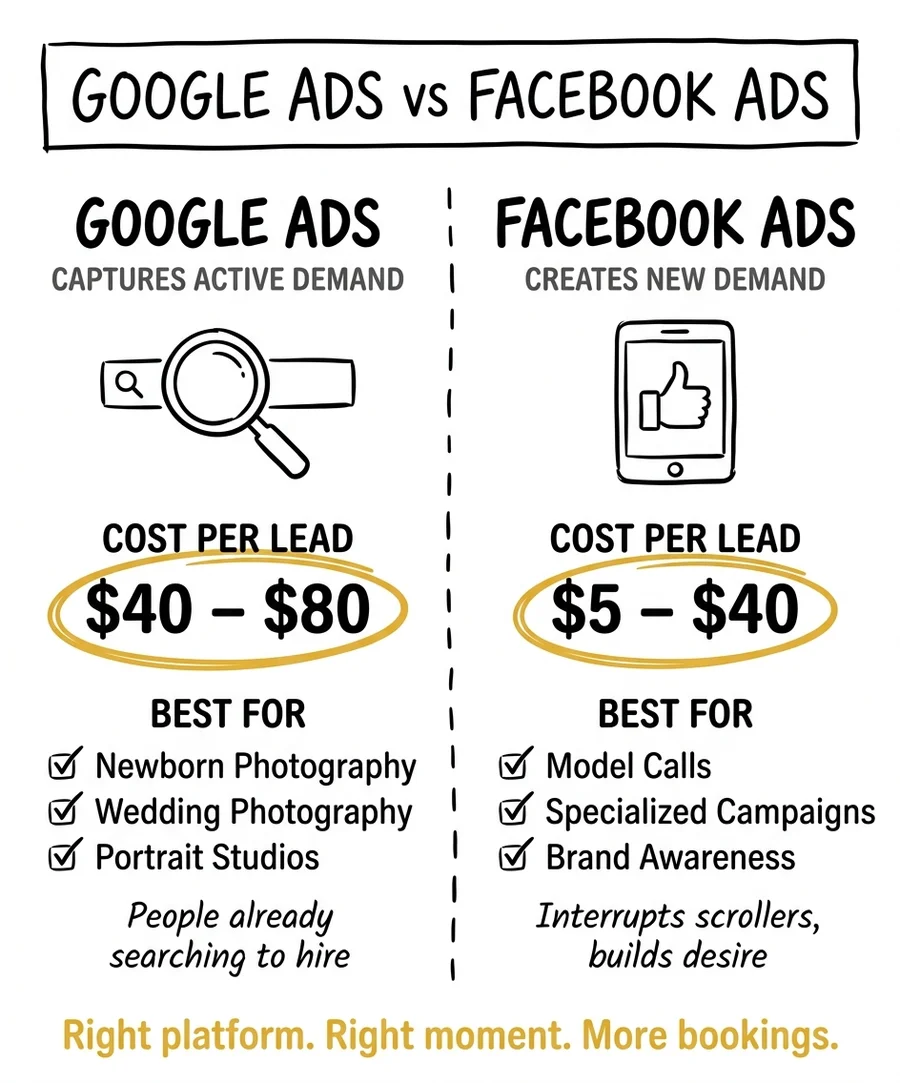
I have audited hundreds of photography ad accounts. The question I get most often is: "Should I be on Google or Facebook?" The honest answer is both, but not at the same time, and not with the same expectations.
The clearest way I can put it: Google fulfills demand. Meta creates demand. For the full multi-channel picture, see our complete photography marketing guide.
When someone searches "boudoir photographer near me," they already know they want boudoir photography. They have made the mental decision. Google puts your studio in front of that decision. Facebook and Instagram, by contrast, interrupt people who were not thinking about photography at all. Your ad has to do the heavy lifting of creating desire from scratch.
This fundamental difference changes everything about how you budget, what you measure, and what results you can expect.
Where Google Ads win for photographers:
- High-intent keywords: "wedding photographer [city]," "newborn photographer near me," "boudoir photography [city]"
- Services with clear search volume: portrait, boudoir, wedding, newborn, headshot
- Studios with a defined local market (specific city or metro)
- Faster lead generation: Search campaigns produce results in weeks, not months
- Measurable ROI: median Search campaign ROI for photography is 5.21x
For a deep dive on the Meta side, see our Facebook Ads for photographers guide.
Where Facebook/Instagram wins for photographers:
- Building brand awareness in a new market
- Retargeting website visitors who did not book
- Showcasing portfolio to cold audiences through visual-first placements
- Lower CPMs for broad awareness, useful before you have conversion data
- Lifestyle-driven services where visual inspiration drives the decision (senior portraits, maternity)
Which should you start with? If you have a defined service, a specific city, and a budget of at least $500/month, start with Google Search. You will get faster signal, cleaner attribution, and leads from people who are already in buying mode. Add Facebook retargeting once your Search campaign is converting. Run Meta prospecting once you have budget to scale.
Running both from day one with insufficient budget is one of the fastest ways to prove to yourself that ads do not work, when the real problem is that you diluted your spend across two platforms before either had enough data to optimize. For a full breakdown of how every channel stacks up in 2026, see Photography Advertising in 2026: What's Actually Working.
How Much Do Google Ads Cost for Photographers?
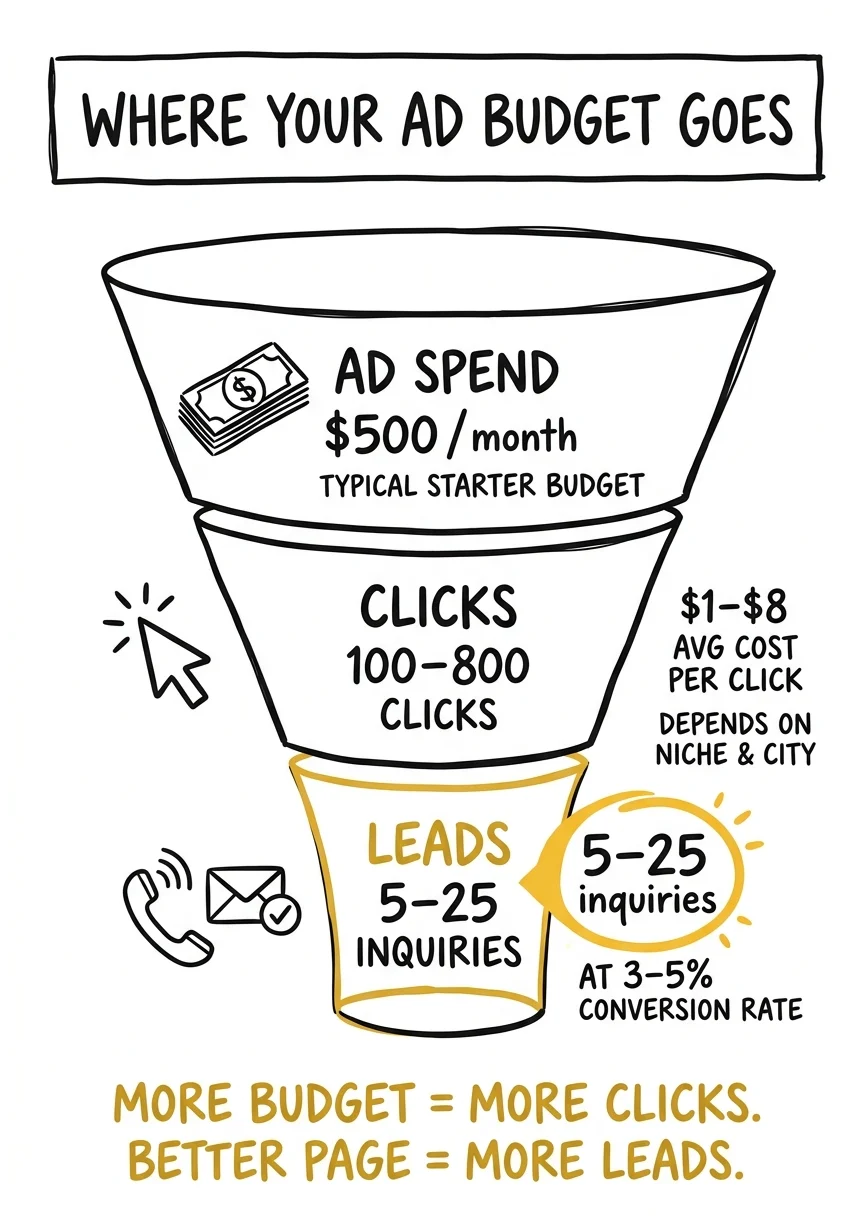
Let me give you real numbers instead of ranges that tell you nothing.
Minimum viable budget: $500–$1,500/month. Below $500/month, Smart Bidding cannot gather enough conversion data to optimize. Google lists conversion volume as one of the three things that determine how long the learning period lasts, alongside the length of your conversion cycle and the bid strategy you choose, and says calibration can take up to three weeks or one to two conversion cycles. In practice, photography accounts need roughly 50 conversions per month before the algorithm settles. If your budget is too low to generate that volume, you are paying to teach the algorithm, and getting very little back while it learns.
At $800/month (a realistic starting point for most portrait and boudoir studios), the math in a mid-size metro looks like this:
| Stage | Number | How it is calculated |
|---|---|---|
| Monthly budget | $800 | A realistic starting point for most portrait and boudoir studios |
| Daily budget | $26.32 | $800 divided by 30.4, the multiplier Google uses to set your monthly spending limit |
| Average CPC | $1–$8 | Photography Search keywords, varying by metro size and how competitive the term is |
| Clicks/month | 100–265 | $800 spread across that CPC range |
| Landing page CVR | 5–8% | A well-optimized, single-service landing page. Most studios we audit sit under 2% |
| Leads/month | 5–21 | Clicks multiplied by conversion rate |
| Cost per lead | $40–$120 | Budget divided by leads. Landing page quality is the biggest variable in this row |
| Booking rate | 15–25% | What qualified Search traffic books at when follow-up is fast |
| Booked sessions | 1–5/month | Leads multiplied by booking rate |
That range ($40–$120 CPL) is wide because your landing page quality is the biggest variable. A weak page (homepage, slow load, no clear CTA) will produce $120+ leads. A purpose-built landing page with a strong headline, proof elements, and a single conversion action will get you toward $40.
What about Performance Max? Performance Max (PMax) is a single campaign type that reaches, in Google's words, all of your Google Ads inventory: Search, Display, YouTube, Discover, Gmail and Maps. PMax campaigns run approximately 20% cheaper per click than Search: $0.68 average CPC versus $0.85 for Search. PMax also drives 45% of all Google Ads conversions across industries. The ROI is slightly lower than Search (4.64x median vs 5.21x), but the volume potential is higher. The catch: PMax requires existing conversion data to work. Run Search first, establish your baseline, then layer in PMax.
| Factor | Search | Performance Max |
|---|---|---|
| Average CPC | $0.85 | $0.68, about 20% cheaper |
| Median ROI | 5.21x | 4.64x |
| Where it runs | Google search results | Search, Display, YouTube, Discover, Gmail and Maps |
| Data required | Can start cold | Needs existing conversion data or it guesses |
| Launch order | First, for 60–90 days | Second, at 20–30% of total spend |
| Best for | Establishing your true CPL and keyword winners | Scaling volume once the account has signal |
Metro market premium. Wedding and portrait keywords in competitive metros (New York, Los Angeles, Chicago, Miami) regularly hit $5–$8 per click. In a market like that, your $800/month budget produces fewer clicks. You compensate by being more specific: "boudoir photographer Brooklyn" converts better than "photographer New York" and costs less per click because fewer advertisers are competing for the longer-tail term.
The "near me" opportunity. "Near me" photography searches have grown over 200% since 2020. These queries tend to have lower competition and high intent. "Boudoir photographer near me" and "portrait photographer near me" should be in every local photography campaign.
The Biggest Mistake Photographers Make with Google Ads
If your Google Ads are not working, it is almost never the platform. It is the setup.
The single biggest mistake I see is running Performance Max before establishing a Search baseline and proper conversion tracking.
Here's why that destroys results. Performance Max is an AI-driven campaign type. It runs across Search, Display, YouTube, Gmail, Shopping, and Maps simultaneously. It needs conversion data to know who to show your ads to. If you launch PMax with no historical data and no verified conversion tracking, the algorithm has nothing to optimize toward. It starts guessing. It burns your budget on Display placements and YouTube pre-rolls that generate zero bookings. You spend $800 in the first month, get 2 leads, and conclude that Google Ads does not work for photographers.
It works. The setup was wrong.
The correct launch sequence:
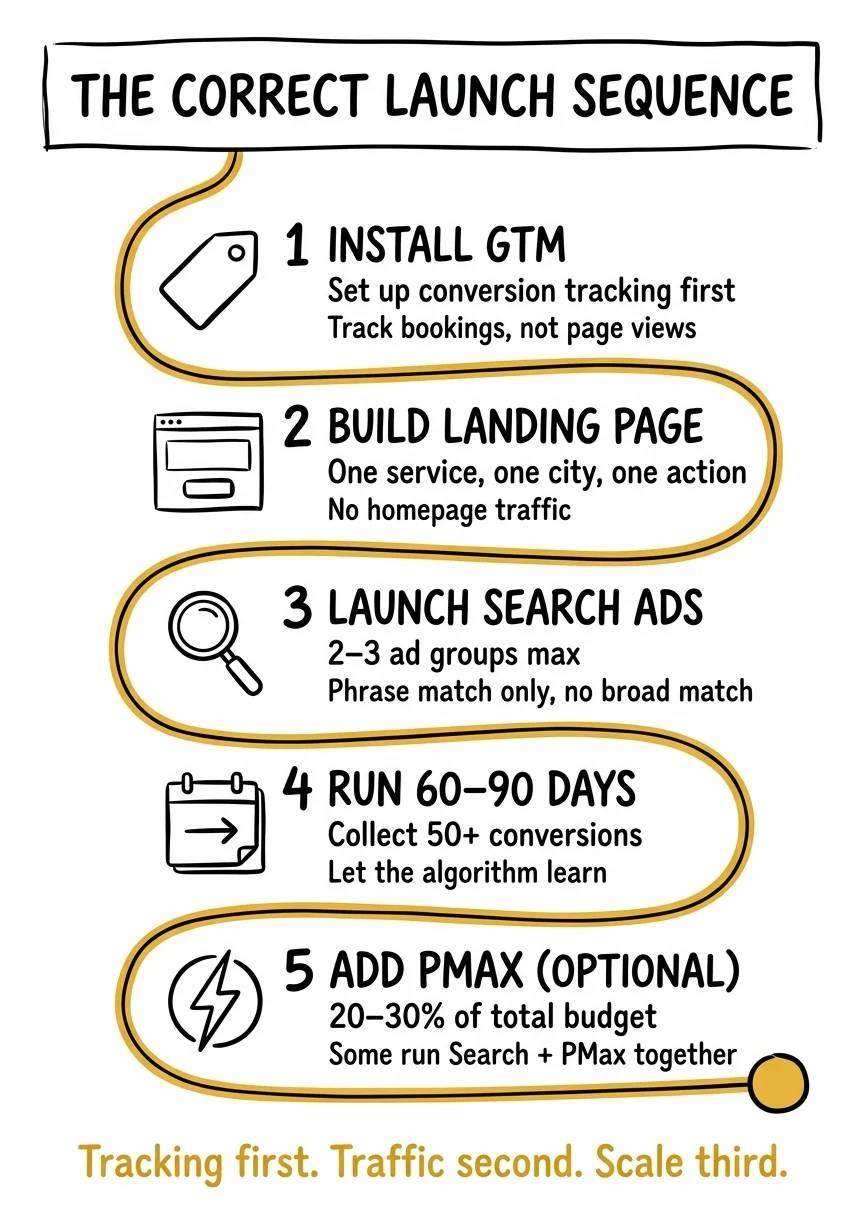
- Install Google Tag Manager and set up conversion tracking first. Track form submissions, phone calls, and consultation bookings as conversions, not page views. If you cannot measure a booking, you cannot optimize toward bookings.
- Build a dedicated landing page per service. Not your homepage. Not your portfolio gallery. A page built for one service, one city, one action. If you run ads for boudoir photography, the landing page headline should say "Boudoir Photography in [City]." This comes before you spend a dollar on traffic.
- Launch a tight Search campaign. Two to three ad groups maximum. Each ad group targets one specific service and city: "boudoir photographer [city]," "portrait photographer [city]," "headshot photographer [city]." Phrase match keywords only, no broad match until you have data.
- Run Search for 60–90 days and hit 50+ conversions. Now you have data. Now you know your CPL, your top-performing keywords, and your conversion rate by device and time of day.
- Add Performance Max (optional, and it can run alongside Search). Some studios run Search and PMax simultaneously; others wait until 50+ conversions are in. Either works once conversion tracking is solid. Feed PMax your best headlines, best images, and existing converter audience as a signal.
This sequence is not exciting. It does not let you launch everything on day one. But it is the sequence that actually produces leads at $40–$120 CPL instead of burning $2,000 and walking away convinced that Google Ads is a scam.
How to Set Up Google Ads for Your Photography Studio

What follows is the practical setup. Not theory. This is the structure I use for photography studio accounts.
Campaign type: Start with Search. Manual CPC or Maximize Conversions (once you have conversion data). Avoid Smart campaigns. They hide too much from you. You need visibility into what is working during the learning phase.
Geographic targeting. Set your campaign to your metro area: your city plus a 15–25 mile radius. Google supports radius targeting down to a 1 km minimum, and warns that too small a radius can mean your ads show only intermittently, so do not over-tighten it. Do not target your entire state. Do not target "people interested in" your location. Target people physically in your service area. A wedding photographer based in Nashville does not need leads from Memphis.
Keyword strategy. Pull your candidate terms from Google's Keyword Planner, which shows estimated monthly searches for a keyword and the average cost for your ad to show on it. Start with three keyword types:
- Service + city: "boudoir photographer Nashville," "portrait photographer Nashville," "headshot photographer Nashville"
- Service + near me: "boudoir photographer near me," "portrait photographer near me"
- Intent modifiers: "book boudoir photographer," "best portrait photographer [city]," "affordable headshots [city]"
| Keyword type | Example | Match type | What it costs you |
|---|---|---|---|
| Service + top metro | "boudoir photographer Chicago" | Phrase | $5–$8 per click in the most competitive metros (New York, Los Angeles, Chicago, Miami) |
| Service + city | "portrait photographer Nashville" | Phrase | $1–$8 per click, depending on how many studios bid in your market |
| Service + neighborhood | "boudoir photographer Brooklyn" | Phrase | Below the metro average, because fewer advertisers compete for the longer-tail term |
| Service + near me | "portrait photographer near me" | Phrase | Lower competition with high intent. These searches have grown over 200% since 2020 |
| Intent modifier | "book boudoir photographer" | Phrase | Low volume, but the strongest purchase intent of any group |
| Negatives | "free," "DIY," "photography classes," "jobs" | Negative | $0 by design. These are exactly what you pay for when broad match is left on |
Use phrase match for all of these. Google defines it as showing your ad on searches that include the meaning of your keyword, which is broad enough to catch real variations and narrow enough to keep out the noise. Then add negative keywords immediately: "free," "DIY," "photography classes," "photography school," "how to become," "photography jobs." Google's guidance on negatives is to exclude the search terms that do not fit your business so budget concentrates on the ones that do. These searches are not your clients.
Ad copy structure. Your headline must mirror the keyword. If someone searches "boudoir photographer Chicago," your headline should say "Boudoir Photography in Chicago." The more specific the match, the higher your Quality Score, the lower your CPC, and the better your click-through rate.
Three headlines and two descriptions is the floor, not the target: it is the minimum a responsive search ad will accept. Google allows up to 15 headlines of 30 characters and 4 descriptions of 90 characters, then tests the most promising combinations for you. Give it more raw material than the minimum. Test at minimum two ad variations per ad group, and let them run for 30 days before declaring a winner.
Landing page requirements. This is where most photography campaigns fail. Your landing page must have:
- Headline that matches the ad keyword (keyword mirroring)
- Hero image or above-fold video that immediately communicates your style
- Social proof: client count, testimonials, awards, press mentions
- Single CTA above the fold: "Book a Free Consultation" or "Check Your Date"
- Load time under 3 seconds on mobile (photography sites with large images routinely fail this)
- No navigation menu. You are paying for this click, so do not give visitors a reason to wander
Conversion tracking. Google's conversion measurement supports website actions, phone calls, app activity and imported offline conversions, and it distinguishes primary conversions (which Smart Bidding optimizes toward) from secondary ones you only observe. Track these as primary conversions in Google Ads:
- Contact form submissions
- Phone calls lasting 60+ seconds. Phone call conversion tracking lets you set a minimum call length so that every call at least that long is counted as a conversion, which requires a Google forwarding number
- Calendar booking completions (Calendly, Acuity, etc.)
Do not track page views as conversions. Page views tell you nothing about whether your ads are generating clients.
Budget pacing. Set your daily budget to your monthly budget divided by 30.4. That number is not arbitrary. Google's average daily budget documentation defines your monthly spending limit as 30.4 times your average daily budget (365 days divided by 12 months) and your daily spending limit as two times it. So Google will spend up to 200% of your daily budget on high-traffic days, but at the end of the month you will not have been charged more than 30.4 times your daily budget. At $800/month, set $26.32/day. Do not pause campaigns on weekends. Wedding and portrait searches spike on Saturdays.
When to add Performance Max. After 60–90 days on Search, with 50+ verified conversions recorded, create a PMax campaign with a budget of 20–30% of your total Google Ads spend. Feed it your top Search headlines, your best portfolio images (portrait: minimum 5 landscape, 5 square, 3 vertical), and set audience signals using your existing customer list plus in-market audiences for "Photography Services." Then add negative keywords to the PMax campaign too. They apply to its Search and Shopping inventory and keep the same junk terms out of the campaign that is hardest to see inside.
Ad Extensions (Assets): The Free Real Estate Most Photographers Skip
Google renamed ad extensions to "assets," but the idea did not change: they are extra links, lines and buttons that attach to your ad at no extra cost. You still pay the same cost per click. What changes is how much of the results page your studio occupies and how many different ways a searcher can act on it.
Assets also feed ad quality, and ad quality feeds what you pay. Nearly every photography account I audit is running bare text ads against competitors showing four sitelinks, a row of callouts and a tap-to-call button. Same budget, a third of the footprint. Here are the four that matter for a studio, in the order I add them.
Sitelink Assets
Sitelinks are the additional links under your ad that send people to specific pages on your site. The constraints from Google: sitelink text is capped at 25 characters, you need at least two before they can appear, and up to six can show on desktop or up to eight in a mobile carousel. Google recommends at least four at the account level and notes that six or more improves your Ad Strength.
The four that earn their place for a photography studio:
- See Pricing pointing at your investment guide, not a contact page
- View Recent Work pointing at one curated gallery for that service, not your full archive
- Client Reviews pointing at a page of testimonials with names and photos
- Check Your Date pointing at the same booking form your main ad sends to
Every one of those is under 25 characters, which is not an accident. Never sitelink to your homepage. You already decided not to send paid traffic there.
Callout Assets
Callouts are short, non-clickable phrases that sit under your ad text. Google caps callout text at 25 characters and can show up to 10 of them depending on device, browser and character spacing. They are the cheapest place in the entire account to answer an objection before the click happens.
- Free Consultation
- Hair & Makeup Included
- Studio & On-Location
- Same-Week Availability
- Payment Plans Available
- 500+ Sessions Photographed
Write callouts about the thing that makes a hesitant person book, not about you. "Award-Winning Photographer" is a callout about your ego. "Hair & Makeup Included" is a callout that removes the reason she was going to wait until next month.
Call Assets
Call assets put your phone number, and on mobile a tap-to-call button, directly into the ad. Google's documentation says they can significantly increase clickthrough rates, and that a click on the call asset is charged the same as a click on your headline. Two settings decide whether they help or hurt:
- Schedule them to your answering hours. Google lets you show a call asset only on certain days and hours, for example only when someone is actually picking up. A paid click that rings out to voicemail is worse than no click at all.
- Turn on call reporting. Call reporting assigns a Google forwarding number so calls can be measured as conversions, with duration and connection status. That is what makes the "count calls over 60 seconds" rule earlier in this guide something the account enforces, instead of something you hope is happening.
Location Assets
Location assets show your street address on desktop, your distance and city on mobile, plus a call button and a tap-through to your hours, photos and directions. They can appear across Search, Display, YouTube, Maps and search partners. The cleanest setup links your Google Business Profile so Google Ads pulls your address, hours, phone number and photos straight from it. If you shoot out of a studio clients can drive to, this is the asset that converts "photographer near me" traffic, because it answers the "near" part of the query inside the ad. If you are home-based and do not publish an address, skip it and put the effort into sitelinks and call assets instead.
Priority order: sitelinks first, because they add the most visual footprint. Then callouts, then call assets scheduled to your hours, then location assets if you have a public studio address. All four are free to add and take under 30 minutes. There is no version of this where skipping them is the right call.
The 7-Figure Studio Approach: Three Levels of Paid Advertising
In the 7-Figure Studio program, we teach what we call the Three Levels framework for paid advertising. I am not going to lay out the full framework here. That is what the program is for. But I will tell you where Google Ads fits.
Google Ads is Level 2: Capturing Active Demand.
Most photographers start at Level 1 or jump straight to Level 3 and skip the middle. Skipping Level 2 is one of the most expensive mistakes a studio can make, because Level 2 is where buyers are already in motion. You are not convincing anyone of anything. You are simply showing up at the moment someone has already decided they want what you offer.
Studios running structured Search campaigns typically see consistent lead flow within the first 30–60 days. Paid search is just one piece. For studios building a multi-channel system, the 6-Channel Marketing System shows how Search, referrals, email, and social work together. The quality is something organic cannot replicate: these people searched for a photographer. They are not being interrupted. They are not passively scrolling. They typed the words and hit enter.
I am not saying organic does not matter. It does, and it compounds over time in a way paid does not. If you want to build that organic foundation alongside paid, our SEO services for photographers cover how we do both together (or learn to do it yourself with our complete SEO guide). But if you need leads in the next 30 days, Google Search is the most direct path to buyers with their hand already up.
Speed to Lead: The Follow-Up Window Is Short
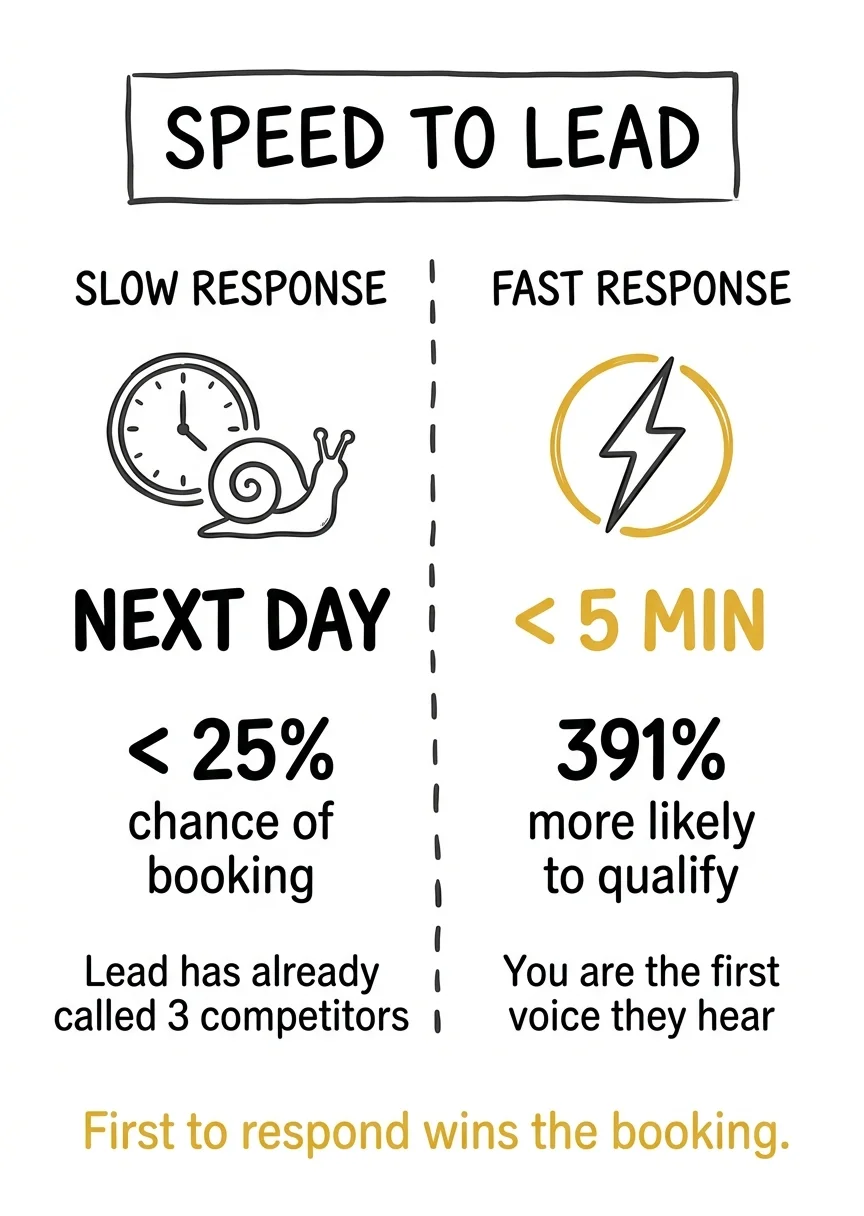
Most photographers underestimate one thing about Google Search leads: the follow-up window is short. A person who searches "boudoir photographer near me" and fills out your form is very likely looking at two or three other studios at the same time. They searched. They clicked multiple results. They filled out whoever had the clearest form.
The studio that responds first, ideally within 5 minutes, wins a disproportionate share of those bookings. Not because they have the best portfolio. Because they showed up when the lead was still warm.
Build your follow-up system before you turn on the ads. Automated confirmation email the moment the form submits. Personal text or call within the hour. If you wait until tomorrow, you are competing against whoever responded today. Referrals work the same way. Studios with a structured referral system convert warm word-of-mouth leads at even higher rates than paid.
If you want to see how the Three Levels framework applies to your studio, and how to build a paid advertising system that scales beyond what Google Ads alone can do, the Google Ads for Photographers service page is the right next step. That is where we get into what it looks like when we run these campaigns for you.
When Google Ads Are Not Right for Your Studio
I run Google Ads for photography studios for a living and I still tell some studios not to do it. Four situations where Search is the wrong first move:
1. Nobody in your market is searching for what you sell. Google Ads is demand capture. If the demand does not exist, there is nothing to capture, and no amount of campaign structure fixes that. Before you build anything, open Keyword Planner and check the estimated monthly searches for your service plus your city. Google will also show you the average cost for your ad to show on each term. If "boudoir photographer [your city]" returns almost nothing, your money belongs on Meta, where you create demand instead of fulfilling it.
2. Your budget is under $500 a month. This is the one photographers argue with me about most. It is not that small budgets are morally wrong, it is that conversion volume is one of the three factors Google names as determining how long a bid strategy stays in its learning period. Too few conversions and the strategy never calibrates, so you pay learning-phase prices indefinitely. Under $500/month, spend it on your landing page and your follow-up system first, then turn ads on.
3. You have no landing page and no plan to build one. Search traffic is the most expensive traffic you will ever buy, and sending it to a homepage or a portfolio gallery converts under 2% in nearly every account I audit. If you cannot build or commission a single-service, single-city, single-CTA page before launch, you are not ready. That page is not an optimization you get to later. It is the thing you are paying for clicks to reach.
4. You cannot respond within the hour. Google Search leads are comparison shoppers by nature, because the same search that found you showed them three competitors. If your realistic response time is "when I finish editing this weekend's wedding," your $80 leads will book with whoever answered on Tuesday afternoon. Fix speed to lead first. It costs nothing and it is worth more than any bid adjustment in this guide.
None of these are permanent disqualifications. They are sequencing problems. Fix the one that applies to you, then come back and run Search properly.
Conclusion: Google Ads Work for Photographers Who Build the System Correctly
Google Ads is not a magic button. It's a machine. Build it right and it delivers booked clients at predictable cost, month after month. Build it wrong and it drains budget with nothing to show. The photographers who fail with Google Ads skip the fundamentals: they run broad-match keywords, send clicks to their homepage, and wonder why nothing converts. The ones who win follow a clear structure: Search first, tightly themed ad groups, a dedicated landing page with a single call to action, and conversion tracking that tells the truth.
Photography to Profits has run this system for portrait studios across every major U.S. market. The results are consistent: $40–$120 cost per lead, 15–25% booking rates on qualified traffic, and studios that graduate from "hoping for referrals" to running a predictable lead machine. If you're ready to build that machine for your studio, the Google Ads for Photographers service page is the right next step.
Using AI tools to run your photography business operations? See how we do it end-to-end in our guide: Claude Code for Photography Studios: The Complete AI Tools Guide.
Frequently Asked Questions

How much should a photographer spend on Google Ads per month?
The minimum viable budget is $500–$1,500/month. Below $500/month, Google's Smart Bidding algorithm cannot gather enough conversion data to optimize effectively. It needs approximately 50 conversions per month to exit the learning phase. At $800/month in a mid-size market, you can expect 5–21 leads per month at $40–$120 cost per lead, depending on your landing page quality and market competitiveness. Budget is not the primary variable; setup quality is. A poorly structured campaign at $2,000/month will outspend and underperform a well-structured campaign at $800/month.
Do Google Ads work for portrait photographers?
Yes. Portrait photography is one of the strongest niches for Google Search campaigns. Portrait, boudoir, headshot, newborn, and family photography all have high-intent search volume, clear geographic targeting, and defined session pricing that makes conversion tracking straightforward. Photography Search campaigns convert at 5–8% for well-optimized setups. Most studios we audit are under 2%. The gap almost always comes down to landing page quality, not ad spend. The key is pairing tight keyword targeting ("portrait photographer [city]") with a dedicated landing page, not your homepage, built for a single service and single conversion action.
What keywords should photographers target with Google Ads?
Start with three keyword categories: (1) Service + city: "boudoir photographer Chicago," "portrait photographer Austin," "newborn photographer Denver." (2) Service + near me: "boudoir photographer near me," "portrait photographer near me." These have grown 200%+ since 2020 and carry extremely high purchase intent. (3) Intent modifiers: "book portrait photographer," "best boudoir photographer [city]." Use phrase match for all keywords and add negatives immediately: "free," "DIY," "classes," "school," "jobs," "how to." Avoid broad match until you have at least 60 days of Search data and 50+ conversions.
How long before Google Ads start producing results for photographers?
You will see clicks in the first week. You should see your first leads within 2–4 weeks if your landing page and conversion tracking are set up correctly. The first 60–90 days are the learning phase: the algorithm is gathering data, and your CPL will be higher than your eventual steady-state cost. Do not judge the campaign's viability in the first 30 days. Judge it after 60 days and 50+ recorded conversions. At that point you have enough data to know whether the setup is working or needs adjustment. Studios that pause campaigns in week 3 because they have not seen results yet are not giving Google's algorithm time to optimize.
Should I use Performance Max or Search campaigns as a photographer?
Start with Search. Always. Performance Max needs conversion data to work. Without it, the algorithm guesses where to show your ads and routinely wastes budget on Display and YouTube placements that do not convert to bookings. Run Search for 60–90 days, collect 50+ verified conversions, then add a Performance Max campaign at 20–30% of your total budget. PMax runs about 20% cheaper per click than Search ($0.68 vs $0.85 average CPC) and drives 45% of all Google Ads conversions, but only once the algorithm has signal to work with. The sequence matters: Search first, PMax second.
Google Ads vs Facebook Ads for photographers: which is better?
Neither is universally better. They serve different functions. Google fulfills demand: it puts your studio in front of people who are actively searching for a photographer. Facebook creates demand: it introduces your studio to people who were not thinking about photography at all. If you have a defined local market and at least $500/month, start with Google Search. It delivers faster, more attributable results from buyers who are already in motion. Add Facebook retargeting once your Search campaign is converting, and Meta prospecting once you have budget to scale. Running both platforms simultaneously with insufficient budget will leave you with diluted results on both and no clear signal on what is working.