
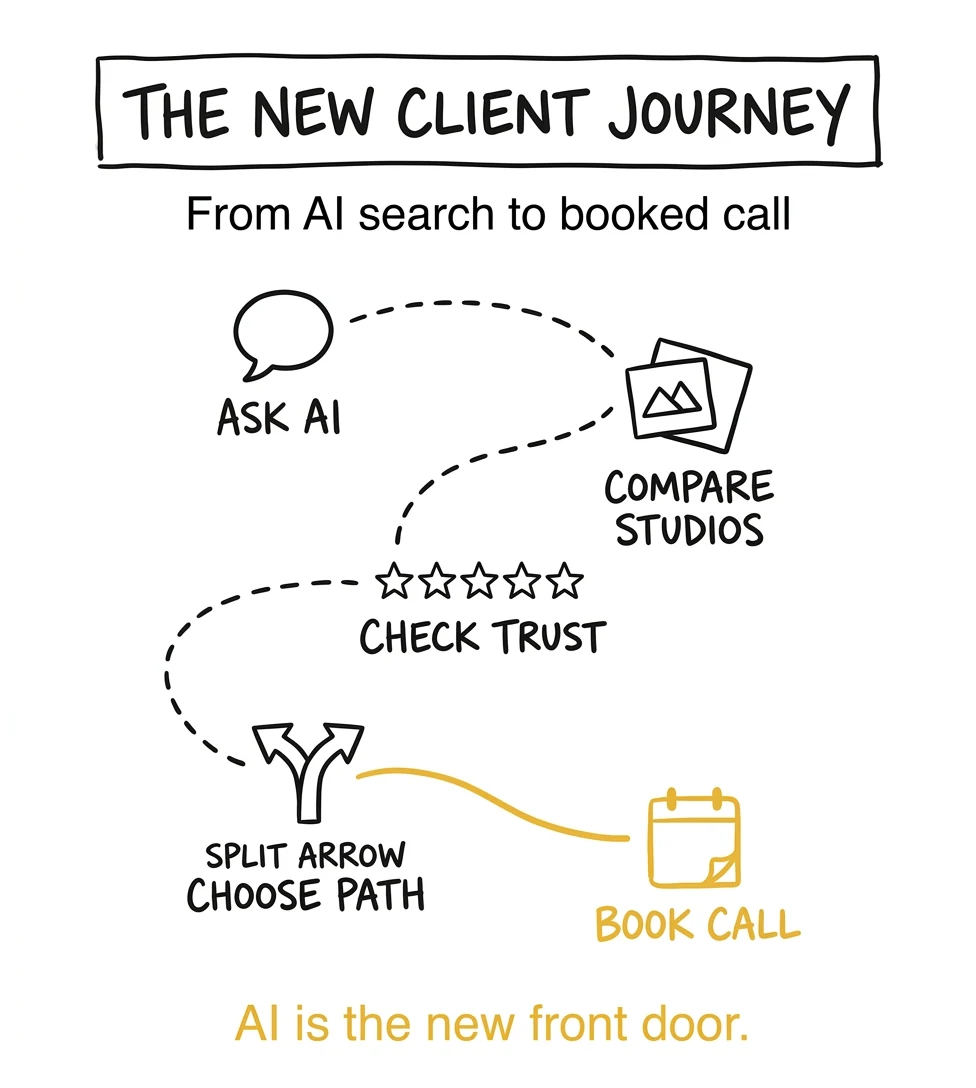
A bride opens ChatGPT. She asks for the best wedding photographer in her city. The AI reads a handful of studio websites, picks one, summarizes the offer, fills out the inquiry form on her behalf, and tells her: "I just reached out to Sarah's Studio for you. She'll be in touch tomorrow." The bride never visited a single photographer's homepage. The site that won her booking did one thing right: it was ready for the agent.
This is not a hypothetical. ChatGPT, Claude, and Gemini are already reading photography websites, comparing studios, and increasingly taking action on behalf of clients. The question this post answers is simple: is your photography website ready for an AI to find, trust, and submit a form to?
Key Takeaways from Humberto Garcia, Founder of Photography to Profits
- Agent-ready does not mean "turn your photography website into a tech product." It means making your studio easy for AI tools (ChatGPT, Claude, Gemini, Perplexity) to read, trust, and act on.
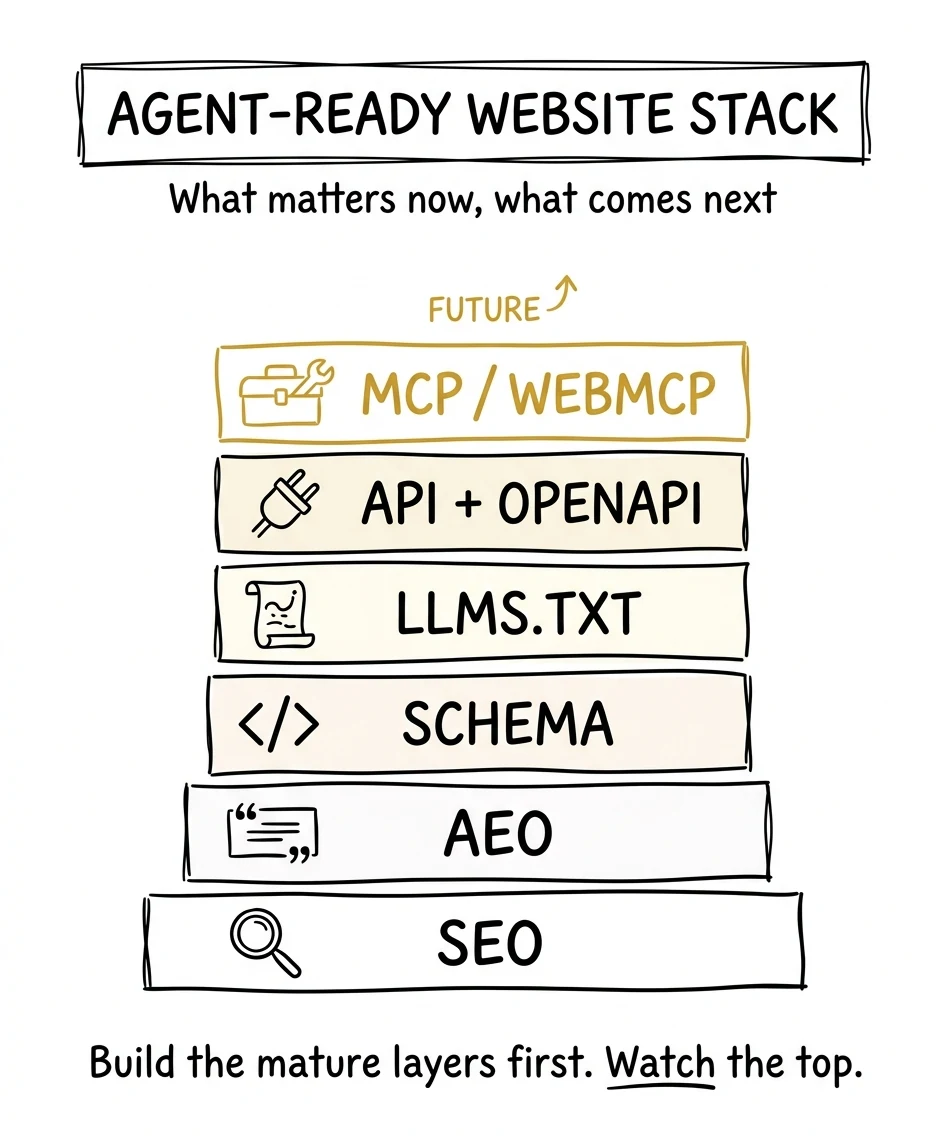
- AEO is the content layer. REST APIs and OpenAPI are the structured access layer. MCP (Anthropic) and Apps SDK (OpenAI) are the new action layers that let AI agents actually do things on behalf of clients.
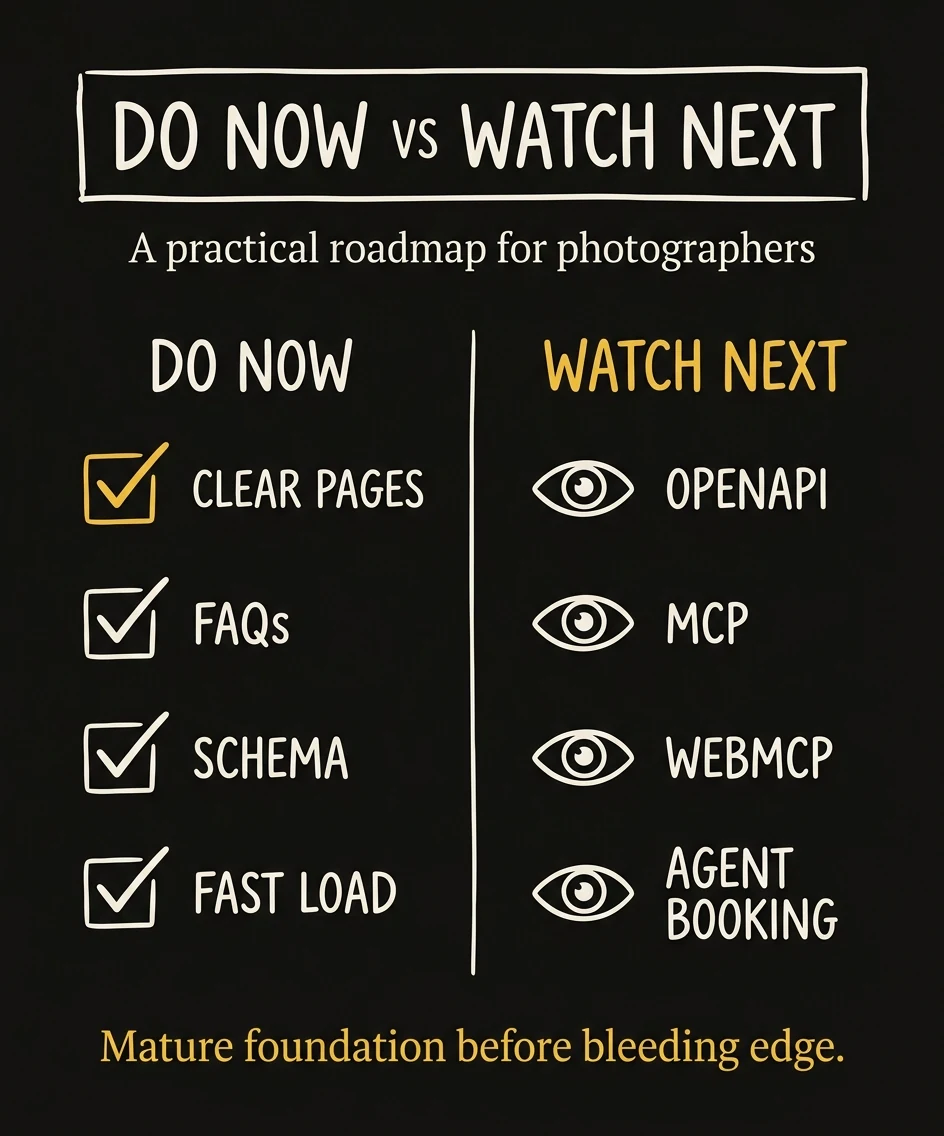
- The mature work to do now is practical: clear service pages, strong local proof, FAQ answers, schema, fast pages, crawlable content, and an obvious booking path.
- WebMCP is still early, but it points to the bigger shift: websites are becoming systems agents can use, not just pages humans view. Template platforms like Showit, Squarespace, and Wix cannot keep up with this. Only custom websites can.
- At Photography to Profits we build custom agent-ready websites for photographers. Start by scanning your current site at Is Your Website Agent Ready?, then book a call to see what a real custom site looks like.
Want the fast answer? Run the free agent-ready website scan and see whether AI tools can understand your photography website.

Client searches Google, clicks ten sites, compares galleries, then fills out a form.
Client asks an AI assistant, the assistant compares studios, then sends the client to the best next step.
What an Agent-Ready Website Means for Photographers
An agent-ready website is a site that AI tools can understand without guessing.
That does not mean your website needs to become complicated. It means your website needs to stop hiding the important parts of your business behind vague copy, image-only layouts, slow pages, unclear forms, or platform limits you cannot control.
For a photographer, the questions are simple:
- Can an AI tool tell what type of photography you specialize in?
- Can it tell where you work?
- Can it understand who your sessions are for?
- Can it summarize your process accurately?
- Can it find proof that you are trustworthy?
- Can it help a client take the next step without confusion?
If the answer is no, you do not have an AI problem. You have a website structure problem.
Clear answers, FAQs, locations, services, proof.
Schema, headings, internal links, crawlable pages.
APIs, OpenAPI, llms.txt, agent discovery files.
Forms, booking, MCP, WebMCP, future agent workflows.
AEO Is the First Layer, Not the Whole Strategy
AEO stands for Answer Engine Optimization. In plain English, it means making your website easier for AI tools to use when they answer a question.
Traditional SEO helps you show up when someone searches boudoir photographer in Austin. AEO helps you show up when someone asks, Who is a good boudoir photographer in Austin for someone nervous about posing?
That second search needs more than keywords. It needs judgment. The AI tool is trying to understand fit, trust, location, style, experience, and next step.
That is why AEO for photographers starts with the basics:
- direct service descriptions
- question-based headings
- FAQs written like real client questions
- clear location and niche signals
- reviews, case studies, and proof
- structured data that matches the page
Weak: "Luxury memories for modern lovers."
Agent-ready: "We photograph intimate weddings and elopements in Asheville, with documentary coverage, timeline help, and galleries delivered in 4-6 weeks."
The second sentence is not less beautiful because it is clearer. It is more useful. A human understands it faster, and an AI tool can safely summarize it.
This is what we build for photographers at P2P. A custom photography website with AEO baked into every service page, FAQ, and location page, not added as an afterthought. Talk to us about your site →
SEO Still Matters Because AI Search Needs Sources
AI search did not erase SEO. It raised the bar for it.
Google has continued telling site owners that many AI search best practices are still SEO fundamentals: helpful content, crawlability, page experience, internal links, and clear structured information. Search Engine Journal summarized Google’s recent AI search guidance the same way: AEO and GEO still sit on top of SEO, not instead of it.
That matters for photographers because your site still needs to be findable before it can be recommended. If Google, ChatGPT, Perplexity, or another answer engine cannot crawl and understand your pages, it has less confidence using you as a source.
If you want the deeper foundation, start with the full SEO for photographers guide. This article is the next layer: what changes when AI assistants become part of the discovery path.
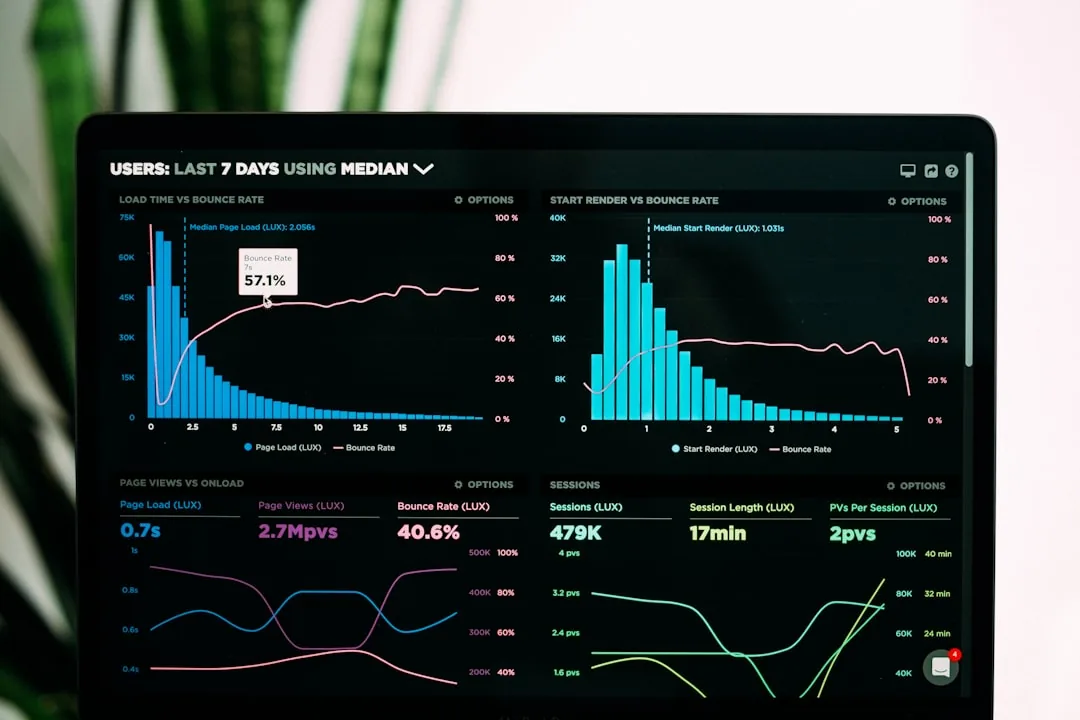
Search Engine Journal covered Google’s AI search guidance and the practical takeaway is simple: AEO builds on SEO instead of replacing it.
SEO: helps the page get found.
AEO: helps the answer get trusted.
Agent-ready: helps the next step happen.
If the first layer is shaky, fix it first. Our complete SEO guide for photographers covers the fundamentals every agent-ready site is built on.
Where APIs Fit Into a Photography Website
This is where the conversation can sound technical, so keep it simple.
A REST API is a structured doorway into a website or system. Instead of an AI tool scraping a page and guessing what it means, an API can give it a clean answer in a predictable format.
For most photographers, you do not need to personally manage an API. But you should understand the direction.
Today, a potential client might visit your website and fill out a form. Tomorrow, an AI assistant might ask your website or booking system:
- What services does this studio offer?
- What cities does it serve?
- What package should this client ask about?
- Is there a consultation slot available next week?
- Where should I send an inquiry?
A custom website can expose those answers cleanly. That does not mean every studio needs a public booking API today. It means your website should be built in a way that can support structured access later.
Human page: "Here are our wedding photography packages."
REST API: "Here is the same package information in a structured format another system can read."
OpenAPI: "Here is the instruction manual for how to use that API."
OpenAPI is the common way developers describe REST APIs. The OpenAPI Initiative calls it a formal standard for describing HTTP APIs. In normal-person language, it is a menu that tells software what your website can answer or do.
The OpenAPI Initiative describes OpenAPI as a formal standard for documenting HTTP APIs, which is why it matters for future agent access.
MCP and WebMCP: The Future Action Layer
MCP stands for Model Context Protocol. Anthropic introduced it as a standard way for AI assistants to connect with tools and systems. If OpenAPI is like an instruction manual for a web API, MCP is closer to a common plug that lets AI assistants use tools in a more consistent way.
For a photographer, the simplest version is this:
Eventually, AI assistants will not only recommend a studio. They may help a client take action.
- Ask which package fits.
- Check available consultation windows.
- Submit a clean inquiry.
- Download a prep guide.
- Start a booking workflow.
Anthropic introduced Model Context Protocol as a standard way for AI assistants to connect with tools and systems; its MCP documentation is the official technical reference.
The other major AI company is moving the same direction. OpenAI launched the Apps SDK in ChatGPT, which lets third-party services plug directly into ChatGPT so a user can take real actions inside the conversation: booking, ordering, scheduling. When the two biggest AI companies on earth both ship a way for websites to expose actions to agents, that is not a fringe experiment. That is the new front door for local services, including photography.
OpenAI's Apps in ChatGPT announcement and the OpenAI tools and functions guide show the parallel push: agents calling structured website actions instead of scraping pages.
WebMCP is even more specific. It is an early browser-side idea for exposing website actions to agents so the agent does not have to blindly click around a page. Chrome’s developer documentation describes WebMCP as a way to reduce fragile “actuation,” where an agent simulates mouse clicks and text input like a human.
That is important, but it is not something most photographers should obsess over today.
Chrome’s WebMCP documentation shows the current experimental browser-side direction: exposing website actions so agents do not have to guess at clicks and fields.
You do not need to build any of this yourself. A P2P custom website ships with MCP-ready endpoints, OpenAPI specs, and an agent-friendly architecture from day one, the same way we built our own site for OpenAI, Anthropic, and Google’s agents to discover. Show me what an agent-ready site looks like →
llms.txt and Agent Discovery Files
You may start hearing about files like llms.txt, llms-full.txt, ai-agent.json, and other discovery files.
Here is the plain-English version: these files tell AI tools where the important information lives.
They are not magic. They are not a ranking button. And llms.txt is still a proposed convention, not an official standard that every major AI company promises to obey.
But it is useful because it forces your website to answer a strategic question:
If an AI assistant only had 30 seconds to understand this studio, what should it read first?
For a photography website, that usually means:
- home page
- main service page
- location page
- portfolio or case studies
- reviews/testimonials
- pricing or investment page
- FAQ page
- contact or booking page
Not magic: "Rank me higher."
Useful: "For services, read this page. For pricing, read this page. For booking, use this page."
Search Engine Land’s llms.txt overview is useful context because llms.txt is best treated as an emerging proposal, not a guaranteed ranking factor.
The Real Risk for Photographers Is Not Being Technical Enough. It Is Being Too Vague.
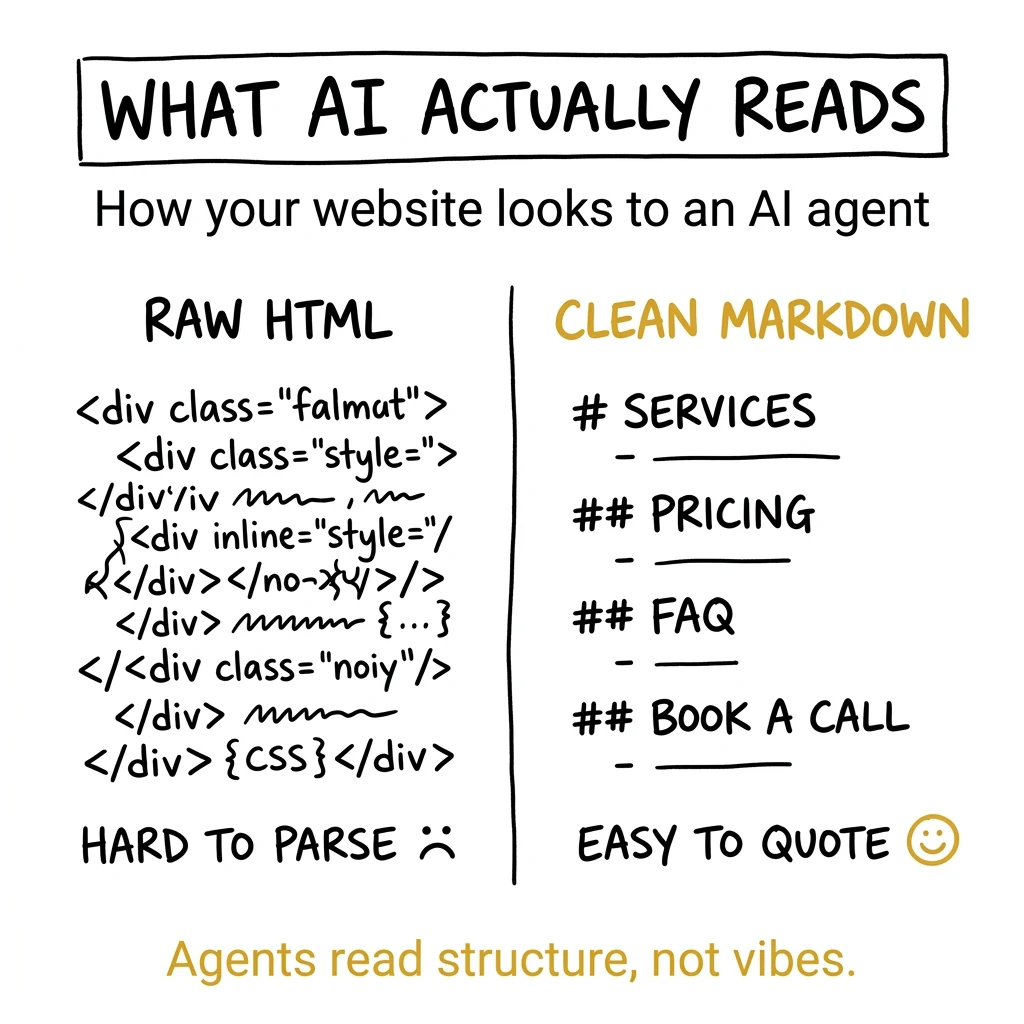
Most photography websites are beautiful but unclear.
They say things like:
- capturing timeless moments
- authentic storytelling
- luxury experience
- for lovers of light and emotion
That copy can sound nice, but it often does not tell a person or an AI tool what the studio actually does.
AI search is not impressed by vibes. It needs facts, structure, and proof.
Before: "A luxury portrait experience for women ready to celebrate themselves."
After: "We offer guided boudoir photography sessions in Tampa for women who want professional posing, wardrobe guidance, same-day image selection, and printed albums."
The second version does more work. It names the service, city, audience, process, and product. That helps humans. It helps Google. It helps AI assistants. And it helps your contact form convert because the client knows what to expect.
Why Platform Websites Can Become a Ceiling
Showit, Squarespace, Wix, and WordPress templates helped a lot of photographers get online. That matters.
But the next stage of search rewards control.
You need to control speed, structure, content formats, schema, redirects, tracking, internal links, discovery files, and eventually agent-facing actions. If your website platform cannot support those changes quickly, your marketing is waiting on someone else’s roadmap.
This is why website design for photographers has to be more than a prettier homepage.
A modern photography website should be a system:
- Every service page has a clear answer section.
- Every city page has local proof and FAQs.
- Every blog post has internal links and schema-ready structure.
- Every form is trackable and extendable.
- Every key page can be summarized by humans and machines.
Template site: easy to launch, harder to evolve.
Programmatic site: structured once, scalable across services, cities, FAQs, tracking, and agent access.
What to Fix This Month
You do not need to implement WebMCP this month. You probably do not need a custom public API this month.
You do need to fix the foundation.
- Write a direct answer at the top of each major page. Say what you do, who it is for, where you work, and what the next step is.
- Add real FAQ sections. Answer pricing, turnaround, posing, wardrobe, location, editing, and booking questions directly.
- Make your contact path obvious. Do not make people or agents hunt for the next step.
- Improve technical crawlability. Keep sitemap, robots, metadata, and schema clean.
- Add proof near the claim. If you say luxury, show reviews, process, results, and client examples.
- Test your site like an AI would. Run an agent-ready scan and see what your site exposes clearly.
Week 1: scan the site and fix crawlability.
Week 2: rewrite homepage and main service page answers.
Week 3: add FAQs, schema, and internal links.
Week 4: tighten inquiry path and publish one answer-first post.
Start with the scan. Use Is Your Website Agent Ready? to check the 15 signals that tell us whether your site is prepared for AI search and agent discovery.
Hire P2P to Build a Custom Agent-Ready Website
You can spend the next eighteen months trying to bolt AEO, schema, llms.txt, API endpoints, and MCP support onto a Showit or Squarespace template. You will lose that fight. Templates were built for a different era of the internet, when humans were the only visitors that mattered.
Or you can hire Photography to Profits to build you a fully custom website that is ready for every kind of visitor, including the AI ones. Here is what you get:
- Custom Next.js architecture. Every service page, city page, and FAQ rendered as fast static HTML that Google, ChatGPT, Claude, and Perplexity can read in a single request.
- AEO and schema baked in. Every page ships with Article, Service, FAQPage, and LocalBusiness JSON-LD. Not added later, but built in from the start.
- Agent discovery surfaces. Live
llms.txt,llms-full.txt,/for-agentsendpoint, and OpenAPI-described routes so AI assistants can crawl, summarize, and eventually book on your behalf. - MCP-ready infrastructure. Endpoints structured so when MCP and WebMCP go mainstream (and they will), your site already speaks the language.
- 10× easier to manage. Forget plugin chaos and theme breakage. You get a clean admin where you control pages, blog posts, FAQs, and pricing without touching a designer.
- It will look and feel different. Every other photographer in your city is using the same five Showit templates. Your site will not look like theirs. It will look like the future.
This is not a theory. photographytoprofits.com is built on the exact stack we sell: agent-ready, AEO-optimized, fully programmatic. Test it yourself: scan it at Is Your Website Agent Ready? and compare it to your current site.
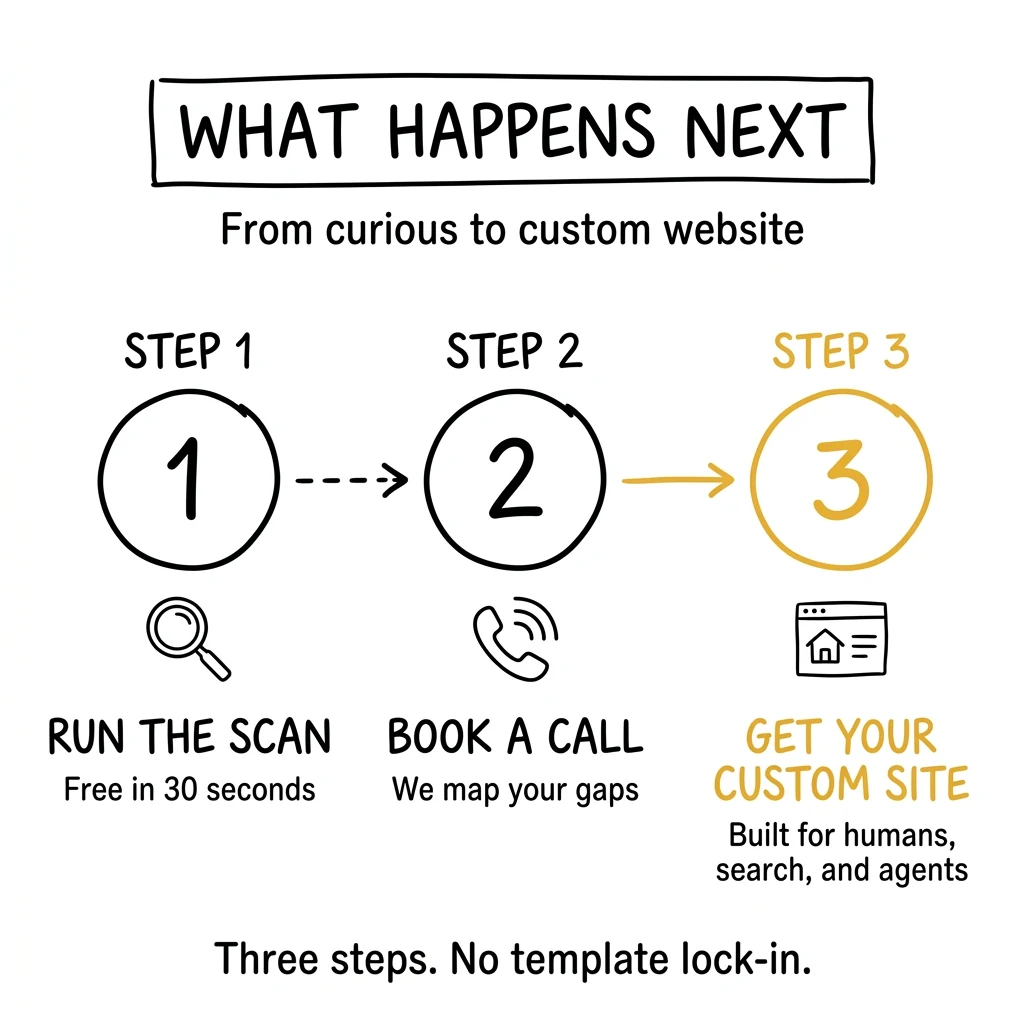
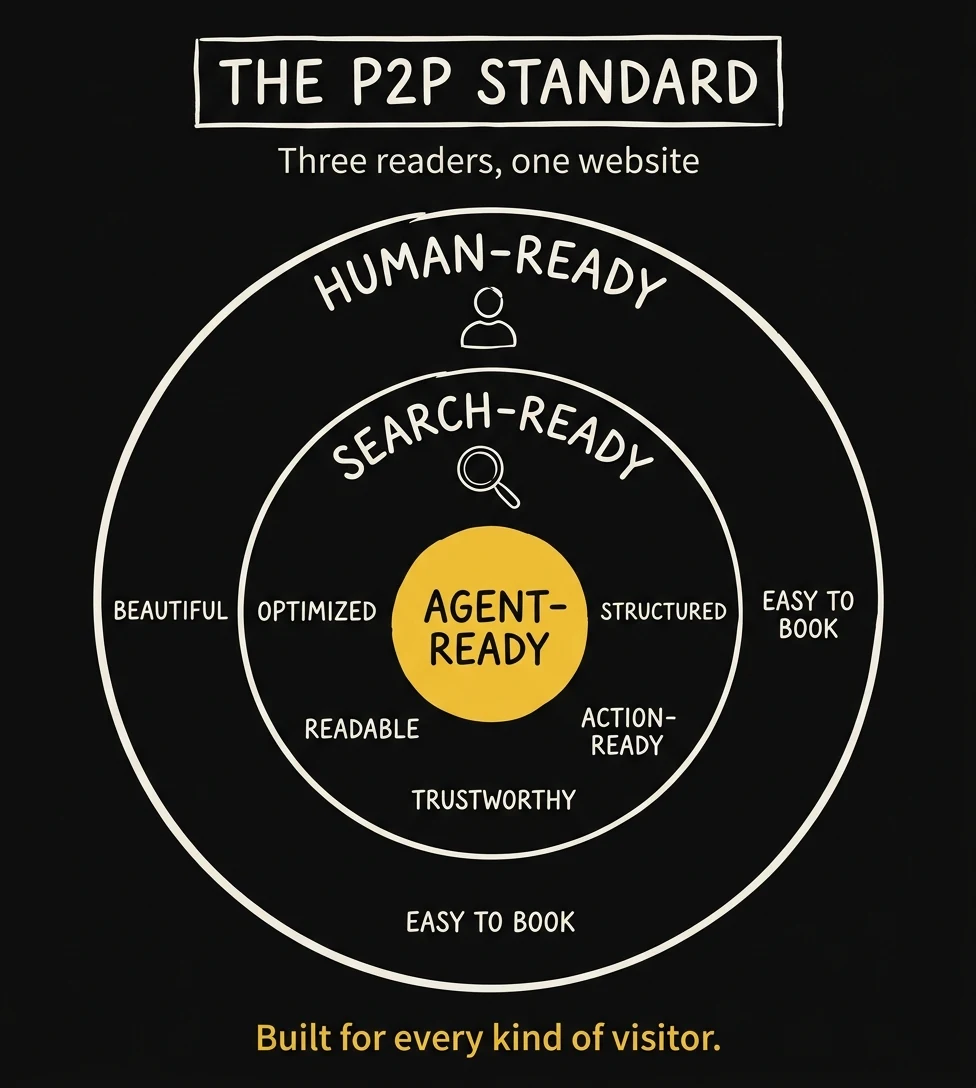
Your website should be clear enough for a nervous bride, fast enough for Google, structured enough for AI, and flexible enough for whatever search becomes next. Template platforms cannot give you that. Custom can.
Ready to stop fighting your platform? Tell us about your current site and we will walk through what is missing and lay out exactly what a P2P custom build looks like for your studio.
Conclusion: Photographers Should Prepare Now, Without Overbuilding
WebMCP is early. MCP is still mostly a developer conversation. OpenAPI matters most if your site has structured booking or business data. llms.txt is useful, but not magic.
But the direction is obvious.
AI tools are becoming a new front door for local buying decisions. That means photography websites need to be clearer, faster, more structured, and easier to act on.
The studios that win will not be the ones using the most buzzwords. They will be the ones whose websites make the business easy to understand and easy to choose.
If you want to know where your site stands, start here: scan your photography website for agent readiness.
Frequently Asked Questions
Do photographers need WebMCP right now?
No. WebMCP is still early and experimental. Photographers should understand what it signals, but most studios should focus first on clear content, technical SEO, structured data, fast pages, and a clean booking path.
What is the difference between AEO and SEO?
SEO helps your website get found in search engines. AEO helps AI answer engines understand and quote your site accurately. For photographers, AEO usually means direct service answers, FAQ sections, local proof, schema, and content written in clear chunks.
What is a REST API in simple terms?
A REST API is a structured way for software to ask your website or system for information. For example, instead of scraping a page, an AI assistant could ask a structured endpoint what services you offer or where to submit an inquiry.
Is llms.txt worth adding to a photography website?
Yes, if it is easy to add, but do not treat it like a magic ranking factor. Think of it as a clean map for AI tools that points to your most important service, pricing, FAQ, portfolio, and contact pages.
What should photographers do first?
Start with the basics: clear service pages, local SEO, FAQs, schema, fast load speed, internal links, and a simple inquiry path. Then run an agent-readiness scan to see which signals are missing.