Every "AI tools for photographers" article online covers the same thing. Photo editing software. Culling. Retouching. Color grading. That's table stakes now. If you're not using AI to speed up your editing workflow in 2026, you're already behind. But editing is only 20% of the AI opportunity sitting in front of you right now.
The photographers pulling ahead aren't just editing faster. They're running their entire business on AI. Marketing, CRM, website, research, voice, content. All of it automated, connected, and working while they sleep. Meanwhile, most photographers are still manually answering every inquiry, writing every caption from scratch, and wondering why their competitors seem to have unlimited time and output.
This guide covers the full stack. What the tools actually do, what they cost, and exactly how photographers are using them to build studios that run on systems instead of hustle. I've worked with hundreds of studios through Photography to Profits. I'll tell you what's working and what's hype.
Key Takeaways
- AI photo editing tools like Evoto and Aftershoot save photographers an average of 473 hours per year, but editing is only 20% of the AI opportunity available to studio owners in 2026
- Humberto Garcia, founder of Photography to Profits, runs the entire P2P website, blog, SEO, and marketing operation through Claude Code: no developer, no agency, no team
- GoHighLevel's AI answers calls, qualifies leads, and books appointments 24/7. Studios using AI-powered workflows report 38% faster lead response times and 22% higher booking rates
- The action step: pick ONE tool from this guide that addresses your single biggest time drain (editing, lead follow-up, content, or research) and commit to testing it for 30 days before adding anything else
Table of Contents
- AI Photo Editing and Retouching (The Part Everyone Already Knows)
- AI for Marketing Copy and Content Creation
- AI Voice and Video for Marketing (ElevenLabs)
- AI CRM and Client Automation (GoHighLevel)
- AI Research and Competitor Intelligence (Perplexity)
- AI-Managed Websites (Claude Code)
- AI Already Built Into Software You Use
- API Keys: What They Are and Why You Should Care
- The 80/20 Rule for Adopting AI
- Conclusion
- Frequently Asked Questions
AI Photo Editing and Retouching (The Part Everyone Already Knows)
Let's start here because it's where most photographers are already experimenting, and where the time savings are most concrete and measurable. These tools are real, they work, and the ROI is straightforward to calculate.
 Evoto AI: Portrait Retouching Specialist
Evoto is built specifically for portrait retouching. Skin smoothing, blemish removal, teeth whitening, eye enhancement, body reshaping: the full retouching menu, done in seconds per image. It runs on a credit system, starting around $9.99/month, and in 2026 it added DSLR tethering for real-time retouching during shoots.
Where Evoto shines: high-volume portrait studios doing boudoir, newborn, senior, or family sessions where every client expects polished, retouched images. It gets you 80% of the way there fast. You review, you adjust, you deliver. The manual retouching that used to take 5 minutes per image now takes 30 seconds. On a 50-image portrait session, that's 3+ hours back in your day.
Best for: portrait studios, boudoir photographers, senior photographers, any genre where skin retouching is a deliverable expectation.
 Aftershoot: Culling and Editing in One Workflow
Aftershoot does two things most photographers hate doing: culling (picking the keepers from thousands of frames) and editing (applying your style to the picks). It processes everything locally on your machine: no cloud upload, no privacy concerns, works offline.
The numbers are staggering. Aftershoot processed 8.8 billion images in 2025 alone. It won the TIPA Award for Best AI Photography Software. Pricing runs $9.99 to $14.99/month flat: no per-image credits, no surprises. The AI learns your editing style the more you use it, so it gets better the longer you stick with it.
The real test: a 3,000-image wedding (the kind that used to eat your entire Monday) goes through culling in under 10 minutes. You're not waiting, you're reviewing. That's the shift. You go from operator to editor-in-chief of your own workflow.
Best for: wedding photographers, event photographers, any genre with high frame counts where culling time is a real business problem.
 Lightroom AI: Features You Already Have and Underuse
If you're on Adobe's Photography Plan ($19.99/month), you're already paying for AI features that most photographers aren't using. Generative Remove handles distracting backgrounds, power lines, and stray objects with one click. AI Denoise runs automatically at import and saves low-light shots that you'd have tossed two years ago. Adaptive Presets apply edits based on the subject in the frame, not just global settings. AI Masking detects subjects, skies, and backgrounds automatically: no manual masking required.
Before you pay for another subscription, spend 30 minutes learning the AI features in the software you already own. Lightroom's AI tools alone could cut your editing time by 20-30% with no additional cost.
 Topaz Photo AI: The Rescue Tool
Topaz Photo AI is what you reach for when images go wrong. Upscaling for images that need to print larger than they should. Denoising for high-ISO saves from dark reception halls. Sharpening for motion blur in fast-moving subjects. It's a one-time purchase at $199, and it pays for itself the first time it saves a shot that would have needed a reshoot or a painful client conversation.
Every portrait and event photographer who shoots in variable lighting conditions should have this in their toolkit. It's not about making mediocre work look good. It's about rescuing technically flawed shots that are emotionally irreplaceable for your clients.
The Real Talk on AI Editing
These tools are real and important. Used together, they'll save you 10-15 hours a week on editing. For a photographer doing $100,000/year in revenue, that's time worth $50-75/hour that you're currently spending on work AI can handle. The ROI math is not complicated.
But here's what I need you to hear: editing isn't what's holding most studios back. The photographers I work with through Photography to Profits aren't struggling because retouching takes too long. They're struggling because their marketing is inconsistent, their lead follow-up is slow, their website isn't converting, and their content output is minimal. Editing AI gives you back hours. The rest of this guide shows you what to do with them.
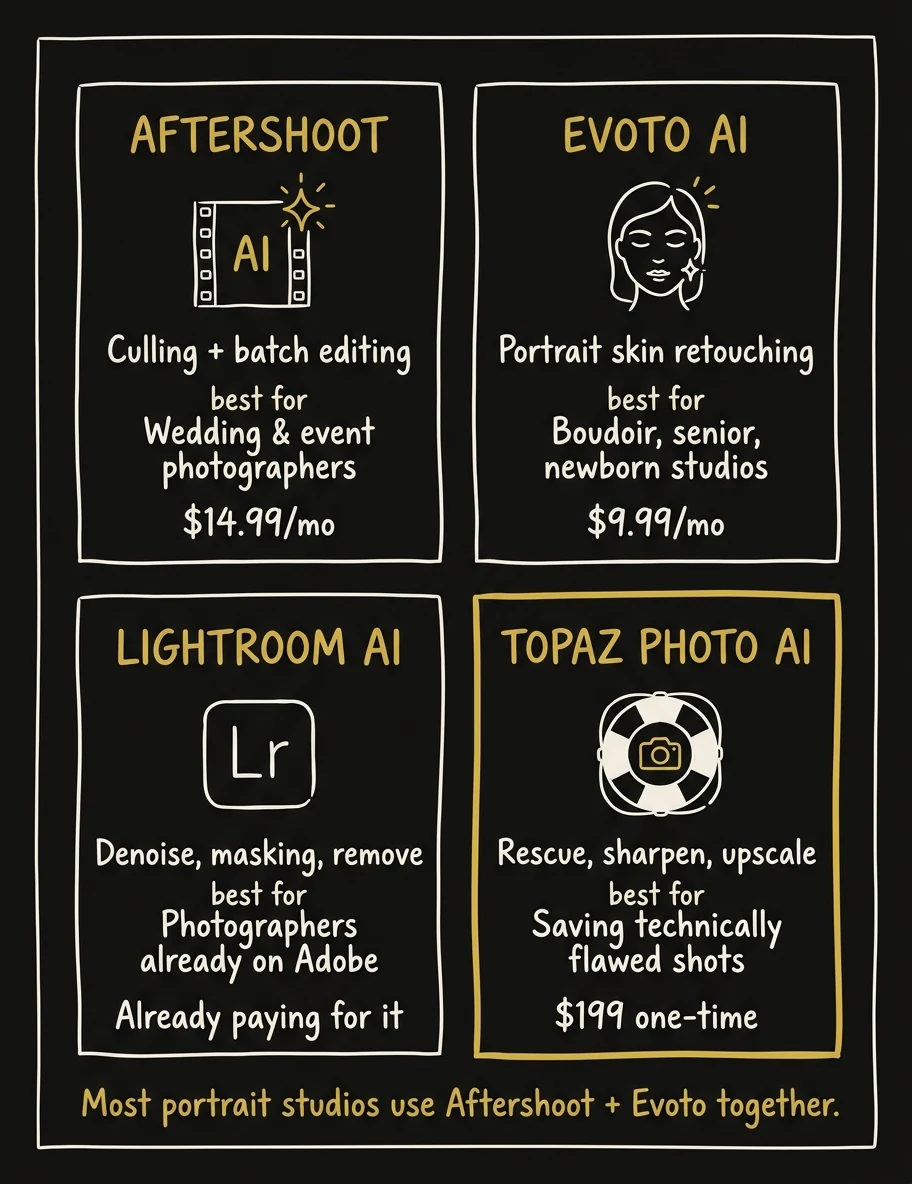 Pick based on your biggest bottleneck. Most portrait studios use Aftershoot + Evoto together.
Want to see how top studios are using AI to build complete marketing systems, not just faster editing workflows? Photography to Profits works with photographers across every genre to implement the full stack.
See How We Work →AI for Marketing Copy and Content Creation
Here's the marketing reality for most photographers: you're a creative professional who didn't sign up to be a copywriter, content strategist, or social media manager. But running a photography business in 2026 requires all three. AI is the solution, but only if you're using the right tool the right way.
 ChatGPT: Where Most Photographers Started
ChatGPT is where most photographers tried AI for the first time. And it works, up to a point. For quick Instagram captions, email drafts, ad copy variations, and brainstorming session ideas, ChatGPT delivers. It's capable, it's fast, and the free tier is genuinely useful.
The limitation shows up fast: ChatGPT has no memory of your business between sessions. Every conversation starts from zero. If you want it to write in your voice, you have to re-explain who you are, who your clients are, what your pricing is, and what makes your studio different, every single time. For photographers who want to use AI as a real marketing partner, this is a dealbreaker.
 Claude: What Photography to Profits Recommends Instead
Claude is what Humberto Garcia and Photography to Profits recommend for photographers doing serious content work. The writing quality is higher, especially for long-form content, nuanced marketing copy, and anything that needs to sound like a real human expert rather than a competent robot.
The difference-maker is Claude's Projects feature. You create a Project for your photography business, upload your brand voice guide, your service descriptions, your client personas, your pricing sheet, and Claude remembers all of it across every conversation. You stop re-explaining. You start building.
Renee Bowen, a senior photographer, switched from ChatGPT to Claude and built her entire business system on it: email sequences, client guides, content calendar, pricing objection scripts, all of it. She described it as having a marketing director on call for $20/month. Photography to Profits ran an entire webinar on this: "Getting Good at Claude for Photographers", because the learning curve is real, but the payoff is significant once you get past it.
Practical use cases for photographers using Claude: weekly blog post drafts, Instagram captions for the next 30 days in one session, client communication templates for inquiry through delivery, email sequences for lead nurture, Google review response templates, pricing page copy, and objection-handling scripts for sales calls.
Claude Cowork: The Agent Interface for Non-Technical Photographers
Launched in January 2026, Claude Cowork is the visual agent interface. It doesn't just write, it acts. It can browse your competitor's website and report back on their positioning. It reads uploaded files, takes screenshots, and works through multi-step research tasks. For photographers who aren't technical but want to use AI as an active assistant rather than a text generator, this is the entry point.
If you've been intimidated by Claude Code (the developer-facing version covered later in this guide), start with Cowork. Same intelligence, visual interface, no terminal required.
What Language Models Actually Are (Plain English Version)
ChatGPT, Claude, and Gemini all run on large language models, the AI engines that understand text, reason through problems, and generate coherent output. You don't need to understand the technical details. What you need to understand is this: the photographer who learns to use these tools effectively has a marketing team available 24/7 for $20/month. The one who doesn't is still spending Sunday nights writing captions and stressing about their content calendar.
Learn more in our guide on Claude Code for photographers.
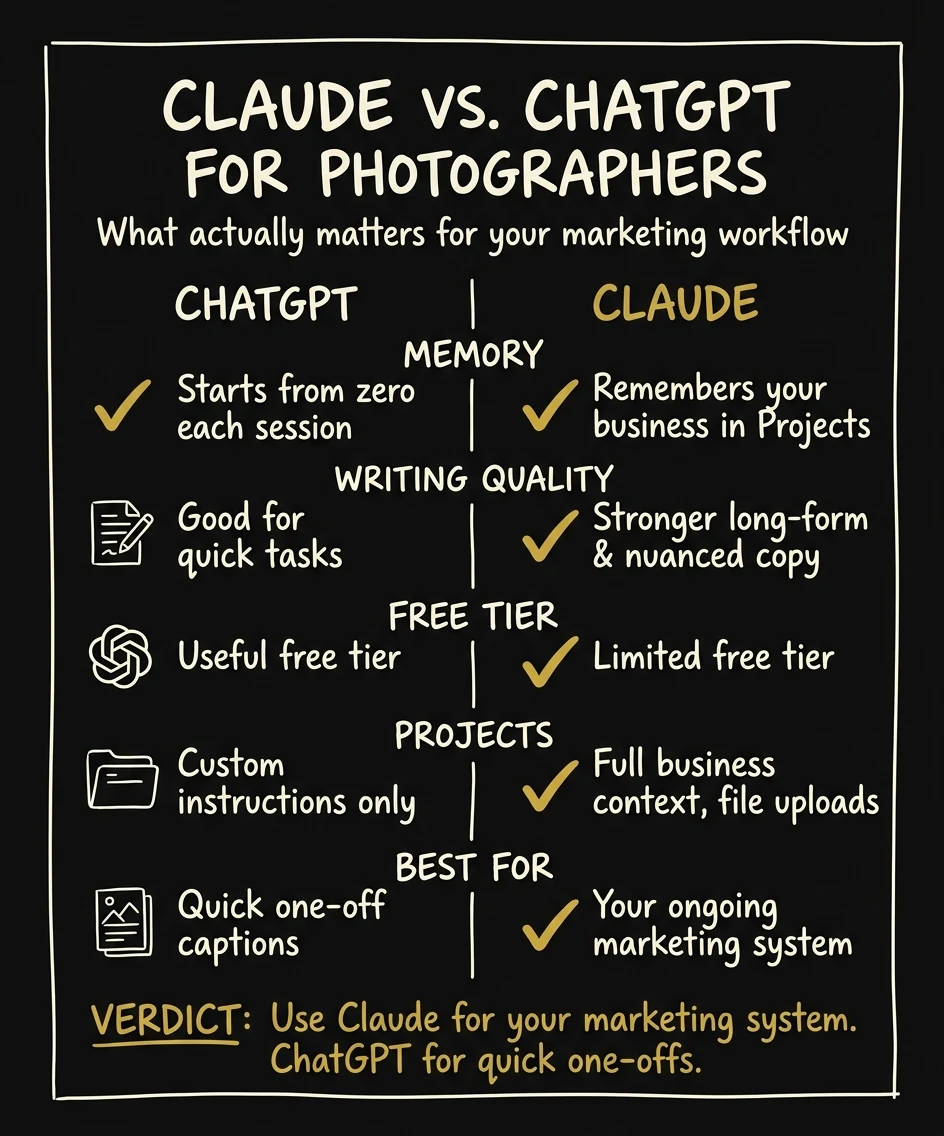 Claude wins for ongoing marketing work. ChatGPT is fine for quick one-offs.
AI Voice and Video for Marketing (ElevenLabs)
Most photographers know they should be creating video content for their marketing. Most photographers also hate being on camera. ElevenLabs eliminates the conflict.
 ElevenLabs: Realistic AI Voice at Scale
ElevenLabs is not text-to-speech in the old sense. It generates realistic, expressive voice in over 70 languages, voices that sound like professional narrators, not robots. The difference between ElevenLabs and the voice assistant in your phone is about the same as the difference between a professional portrait photographer and a snapshot on a smartphone camera.
Here's how photographers are using it specifically:
Behind-the-scenes reel narration without being on camera. You edit together footage from your last session (setup, lighting, candid moments) and write a 60-second script describing your process, your philosophy, what clients can expect. ElevenLabs generates the voiceover. You overlay it on the footage. That's a professional marketing video with zero camera anxiety.
Studio tours and portfolio walkthroughs. Walk through your portfolio with a narrated video that explains your eye, your process, your why. Clients who watch a narrated portfolio before booking have higher conversion rates and show up to consultations already sold on your approach.
Voice cloning for consistent brand content at scale. ElevenLabs can clone your voice from a 3-minute audio sample. Once cloned, every piece of voiceover content sounds like you: consistent brand identity across every video, without recording yourself every time.
Multilingual content for diverse markets. If you shoot in a multicultural market, you can deliver your wedding or portrait marketing in the client's first language. A 60-second welcome video in Spanish, Mandarin, or Portuguese for inquiring clients is a conversion lever that almost no photographers are using yet.
The content production math: with ElevenLabs and a basic video editor, one focused afternoon generates a week's worth of professional video content with consistent audio quality. Pricing starts free for testing, paid plans begin around $5/month, and the Pro tier, which most photographers will want for voice cloning, runs about $22/month.
ElevenLabs also does AI-generated sound effects and background music, and it's expanding into image-to-video creation. The platform is moving fast. The photographers who get fluent with it now will have a significant content advantage over the next two years.
Photography to Profits builds complete AI marketing systems for portrait and wedding studios. If you want the full stack implemented, not just tools advice, let's talk.
See Our Done-For-You Program →AI CRM and Client Automation (GoHighLevel)
Of every tool in this guide, GoHighLevel has the highest potential impact on studio revenue. Not because it has the flashiest AI features, but because it solves the problem that kills the most bookings: slow or missed lead follow-up.
 What GoHighLevel Is
GoHighLevel is an AI-powered business operating system. CRM, email marketing, SMS automation, website builder, funnel builder, booking calendar, reputation management, pipeline tracking. All in one platform. Over one million businesses run on it. It was built for service businesses, and photography studios are one of the clearest use cases.
Photography to Profits runs all client pipeline management through GoHighLevel. Every lead that comes in (from the website, from ads, from Instagram) lands in GHL and enters an automated follow-up sequence immediately.
The AI Features That Matter for Photographers
AI Voice Agent. This is the one that changes the game. The GHL AI Voice Agent answers your inbound calls 24/7. It qualifies leads using your custom qualification questions, handles objections with scripted responses, checks your calendar for availability, and books appointments, all without you picking up the phone. Not a recorded message. An actual conversational AI that sounds professional and handles the full inquiry flow.
Think about what this means for a wedding photographer. A bride is comparing three photographers on a Saturday night at 9pm. She calls all three. Two go to voicemail. Yours is answered by your AI agent, which takes her through your availability, answers her questions about your packages, and books a consultation. That's a $3,000+ booking you'd have lost to the competitor who answered.
Conversation AI. GoHighLevel's Conversation AI responds to SMS, email, webchat, Instagram DMs, and Facebook Messenger within 60 seconds of an inquiry, automatically. It's trained on your business information, your services, your pricing ranges, your process. It qualifies leads, answers common questions, and routes serious buyers toward booking a call. Studios using this report dramatically lower no-contact rates and shorter time-to-consultation timelines.
AI Reputation Agent. Every Google review your studio receives gets a personalized, on-brand response, automatically. This isn't just good client service. Google's algorithm favors businesses that respond to reviews consistently. The AI Reputation Agent turns your review management into a passive SEO activity.
Content AI. Generates email and SMS copy in your brand voice. You build out the templates once, the AI fills them with context-aware variations based on where each lead is in your pipeline. The follow-up email to a boudoir inquiry sounds different from the follow-up to a wedding inquiry, automatically.
Workflow Automation. GoHighLevel's visual automation builder lets you create if/then logic sequences across every channel. If a lead fills out your inquiry form but doesn't book within 48 hours, trigger an SMS. If they open that SMS but don't respond, trigger an email with a different angle. If they respond but don't book, flag for a personal outreach call. This is the kind of follow-up system that used to require a full-time sales coordinator. Now it runs automatically.
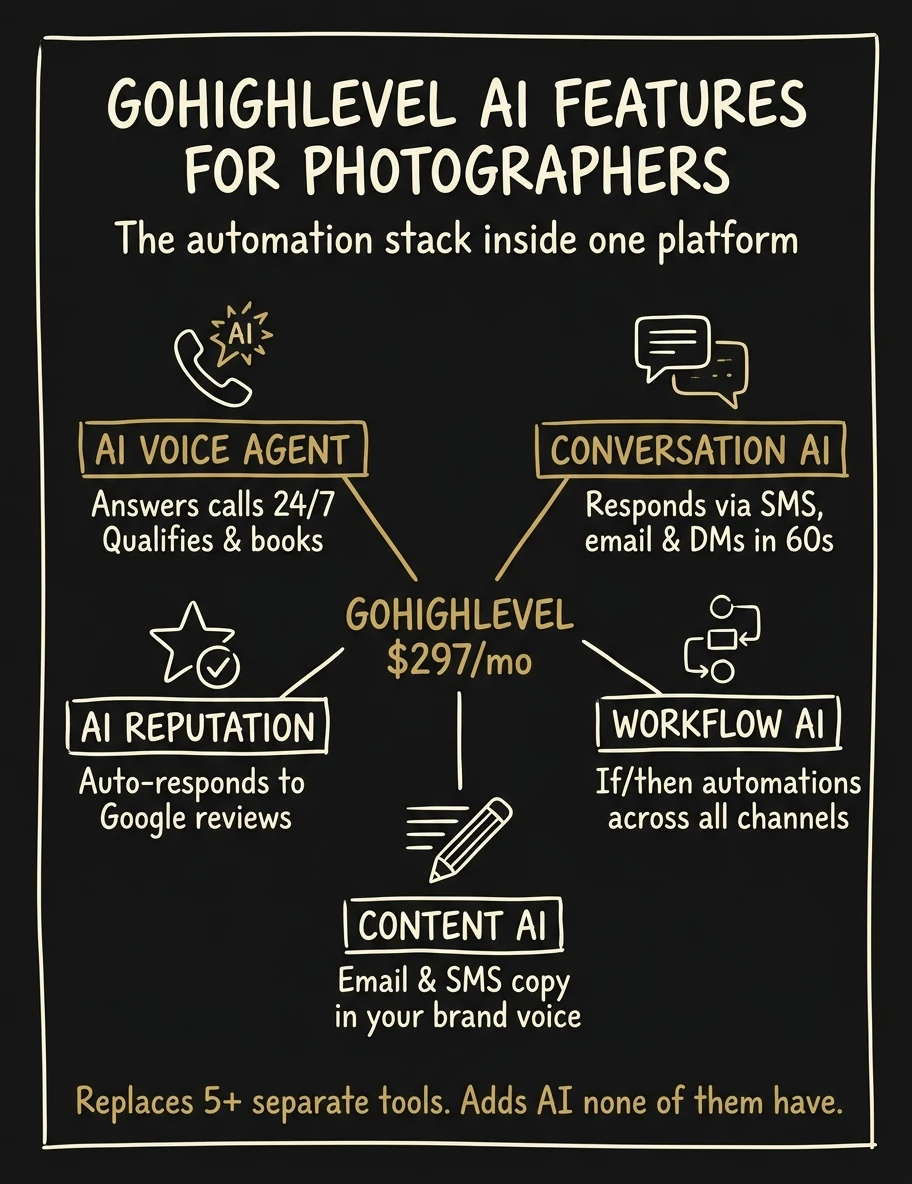 Five AI features inside one platform. Replaces a stack of separate tools.
The Numbers That Matter
Studios using AI-powered CRM workflows report 38% faster lead response times and 22% higher booking rates compared to manual follow-up. For a studio doing $80,000/year, a 22% improvement in booking rate is $17,600 in additional revenue, from the same number of leads, with no additional ad spend.
Corey Brandon, a P2P client with a $6,700 average sale, has a principle I quote constantly: "Anything I have to do more than once has to be automated." That's the philosophy GoHighLevel runs on.
Pricing: Starter at $97/month, Unlimited at $297/month, SaaS Pro at $497/month. For most photography studios, the Unlimited plan at $297/month is the right level. It replaces $500-800/month worth of separate tools (email marketing platform, SMS service, booking software, pipeline CRM) while adding AI capabilities none of those individual tools have.
Read our full breakdown: Best CRM for Photographers.
P2P sets up GoHighLevel for photography studios: workflows, automations, AI voice, the full system. No tech confusion, no wasted hours figuring it out yourself.
Book a Strategy Call →AI Research and Competitor Intelligence (Perplexity)
Every business decision you make as a photographer (what genre to specialize in, how to price your packages, which ad angles to test, what your competitors are doing) used to require either guessing or paying someone else to find out. Perplexity changed that.
 What Perplexity Is
Perplexity is what you get when you combine Google's search reach with ChatGPT's ability to synthesize and explain. You ask a question, Perplexity searches the current web in real time, pulls from multiple sources, synthesizes an answer, and cites every source. It's not a chatbot giving you its best guess. It's a research engine giving you a current, sourced answer.
How Photographers Are Using It
Competitive analysis. "What are the top five boudoir studios in [your city], what's their pricing strategy, and what do their Google reviews say about their client experience?" That used to be three hours of tab-switching and note-taking. In Perplexity, it's a five-minute research session with organized results you can act on immediately.
Content idea validation. Before writing a blog post or recording a reel, ask Perplexity what questions real couples, families, or clients are actually asking when they're searching for photographers in your genre. "What questions do brides ask when choosing a wedding photographer?" generates a list of content angles rooted in real search behavior, not guesswork.
Market positioning research before launching a new genre. Thinking about adding boudoir to your portrait studio? Ask Perplexity what the competitive landscape looks like in your market, what price points competitors are using, and what differentiators are showing up in top-ranking studios. Make the decision with data, not instinct.
Ad angle validation before spending money. Run your ad concept through Perplexity before you put $500 behind it. "What are the most common reasons couples choose one wedding photographer over another?" gives you purchase drivers directly from client research and review data. You're writing ads to confirmed motivations, not assumed ones.
Weekly competitor monitoring. Perplexity's Automated Tasks feature lets you set up recurring research queries that run on a schedule. Set it to monitor your top three competitors weekly (any new pricing pages, new offerings, new content) and get the summary delivered without logging in.
The before-and-after is stark. Before Perplexity, photographers either guessed at their market position or paid a consultant $2,000 to tell them. Now it's $20/month for Pro (with a capable free tier) and 15 minutes. The Deep Research feature goes even further: multi-source investigation on complex questions, delivered as a structured report you can use directly in your planning sessions.
AI-Managed Websites (Claude Code)
This is the section most photographers weren't expecting in an AI tools roundup. And it's the one with the longest-term competitive implications.
What Claude Code Is (and Isn't)
Claude Code is not a website builder like Squarespace or Wix. It's not a chatbot. It's an AI agent: it reads your actual website code, understands the entire codebase, writes new code, fixes problems, deploys updates, publishes blog posts, manages SEO, and handles technical integrations. All of it through plain English instructions. You describe what you want. Claude Code builds it.
It operates directly on your computer and file system. It can open a file, read it, edit it, run tests, push to your hosting platform, and confirm the deployment succeeded, autonomously, in sequence, without you touching a terminal.
How Photography to Profits Uses It
The entire Photography to Profits website (100+ pages, blog, forms, CRM integration, SEO infrastructure, structured data, sitemap) is managed through Claude Code. No developer on retainer. No agency relationship. No waiting three weeks for someone to update a page. When Humberto wants a new service page, a blog post published, an SEO update, or a form integrated with GoHighLevel, Claude Code handles it the same day.
The cost comparison is direct: Claude Pro is $20/month. Claude Max is $100/month. A website developer runs $3,000-10,000/year minimum for ongoing management. An agency managing your site and SEO is $1,500-5,000/month. Claude Code doesn't replace all of that, but for photography studio websites, which are fundamentally marketing pages with blog and booking infrastructure, it handles the vast majority of what you'd otherwise pay for.
What Photographers Are Doing With It
One photographer documented rebuilding his entire website from Squarespace using Claude Code. The result: 1,000+ pages indexed, page speed scores significantly improved, and a technical SEO foundation that Squarespace templates can't match. He had no coding background. The entire project was English-language instructions translated into code by Claude.
Another photographer built a private photo journal app for client proofing in a single day: 2,700 lines of code generated through Claude Code. What would have cost $5,000-15,000 as a custom development project cost $100 in Claude subscriptions and one focused work session.
Watch the full breakdown: how to build a service page with Claude Code. And read our deep dive: Claude Code for Photographers.
Who This Is For Right Now
Honest answer: Claude Code has a real learning curve. If you've never seen a code file before and you're not curious about the technical side, this isn't your first AI tool to adopt. Start with Claude on claude.ai, learn to use it for content, then use our Cowork vs Codex guide to choose the right bridge. Claude Code is the next level.
But here's the strategic reality: the gap between template builders and AI-managed websites compounds every month. The photographer running their site through Claude Code in 2026 will have a technical SEO and content velocity advantage in 2028 that no template-builder photographer can close. This is the tool with the steepest learning curve and the highest long-term ceiling.
AI Already Built Into Software You Use
Before you sign up for anything new, take a full inventory of what you already own. The most common feedback I hear from photographers after working with P2P for a few months: "I can't believe I was paying for tools I had the whole time."
Adobe Lightroom
If you're on the Photography Plan, you have: Generative Remove (click on distracting elements to erase them from the background), AI Denoise at import (runs automatically when you import high-ISO shots), Adaptive Presets (apply edits based on detected subjects, not just global settings), and AI Masking (automatically selects subjects, sky, background, and foliage with zero manual work). Most photographers using Lightroom daily are using maybe 40% of its current AI capabilities.
 Canva
Canva
For photographers building their own social media graphics, client guides, pricing PDFs, or welcome packets, Canva's AI tools are underused. Magic Write generates copy directly in the design canvas. Magic Edit changes specific elements in an uploaded photo. Background Remover works in one click. Text-to-image generates placeholder visuals for mockups. Canva AI handles the design output that would otherwise require either expensive design software or hiring a graphic designer.
 Google Workspace
Gmail's AI drafts, the suggestions that appear as you type, are a genuine time-saver for photographers responding to high volumes of inquiry emails. Google Docs' "Help me write" feature drafts client communication templates, contract language, and follow-up sequences. Google Sheets can now generate complex formulas from plain English descriptions. If you run your studio admin through Google Workspace, the AI features built into your existing subscription are worth learning before paying for separate tools.
 Apple Intelligence
If you're on an iPhone 15 Pro or later with iOS 18+, or on an M-series Mac, Apple Intelligence is running quietly in the background. Smart summaries condense long email threads. Writing Tools clean up and expand text in any app. Image Cleanup removes objects from photos right in the Photos app. These aren't groundbreaking features, but they're on the device you already carry to every shoot, and they reduce friction in daily admin tasks without any additional cost.
The principle: audit your existing subscriptions before adding new ones. You're probably paying for AI capability you haven't activated yet.
API Keys: What They Are and Why You Should Care
This section exists because photographers consistently tell me they hit a wall when they try to connect AI tools to each other. The wall usually has two words on it: API key. Once you understand what an API key is, the wall disappears.
The Plain English Explanation
An API key is a password that lets two software tools talk to each other automatically. When your website contact form triggers an automatic text message to a new lead, that connection runs through an API. When your booking software updates your calendar after a client pays a deposit: API. When Claude Code deploys a change to your live website after you approve it: API.
You don't need to understand how APIs work technically. You need to understand that they're the infrastructure that turns individual AI tools into a connected system. And using an API key in practice looks like this: copy a string of letters and numbers from one software's settings, paste it into another software's settings field, click save. That's it. If you can copy and paste, you can use an API key.
Why Photographers Should Know About This
Here's the multiplier effect in practice. Your website form captures an inquiry. Through an API, that inquiry automatically lands in GoHighLevel as a new lead. GHL's AI Conversation AI immediately responds via SMS within 60 seconds. If the lead engages, the AI qualifies them and offers to book a consultation. If they book, the appointment automatically appears on your calendar and triggers a pre-consultation email sequence. If they don't respond, a multi-day follow-up sequence launches automatically.
That entire workflow, from website visitor to booked consultation, runs without you touching anything. Not because any single tool is magical, but because the tools are connected through APIs and they're working as a system instead of as isolated software.
This is what I call the Photography Client Machine. Individual tools are powerful. Connected through APIs, they become a revenue machine that works when you're shooting, when you're sleeping, and when you're on vacation. The studio owners who build this infrastructure in 2026 will look back on it as the best investment they made in their business.
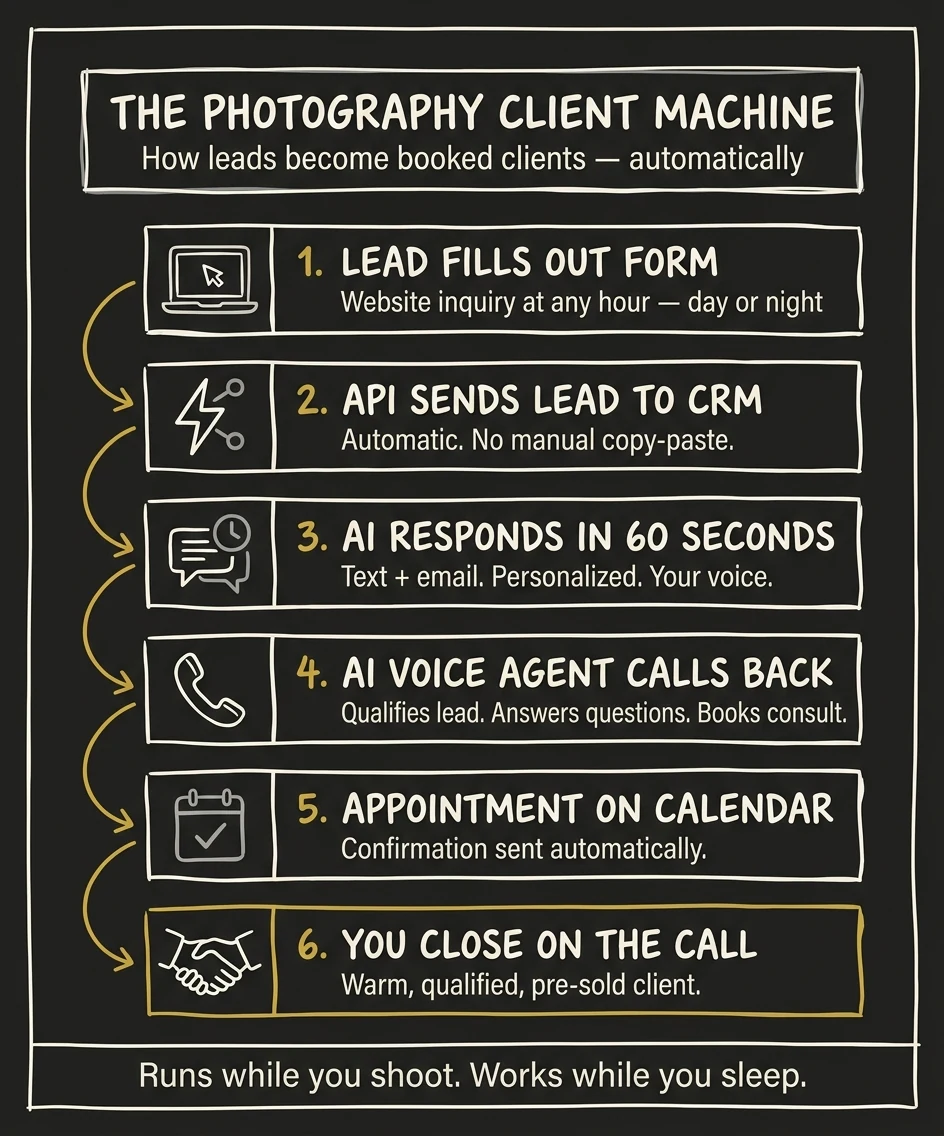 The Photography Client Machine: 6 steps, zero manual follow-up.
Photography to Profits builds these connected systems for portrait and wedding studios. We handle the technical setup so you can focus on photography.
See How We Build Your System →The 80/20 Rule for Adopting AI (Don't Try Everything at Once)
I've watched photographers do this: they read a guide like this one, get excited, and sign up for seven new tools in the same week. Three months later, they're using none of them at full capacity, they've spent $200/month on subscriptions that aren't delivering, and they're more skeptical about AI than they were before.
Don't do that. The "test one new tool per quarter" principle from my book exists for a reason. AI tools only create value when you actually integrate them into your workflow. Integration takes time and attention. You can't integrate seven tools simultaneously and do any of them well.
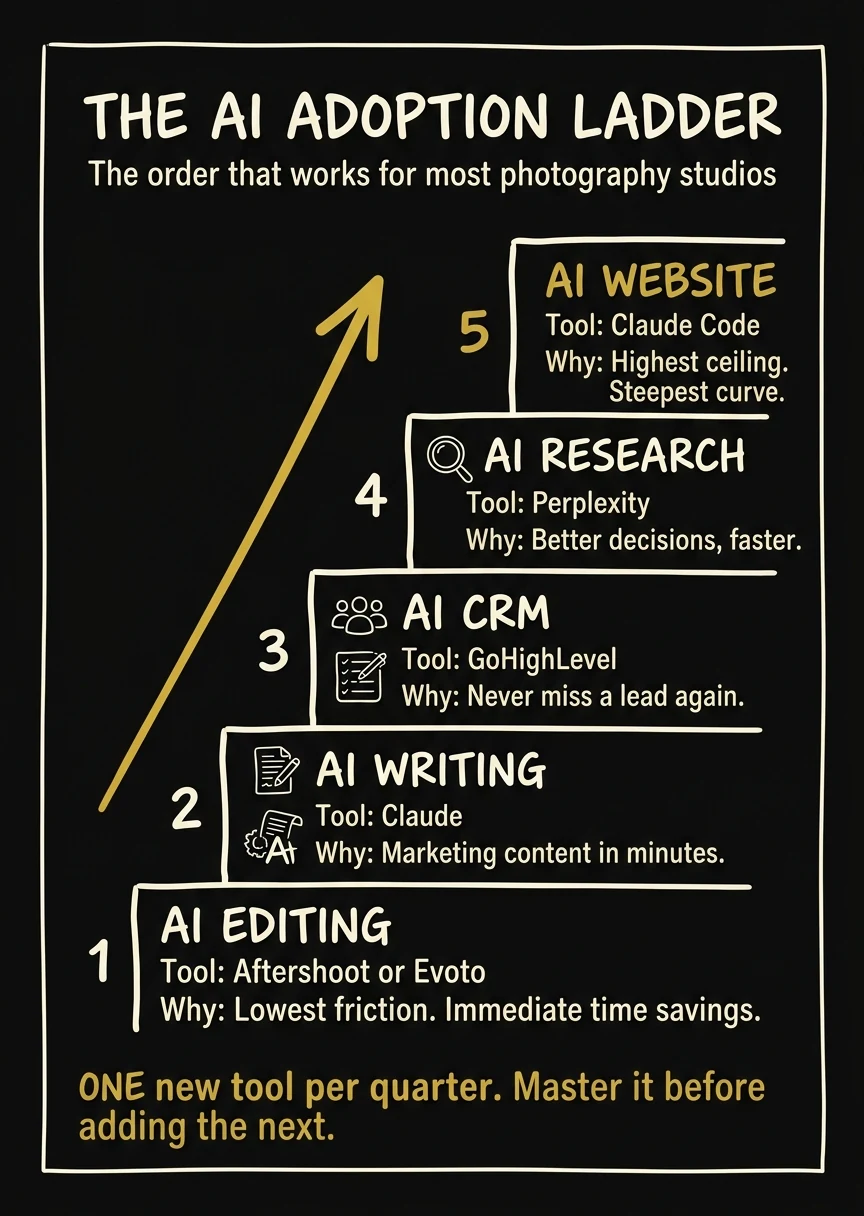 One new tool per quarter. Master it before adding the next.
The Adoption Order That Works for Most Studios
Start with whatever costs you the most time right now. But if you're starting from zero, this sequence works well for most photography studios:
1. AI editing (Aftershoot or Evoto). Immediate, measurable time savings. You'll know within the first week whether it's worth keeping. The learning curve is minimal. This is the lowest-friction AI adoption available to photographers.
2. AI writing (Claude). Marketing content in minutes instead of hours. Start with one use case: email templates, or Instagram captions for the next month, or one blog post draft. Master that use case before expanding.
3. AI CRM (GoHighLevel). Never miss a lead again. This takes more setup time than the first two, but it's also where the biggest revenue impact lives. Give yourself a week to set up the basic automations before you start adding complexity.
4. AI research (Perplexity). Make better decisions faster. Add this when you're making your next strategic decision: pricing, marketing, new genre launch, ad campaign. Use it as your research partner for that decision and evaluate from there.
5. AI website (Claude Code). When you're ready to own your platform. This is the most powerful tool in the stack and the one with the steepest learning curve. Tackle it when the other pieces are running and you have bandwidth to invest in the learning curve.
The Oversight Principle: "Inspect What You Expect"
AI needs supervision. Not because these tools are unreliable, but because they're not you. The AI Voice Agent handling your calls needs periodic review: are the leads it's qualifying actually the right clients? The email sequences Claude drafted need to sound like you: are they, or have they drifted generic over time? The GoHighLevel automations need to match your actual business process: have things changed since you set them up?
Treat AI like a capable new hire. You don't manage them constantly, but you do check in regularly. Review what the AI is doing monthly. Adjust based on results. The studios that get the most from AI aren't the ones who set it and forget it. They're the ones who set it, review it, and iterate.
From my book: "The studios that fall behind on AI won't lose overnight. They'll gradually find themselves doing manually what everyone else is doing automatically. The gap looks manageable at first. Then one day it isn't." The time to close that gap is now, and it starts with one tool, one workflow, thirty days.
Conclusion: AI Won't Replace Photographers, But Photographers Using AI Will Replace Those Who Don't
The camera didn't replace painters. Digital didn't replace film photographers. It just changed who was competitive. AI won't replace professional photographers either. The relationship between a photographer and their client (the trust, the vulnerability, the collaboration that produces images people treasure for generations) is irreplaceable.
What AI is replacing is the version of running a photography business that required grinding through hours of tasks that aren't photography: manually retouching every image, writing every email from scratch, chasing leads that never responded, updating website pages that needed to be updated six months ago, doing competitive research that took half a day.
The studio owner who edits in half the time, follows up with every lead in 60 seconds, publishes consistent weekly content, manages 100 pages of technical SEO, and runs the entire operation with no developer or agency (all through AI) will outperform the studio still doing all of it manually. Not because of talent. Because of leverage.
Photography to Profits and Humberto Garcia built the entire P2P operation on this exact stack. The website, the blog, the email marketing, the CRM, the research: all of it runs on the tools covered in this guide. I'm not recommending things I haven't tested. I'm telling you what actually works at the studio owner level.
Pick one tool from this guide. Pick the one that addresses your single biggest time drain right now. Test it for 30 days. Measure the time you get back. Then decide whether to add the next one. That's how you build the stack without the overwhelm. And if you want help building the full system, not just advice, Photography to Profits is here for that.
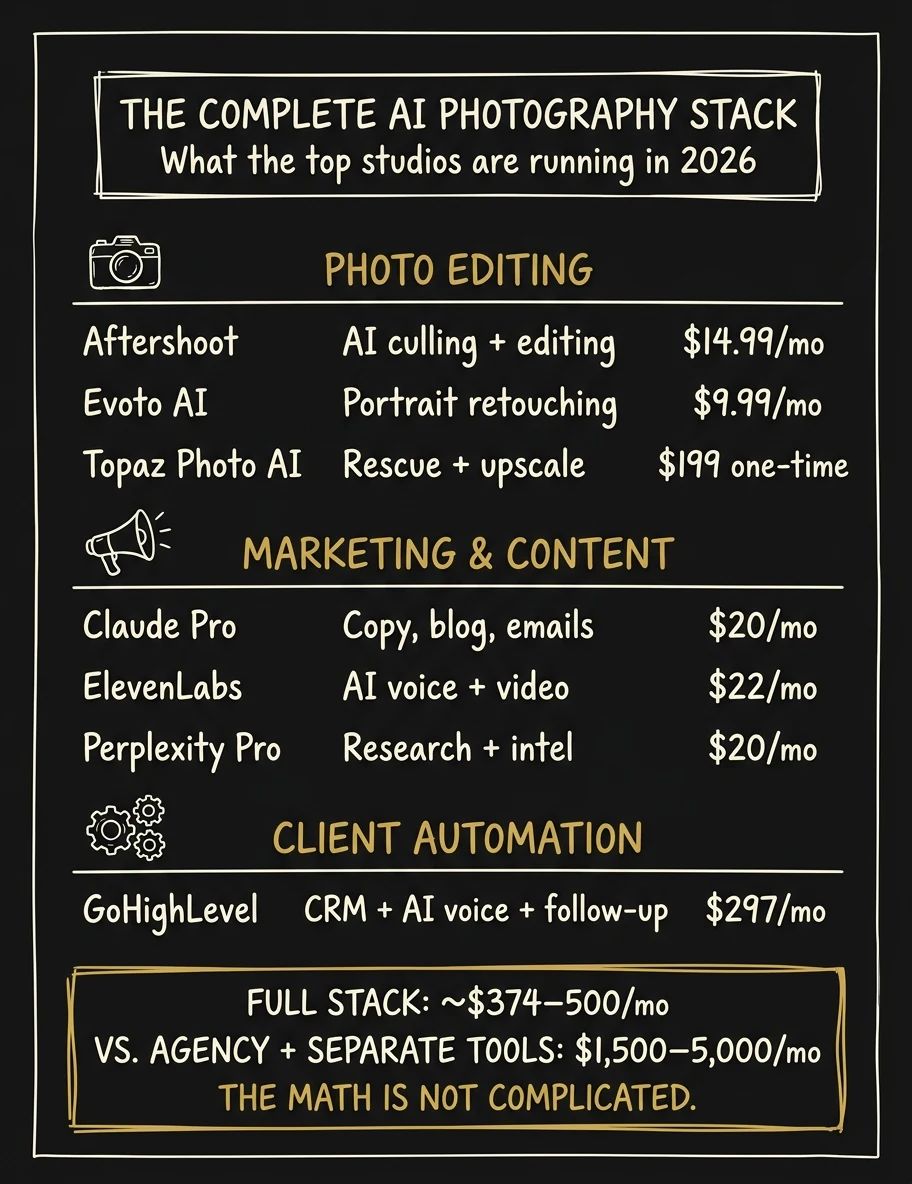 The complete AI photography stack: ~$374–500/mo vs. $1,500–5,000/mo the old way.