
The Question Nobody Ranking for "Best CRM" Will Answer
Every "best CRM for photographers" article you've read this year was written by someone who either gets paid per click, has never run a photography business, or both. They line up eight platforms in a neat grid, slap affiliate links on the top three, and call it journalism. You walk away no closer to an actual decision.
Here's what none of them will tell you: the average small business wastes $135,000 per year on unnecessary SaaS subscriptions. Scale that down to a portrait photographer running six to eight tools at $30 to $80 each: scheduling software, email marketing, invoicing, contracts, a separate CRM (Customer Relationship Management), maybe a website builder. You're bleeding $300 to $500 a month before you've spent a dollar on ads. That's $3,600 to $6,000 a year on digital duct tape holding your business together.
This post isn't a feature comparison. It's a financial audit. I'm going to walk you through what photographers actually need from a CRM, what every major platform charges, what the white-label markup game looks like behind the scenes, and why my company built MeetNikki the way we did. You'll know exactly what you're paying for, and what you're overpaying for, by the time you're done reading.
I'm Humberto Garcia, founder of Photography to Profits. We've helped thousands of photographers build marketing systems that actually book clients. And I've watched this industry get fleeced by software companies for long enough.
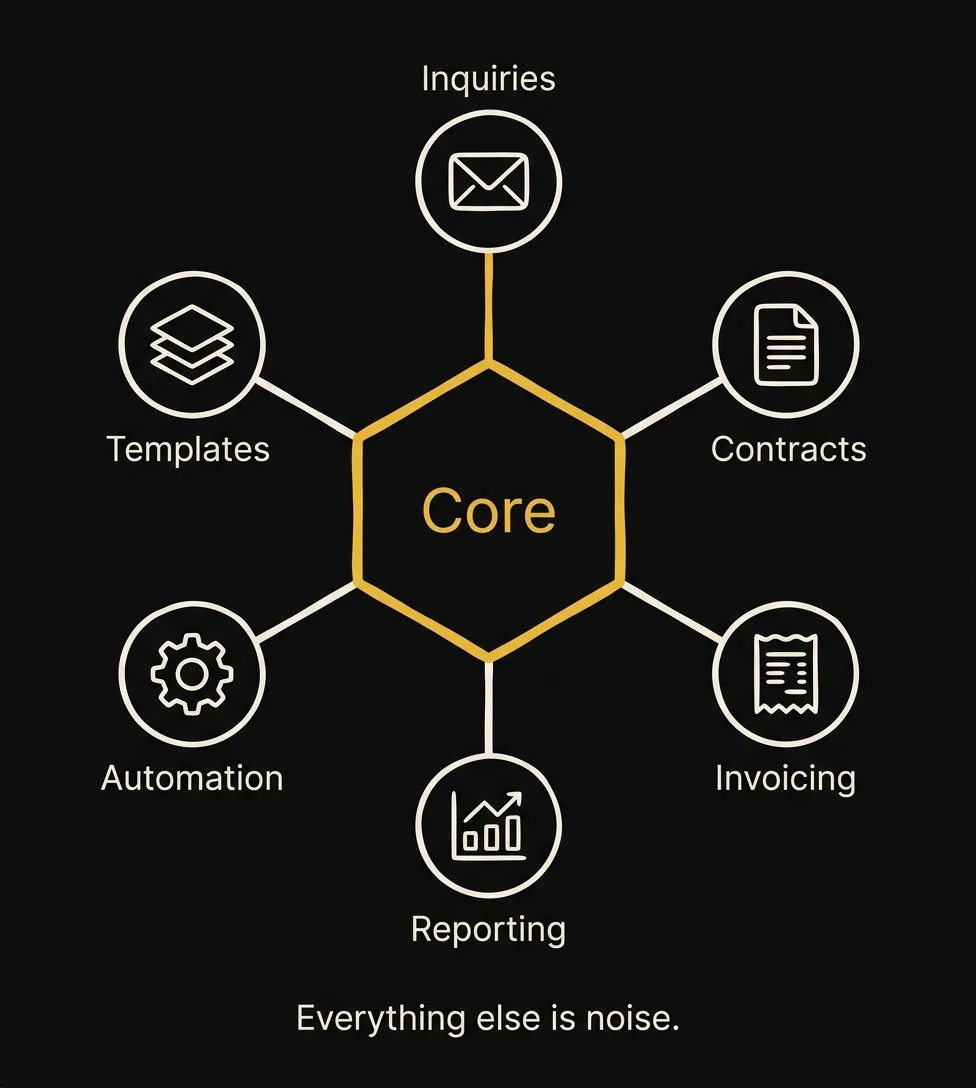
What Photographers Actually Need From a CRM (It's Only 6 Things)
The CRM market for photographers is projected to hit $153 million by 2033, growing at 9.4% annually. That's a lot of money chasing a problem that, at its core, requires exactly six features. Everything else is noise engineered to justify a higher price tag.
1. Inquiry Management
When a lead fills out your contact form, their information needs to land in one place, not your email inbox, not a spreadsheet, not a sticky note on your monitor. A real CRM captures the inquiry, tags it by session type, and gives you a pipeline view so you know exactly where every potential client stands. That's it. You don't need AI-powered lead scoring for a business that books 40 to 80 clients a year.
2. Contracts and Booking
Digital contracts with e-signatures. A booking flow that lets clients pick a date, sign, and pay a retainer without you sending four separate emails. This is table stakes in 2026. If your CRM can't do this natively, it's not a CRM. It's a contact list with delusions of grandeur.
3. Invoicing and Payments
Send invoices. Collect payments. Set up payment plans. Track what's outstanding. Integration with Stripe or Square is non-negotiable. If you're still chasing clients with Venmo requests, your CRM has failed you.
4. Automation Sequences
This is where the real money lives. Automated follow-ups when someone inquires. Automated reminders before a session. Automated review requests after delivery. Research shows CRM usage increases sales by 29% and productivity by 34%, and nearly all of that comes from automation, not from the software sitting there looking pretty.
5. Templates
Email templates. Contract templates. Questionnaire templates. If you're writing the same "Thank you for your inquiry" email from scratch every time, you're donating hours of your life to a problem that was solved in 2015.
6. Reporting
How many inquiries came in this month? What's your booking rate? What's your average sale? Where are leads dropping off? You need answers to these questions in under 30 seconds. If pulling a basic report requires exporting a CSV and opening Excel, something is broken.
That's the list. Six things. The gut-check: if you can't name three features in your current CRM that you actually used this week, you're paying for a brochure. CRM boosts customer retention by 27%, but only if you actually use the thing. Most photographers are paying $50 a month for an expensive address book.
The Real CRM Landscape for Photographers in 2026
Let's talk about who's actually in this market and what they charge. I'm going to be fair here. Every platform on this list does something well. But I'm also going to be honest about what none of them do.
Dubsado: The Incumbent
Dubsado holds roughly 38% market share among photographers, and that's not an accident. Their contract and workflow builder is genuinely excellent. If all you need is a bulletproof client management workflow (inquiry form to contract to invoice to questionnaire), Dubsado does it well at $35 to $55 per month. The learning curve is steep, the interface looks like it was designed in 2018 (because it was), and there's no built-in email marketing or SMS. But for pure workflow management, it earns its reputation.
HoneyBook: The Pretty One
HoneyBook has about 19% market share and the best user interface in the category. It's genuinely pleasant to use, the mobile app is solid, and onboarding is fast. Then February 2025 happened. HoneyBook hit users with an 89% price increase on their Starter plan: $19 jumped to $36 overnight. Their full suite now runs $36 to $129 per month. The product didn't get 89% better. The investors needed returns. That's how it works when the company's business model depends on raising prices once you're locked in.
Studio Ninja
About 8% market share, priced at $16 to $40 per month. Solid for simple studios that want clean workflow management without the complexity of Dubsado. Australian-built, which means their support hours might not align with yours if you're in the US. Functional but limited: no marketing tools, no SMS, no automation beyond basic triggers.
17hats
Roughly 6% market share. They offer a free tier, which is genuinely useful if you're just starting out and booking fewer than ten clients a year. The paid tier is $60 per month. The interface hasn't evolved much in years, and the automation capabilities are basic. It's fine. "Fine" is the strongest word I can use.
VSCO Workspace (Formerly Táve)
About 6% share at $28 to $44 per month. Táve was a photographer favorite for years: powerful, customizable, loved by high-volume studios. Then VSCO acquired it, rebranded it, and the photography community has been holding its breath ever since. The tool still works, but the roadmap is unclear, and betting your business infrastructure on a platform mid-identity-crisis is a risk.
Sprout Studio
Around 4% share. Sprout tries to be the all-in-one: CRM, galleries, invoicing, contracts, email marketing. The ambition is admirable, but the execution is uneven. Jack of all trades, master of none. If you want one login for everything and you're willing to accept "good enough" across the board, Sprout might work. But "good enough" in your CRM means "good enough" in your revenue.
What None of Them Do
The pattern: every platform on this list is a workflow tool, not a growth engine. They manage clients you already have. They don't help you get new ones. None of them offer unified marketing: email campaigns, SMS outreach, funnel building, pipeline management, and client management in one system. To get that, you're stacking three to five tools on top of your CRM, paying for each one separately, and hoping the integrations don't break at 2 AM before a wedding weekend.
Meanwhile, 83% of photographers are already using AI in their workflows. The tools are evolving. The CRM category should be evolving with them. Most of it isn't.
The GoHighLevel White-Label Markup Problem
Now we need to talk about something the "best CRM for photographers" articles will never mention, because it would expose the business model of the people writing them.
GoHighLevel (GHL for short) is a marketing and CRM platform built for agencies. It's not designed for end users. It's designed for people who want to resell it. Here's how the pricing works at the source:
- Starter: $97 per month, one sub-account (one business)
- Agency: $297 per month, unlimited sub-accounts, some white-label features
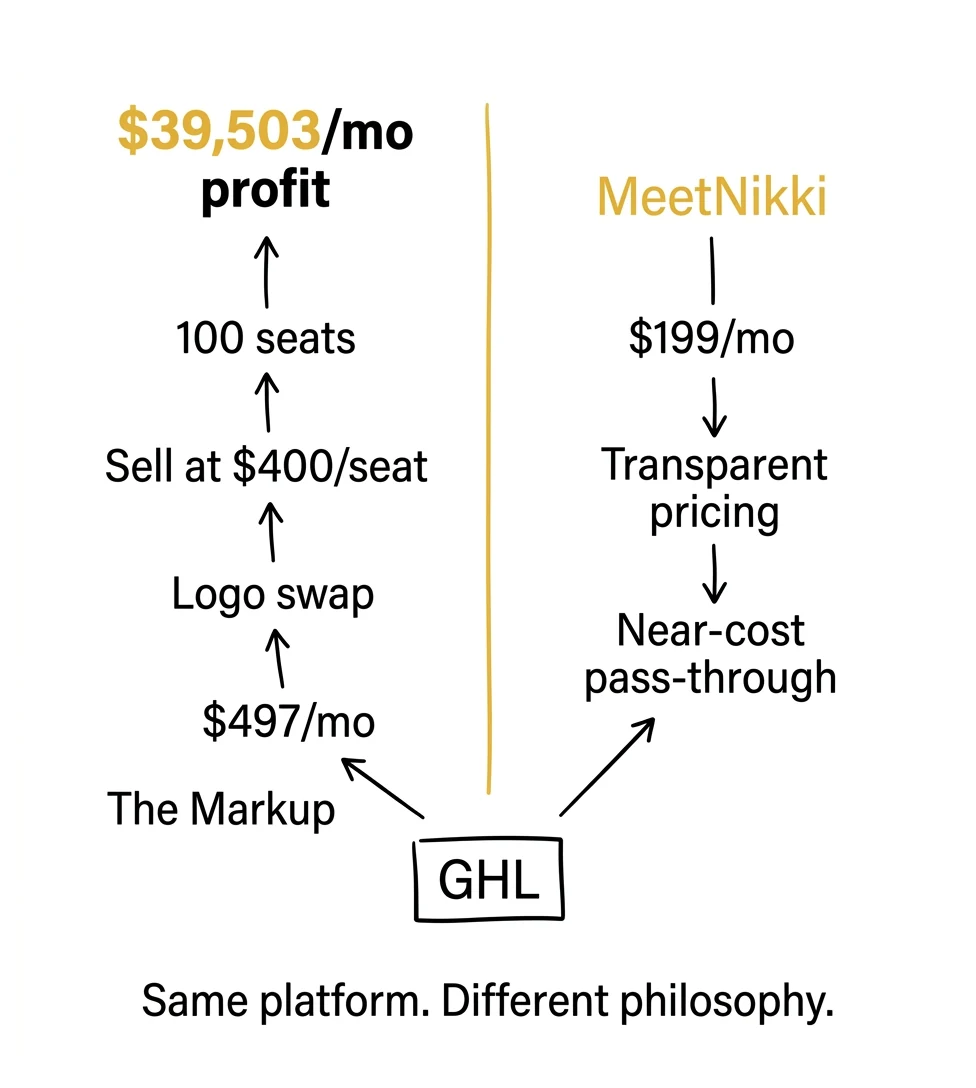
- Agency Unlimited: $497 per month, full white-label, unlimited sub-accounts, custom branding, your own domain, your own logo
That $497 per month Unlimited plan is where the gold rush happens. Let's do the math that every GHL reseller knows but none of them advertise.
A reseller buys the $497 per month plan. That gives them unlimited sub-accounts. They white-label it: slap their logo on it, give it a custom domain, write some onboarding docs. Then they sell access to photographers at $300 to $500 per month per seat. If they sign up 100 photographers at $400 per month each, the revenue is $40,000 per month against a $497 cost. That's $39,503 per month in pure margin. On a logo swap.
I'm not saying there's anything illegal about this. White-labeling is a legitimate business model. But here's the tell: if a "photographer CRM" company can't clearly explain what they built versus what GoHighLevel provides out of the box, you're paying a 4x to 8x markup for a different login screen. Ask them directly. If the answer is vague ("we've customized the platform extensively for photographers"), ask them what, specifically, they built. Custom code? Proprietary integrations? Or just pre-loaded templates on a GHL sub-account?
The real cost of GHL with actual usage (communications charges for SMS, email, and phone) runs most photographers $400 to $500 per month if they buy it themselves and build it out. That's the number to benchmark against when someone quotes you their white-label pricing.
Meet Nikki: What Transparent White-Labeling Looks Like
Here's where I put my own money on the table.
MeetNikki is Photography to Profits' CRM platform. It's built on GoHighLevel. I just told you that. In writing. On a page that will be indexed by Google and read by my competitors. And I'm telling you because that's exactly the point.
MeetNikki costs $199 per month. That includes a $40 communications credit, enough for approximately 3,475 text messages, or 3,051 call minutes, or 46,428 emails per month. If you blow past that (and most photographers won't), additional credits are $10 per block. No long-term contracts. Cancel anytime. Thirty-day free trial so you can actually test it before you pay anything.
Here's why we price it this way: Photography to Profits' business is marketing services, not software margin. We make our money helping photographers build and execute marketing systems: automation, ads, SEO, the full stack. MeetNikki exists because our clients needed a CRM that could actually handle what we were building for them, and every existing option either couldn't do it or charged too much for what it delivered.
We're not trying to make $39,000 per month on a platform we didn't build. We're trying to give photographers the same infrastructure we use, at a price that makes the tool accessible, so they can focus on what actually grows their business.
The transparency test is simple: I just told you what GHL costs wholesale. I told you what our markup is. I told you why. Find me another GHL reseller in the photography space who will do that. I'll wait.
What MeetNikki Replaces
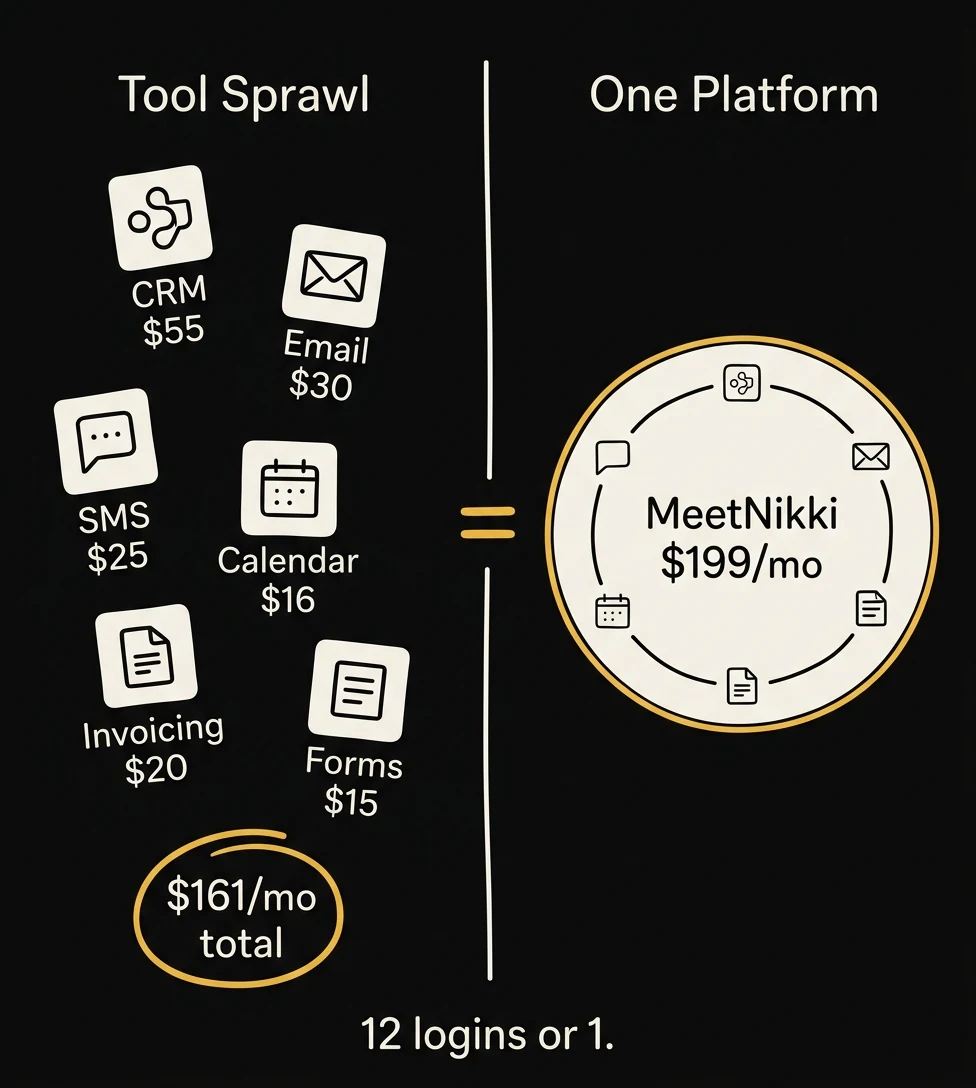
One login at $199 per month replaces twelve or more separate tools:
- CRM and pipeline management: track every lead from inquiry to booking to delivery
- Email marketing: broadcast campaigns, drip sequences, segmentation
- SMS messaging: two-way texting with clients, automated text sequences
- Website builder: landing pages and full sites (most photographers won't use this, but it's there)
- Funnel builder: opt-in pages, lead magnets, multi-step booking flows
- Scheduling and calendars: online booking, calendar sync, automated reminders
- Web chat and widgets: live chat on your website, chatbot flows
- Payments and invoicing: Stripe integration, payment plans, invoice tracking
- Forms and surveys: questionnaires, intake forms, feedback surveys
- Social media integrations: connect and manage social accounts
- Contracts and e-signatures: digital contracts with legally binding signatures
- Analytics and reporting: pipeline reports, conversion tracking, revenue dashboards
If you're currently paying for Dubsado ($55) plus Mailchimp ($30) plus Calendly ($16) plus a separate SMS tool ($25) plus a landing page builder ($30), that's $156 per month for five tools that don't talk to each other. MeetNikki is $199 for all of it in one system where every piece connects natively. The math isn't complicated.
Ready to see it in action? Start your free 30-day MeetNikki trial →
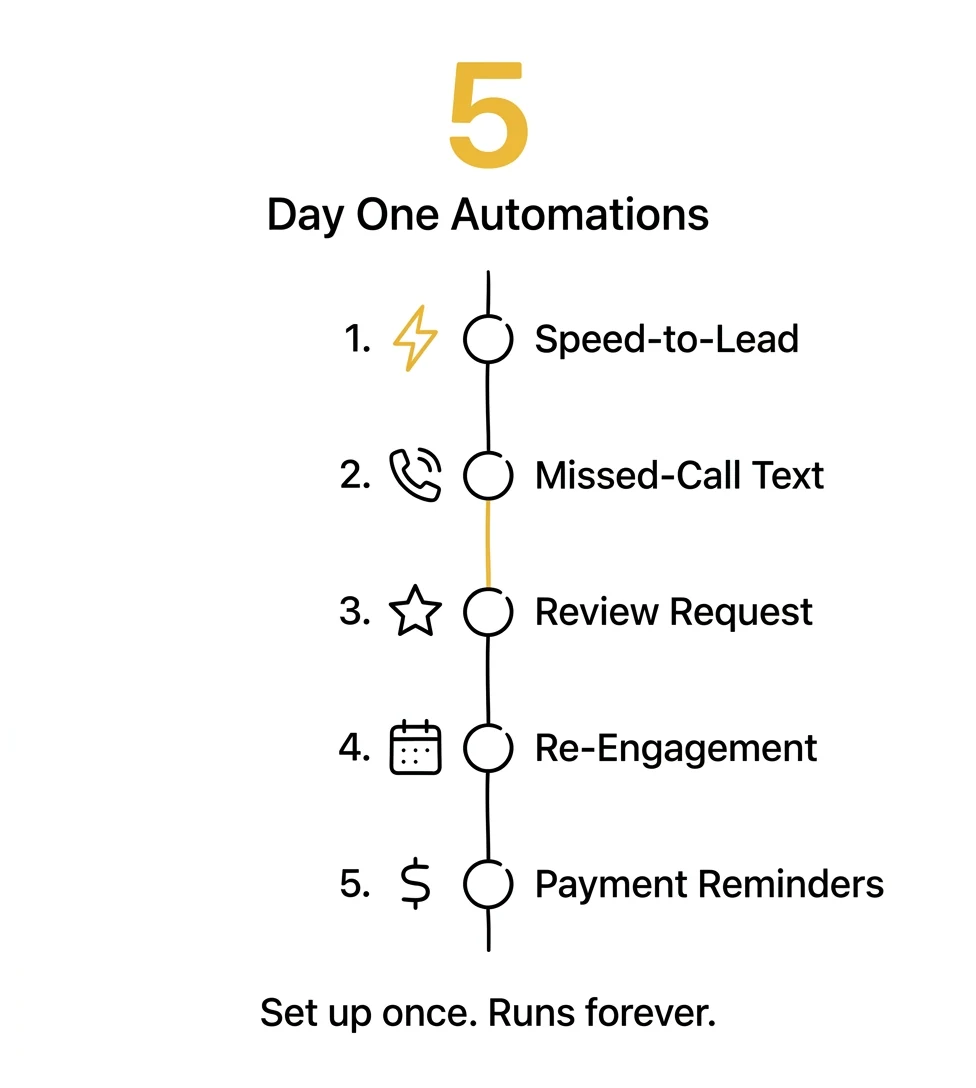
5 Automations Every Photographer Should Set Up on Day One
A CRM without automation is like buying a sports car and never shifting out of first gear. You paid for the engine. Use it. Here are the five automations that have the highest ROI (Return on Investment) for photographers, in order of impact.
1. Inquiry Auto-Response (Speed to Lead)
When someone fills out your contact form, they should receive a personalized response within 60 seconds, not when you check your email three hours later. The data on this is brutal: responding within five minutes makes you 21 times more likely to qualify the lead. After 30 minutes, your odds crater. Set up an automation that sends an immediate text and email the moment an inquiry hits your CRM. Include your pricing guide or a link to book a consultation. This single automation will book you more clients than any Instagram post you've ever made.
2. Missed-Call Text-Back
You're shooting. Your phone rings. You can't answer. The lead calls the next photographer on their list. Game over, unless you have an automated text that fires within ten seconds: "Hey, this is [Name] with [Studio]. I'm with a client right now but I saw your call. I'll follow up within the hour. In the meantime, here's a link to see my work and check availability." That text keeps the lead warm while you finish your session. It's the simplest automation on this list and one of the most valuable.
3. Post-Session Follow-Up (Review Request + Referral Ask)
Two weeks after gallery delivery, an automated sequence fires: a thank-you email, a link to leave a Google review, and a soft referral ask. Three weeks later, a second nudge if they haven't reviewed yet. This runs in the background forever. You set it up once and your Google reviews compound month over month without you lifting a finger. Pair this with a strong email marketing strategy and you've built a referral engine that runs while you sleep.
4. Re-Engagement Drip for Past Clients
Your past clients are your warmest leads. A family photographer who shot a family last fall should have an automated sequence that reaches out in early spring: "It's been almost a year since your session. Your kids have probably grown six inches. Want to lock in a date before my fall calendar fills up?" This is pure profit. No ad spend, no cold outreach. Just a well-timed reminder to someone who already knows, likes, and trusts you.
5. Payment Reminder Automation
Stop chasing invoices manually. Set up automated reminders at seven days, three days, and one day before a payment is due, and an escalating sequence after it's overdue. Professional, consistent, and it removes the awkwardness of personally asking for money. Your CRM handles the uncomfortable conversations so you don't have to.
"If you do something more than once a week, it can probably be automated," from Chapter 17 of The 7-Figure Studio
These five automations alone will save you five to ten hours per week and directly increase your booking rate and client retention. If your current CRM can't handle all five without third-party integrations, it's the wrong CRM. If you want the full blueprint on building marketing automation for your photography business, we've built a complete system around this.
The 4 CRM Mistakes That Cost Photographers the Most Money
I've audited hundreds of photographers' tech stacks. These are the four mistakes I see over and over, and every one of them is expensive.
Mistake #1: Choosing Based on Feature Count, Not Workflow Fit
More features doesn't mean better. It means more things you're paying for and not using. A CRM with 200 features sounds impressive until you realize you use 11 of them and the other 189 are just cluttering your dashboard and slowing your onboarding. The right CRM is the one that matches how you actually work, not the one with the longest feature list on the comparison page.
Mistake #2: Paying for "Photographer-Specific" Branding on a Generic Platform
This is the white-label trap I described earlier. A company takes a general-purpose platform, adds some photography-themed templates and stock images to the onboarding, and charges you a premium for the "photographer-specific" experience. The underlying platform is the same one dentists and real estate agents use. That's not inherently bad. GHL works for photographers precisely because marketing and CRM fundamentals are universal. What's bad is paying a 300% markup for the branding.
Mistake #3: Running 5+ Tools Instead of Consolidating
Every tool in your stack is a monthly bill, a login to remember, a potential integration break, and a data silo. When your CRM doesn't talk to your email marketing tool, which doesn't talk to your invoicing software, which doesn't talk to your scheduler, you're manually bridging gaps that software should handle automatically. Consolidation isn't just about cost. It's about having one source of truth for your client data instead of five conflicting ones.
Mistake #4: Setting Up a CRM but Never Building Automations
This is the most expensive mistake because it's invisible. You're paying $40, $60, $199 per month for a CRM, but you're still manually sending every follow-up email, manually chasing every invoice, manually requesting every review. You bought the tool but you're doing the work the tool was supposed to do for you. An unautomated CRM is an expensive address book. Chapter 17 of The 7-Figure Studio says it plainly: "Your CRM is the center of this. Whatever system you use, it should be the assistant that never sleeps." If your assistant is sleeping, wake it up or stop paying it.
If any of these mistakes sound familiar, it might be time to rethink your entire approach. Book a strategy call with our team and we'll audit your current stack for free.
CRM Comparison: Features, Pricing, and What They Won't Tell You
This is the comparison table everyone wants. I've included what most reviews leave out (white-label origin and price hike history) because those two columns tell you more about a platform's future than any feature checkbox.
| Feature | Dubsado | HoneyBook | Studio Ninja | 17hats | MeetNikki (GHL) |
|---|---|---|---|---|---|
| Monthly Cost | $35–$55 | $36–$129 | $16–$40 | Free–$60 | $199 |
| Contracts | Excellent | Good | Good | Basic | Good |
| Invoicing | Good | Good | Good | Good | Good |
| Email Marketing | No | Basic | No | No | Full suite |
| SMS / Text | No | No | No | No | Yes (2-way) |
| Automation | Workflows | Basic | Basic triggers | Basic | Advanced multi-step |
| Pipeline / CRM | Limited | Yes | Limited | Limited | Full visual pipeline |
| Website Builder | No | No | No | No | Yes |
| Scheduling | Yes | Yes | Yes | Yes | Yes |
| White-Label Origin | Proprietary | Proprietary | Proprietary | Proprietary | GoHighLevel (disclosed) |
| Price Hike History | Moderate increases | 89% hike (Feb 2025) | Stable | Stable | None since launch |
| Free Trial | Yes (limited) | 7 days | Yes | Free tier | 30 days full access |
A few honest notes on this table, because I'm not here to pretend MeetNikki is perfect for everyone:
Dubsado is better for contract-heavy studios. If your business revolves around complex multi-event contracts with detailed payment schedules (high-volume wedding studios doing 50+ weddings a year), Dubsado's contract builder is more mature. If contracts are 80% of what you need and marketing doesn't matter to you, Dubsado at $55 per month is a legitimate choice.
HoneyBook is better for simplicity. If you want the easiest possible setup and you're booking fewer than 15 clients a year, HoneyBook's UI is unmatched. The question is whether that simplicity is worth $129 per month on their top plan, and whether you trust them not to raise prices again.
Studio Ninja and 17hats win on price. If your budget is truly $40 per month or less and you need basic client management, these work. You'll outgrow them, but they'll keep you organized while you do.
MeetNikki is better for growth. If you want a CRM that also handles your marketing (email campaigns, SMS sequences, funnel pages, pipeline tracking, and real automation), MeetNikki consolidates everything at a price point that would cost $300+ if you assembled it from separate tools. The trade-off is a steeper learning curve. GHL is powerful, and powerful tools take time to learn. We provide onboarding support, but I won't pretend you'll master it in an afternoon.
The real question isn't which CRM has the most checkmarks in a comparison table. It's this: do you want a tool that manages your existing clients, or a system that helps you get more of them? That's two fundamentally different categories, and most comparison articles pretend they're the same thing.
Conclusion: Stop Paying for Software Someone Else Built
The CRM decision isn't really a software decision. It's a freedom decision.
In Chapter 17 of The 7-Figure Studio, I wrote: "Your CRM is the center of this. Whatever system you use, it should be the assistant that never sleeps." That line wasn't about features or pricing tiers. It was about building a business that doesn't require you to be present for every single interaction, follow-up, and invoice chase.
The definitive verdict after everything we've covered: if you're a photographer who wants to grow (not just manage what you have, but actively book more clients, automate your follow-up, and consolidate your tech stack), you need a CRM that does marketing and client management in one platform. That's MeetNikki, and we built it specifically because nothing else on the market delivered both at a fair price.
If you're happy with your current client load and just need clean workflow management, Dubsado or HoneyBook will serve you fine. I mean that genuinely. Not every photographer needs a growth engine. Some need a filing cabinet. Know which one you need.
But if you're paying $300 to $500 per month across five different tools, manually sending follow-up emails, and wondering why your booking rate hasn't improved, the problem isn't your marketing. It's your infrastructure. Fix the foundation and everything built on top of it gets better.
One clear action step: audit your current monthly software spend this week. Add up every tool: CRM, email, scheduling, invoicing, SMS, landing pages, forms. Write down the total. Then ask yourself: is what I'm getting worth what I'm paying? If the answer is no, you know where to find us.
Humberto Garcia, Photography to Profits
Ready to Stop Overpaying for Your CRM?
Photography to Profits offers two ways to work together:
- MeetNikki CRM: GoHighLevel at near-cost: $199/mo, fully set up for photographers. Try MeetNikki free for 30 days →
- Done-For-You Marketing: We build and manage your entire marketing system. Book a strategy call →
Frequently Asked Questions
Is GoHighLevel worth it for photographers?
Yes, if you need more than basic client management. GHL is overkill if all you do is send contracts and invoices. But if you want email marketing, SMS automation, pipeline management, funnel building, and scheduling in one platform, GHL replaces $300+ per month in separate tools. The catch is the learning curve and the real cost: $97 to $497 per month at the source, plus communication charges that push most users to $400 to $500 total. That's why white-labeled versions like MeetNikki exist. You get the platform at a lower entry point with onboarding support built in.
What's the difference between GoHighLevel and HoneyBook?
HoneyBook is a client management tool: contracts, invoicing, scheduling, and basic automation for creative professionals. GoHighLevel is a full marketing and sales platform: CRM, email marketing, SMS, funnel builder, website builder, pipeline management, and advanced automation. HoneyBook is easier to learn and costs $36 to $129 per month. GHL is more powerful, harder to learn, and costs $97 to $497 plus usage. They solve different problems. If you just need to manage existing clients, HoneyBook works. If you want to actively generate and convert new leads, GHL is the better tool.
Can I migrate from Dubsado or HoneyBook to MeetNikki?
Yes. Client contact data exports cleanly from both platforms via CSV. Contracts and templates need to be recreated, but most photographers have fewer than ten templates, so the rebuild takes a few hours at most. Automation workflows need to be rebuilt from scratch. There's no one-click migration between any CRM platforms in this category. The Photography to Profits team provides migration support during the 30-day trial to help you get set up without disrupting active client workflows.
What's the real monthly cost of MeetNikki with usage?
For most photographers, $199 per month covers everything. The included $40 communications credit provides approximately 3,475 texts or 3,051 call minutes or 46,428 emails. A photographer booking 30 to 50 clients per year and running standard automations typically uses $15 to $30 of that credit. High-volume studios running aggressive SMS campaigns might exceed the credit and pay an additional $10 to $20 per month. Worst-case realistic scenario for a busy studio: $220 to $230 per month total.
Do I need a CRM if I only book 20-30 clients a year?
Yes, arguably more than a high-volume studio does. When you're booking 20 to 30 clients, every single lead matters. You can't afford to lose one to a slow follow-up or a forgotten inquiry. A CRM with basic automation ensures no lead falls through the cracks. At that volume, even a budget option like 17hats (free tier) or Studio Ninja ($16 per month) is worth it. The question isn't whether you need a CRM. It's how sophisticated your CRM needs to be. At 20 to 30 clients, basic is fine. When you're ready to grow past that, you'll need the marketing capabilities that platforms like MeetNikki provide.
How long does it take to set up a CRM?
For a basic setup (importing contacts, creating two or three email templates, building one automation, and connecting your calendar), budget a weekend. Eight to twelve hours of focused work. For a full setup (multiple automation workflows, pipeline stages, custom forms, SMS sequences, and reporting dashboards), plan for two to three weeks of part-time work or hire someone to do it. The biggest mistake is trying to build everything at once. Start with the five automations listed in this article, run them for 30 days, then add complexity. A CRM you actually use beats a CRM that's perfectly configured but overwhelming.
What is a white-label CRM and why should I care?
White-labeling means a company buys a platform wholesale, puts their own brand on it, and resells it at a markup. This is common in the photography CRM space. The platform you're using might be GoHighLevel, Vendasta, or another base product underneath a different logo. White-labeling isn't inherently bad. It's how many SaaS (Software as a Service) businesses work. You should care because the markup varies wildly. Some resellers charge 2x the wholesale cost. Others charge 5x to 8x. The difference is pure profit margin for the reseller, not additional value for you. Ask any CRM vendor: "What platform is this built on?" If they won't answer clearly, that's your answer.