
Google Ads AI Max for photographers is not a new campaign type. It is an automation layer inside Search campaigns that can expand the searches you match, create new ad text, and choose a different landing page from your website.
The deadline story is more confusing than it should be. Google's original April announcement said Dynamic Search Ads would begin moving to AI Max in September 2026. Google added an update on June 11 that postponed existing DSA migrations until February 2027. September still matters for automatically created assets, campaign-level broad match, and the end of new DSA creation.
That distinction matters for a photography studio because AI Max can affect three things that decide lead quality: the query Google buys, the promise the ad makes, and the page a prospect sees after the click. This guide shows the real Google controls, the risks for local studios, and the account audit to run before you switch anything on.
Last verified July 29, 2026 against Google Ads Help and Google's June 11 announcement update.
Key Takeaways
- Existing Dynamic Search Ads are now scheduled to begin automatic migration in February 2027, not September 2026.
- Automatically created assets and campaign-level broad match still begin upgrading to AI Max in September 2026, and new DSA creation ends then.
- Final URL expansion can send a click to a different page on your domain, and pinned responsive search ad assets may not be respected.
- A photography studio should audit conversion goals, service areas, website pages, generated assets, negative keywords, and tracking templates before testing AI Max.
What Is Google Ads AI Max for Photographers?
AI Max is a set of targeting and creative features inside an existing Google Search campaign. Google calls it a continuous optimization layer, not a replacement campaign type. Its two main groups are search term matching and asset optimization.
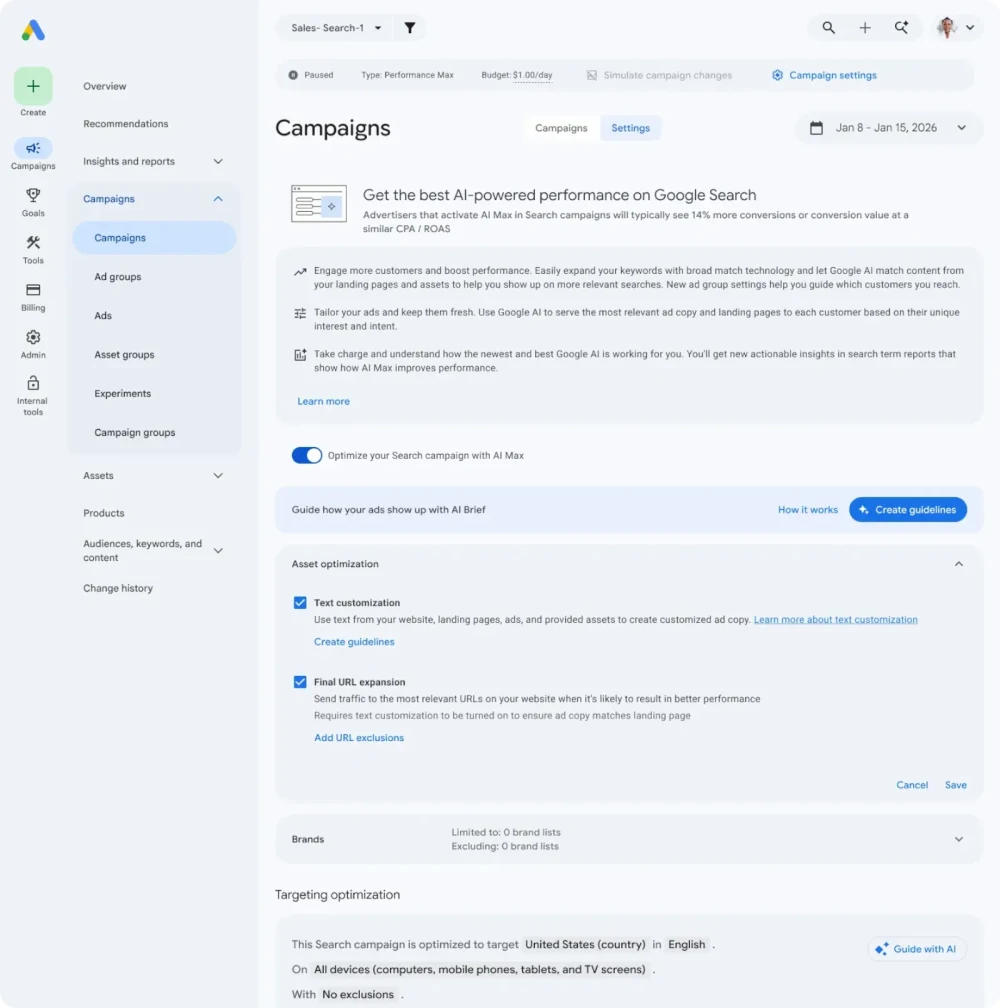
Google's current AI Max campaign settings show the controls in one place. Source: Google Ads, May 2026.
| AI Max feature | What Google can change | Photography studio question |
|---|---|---|
| Search term matching | Expands beyond your keyword list using broad-match and keywordless technology | Did the new query describe a buyer in your genre and service area? |
| Text customization | Creates headlines and descriptions from ads, assets, and website content | Is the generated promise accurate, on-brand, and appropriate for the service? |
| Final URL expansion | Selects another relevant page on your domain | Can every eligible page convert paid traffic without confusing the buyer? |
| Controls and reporting | Uses brand, location, URL, search-term, landing-page, and asset controls | Can you see why the ad matched and where the click landed? |
This is the first mental shift: AI Max does not simply "find more keywords." It uses your account and website as a larger set of inputs. A mixed-genre homepage, outdated mini-session page, weak conversion goal, or untested tracking template becomes an advertising problem.
What Changes in September 2026, and What Waits Until 2027?
September 2026 is an upgrade deadline for some legacy Search settings, but existing DSA migrations have been delayed until February 2027. Google's June 11 correction is the current timeline even though older language remains elsewhere on the original announcement page.
| Date | Google Ads change | What to do now |
|---|---|---|
| September 2026 | Eligible campaigns using automatically created assets begin upgrading to AI Max | Review text customization and generated assets before the transition |
| September 2026 | Eligible campaigns using campaign-level broad match begin upgrading | Review search-term matching, negative keywords, and conversion goals |
| September 2026 | New DSA creation ends in Google Ads, Ads Editor, and the API | Do not build a new account strategy around a legacy DSA workflow |
| February 2027 | Existing DSA sunset and automatic migration begin | Use the extra time to test AI Max and audit URL controls |
Google says advertisers will receive account notifications before a transition. Do not use a blog post, including this one, as a substitute for the notice inside your own account. Eligibility and timing can vary.
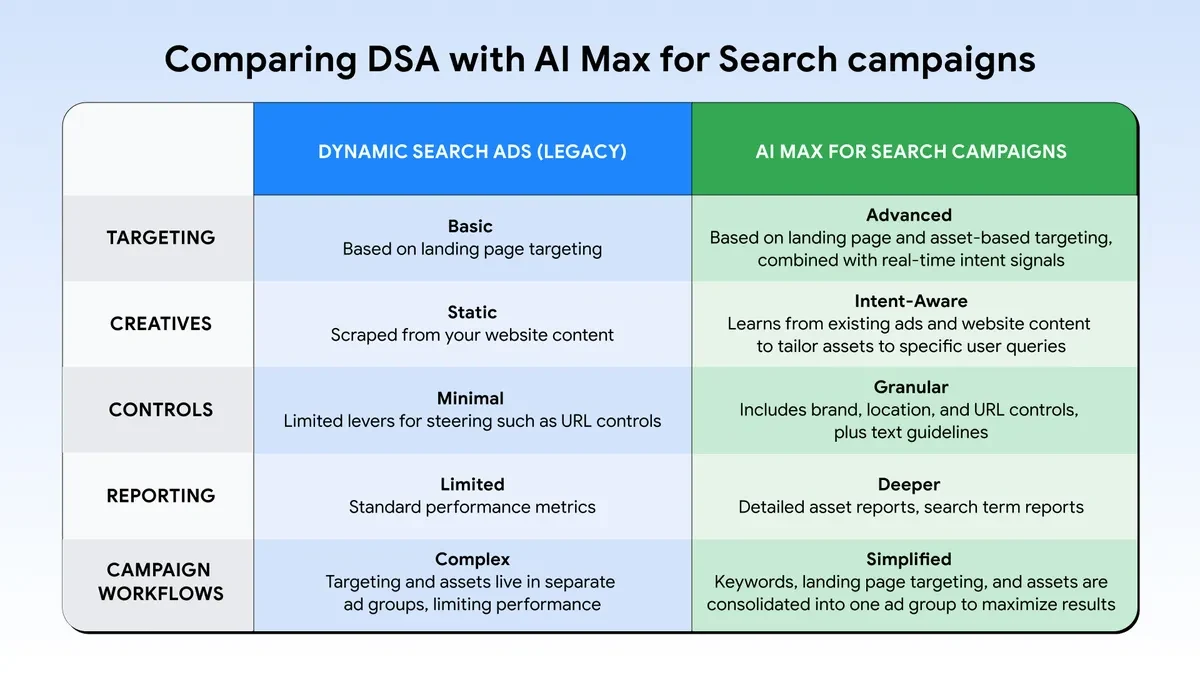
Google positions AI Max as the successor to DSA, with more signals, controls, and reporting. The readable timeline above reflects Google's June 11 update. Source: Google Ads and Commerce Blog.
Why Does AI Max Matter More for a Photography Studio?
A local photography campaign has a narrow job. It must find the right genre, in the right market, at the right stage of buying. More reach is useful only when those three conditions survive the expansion.
Genre drift can turn clicks into the wrong inquiries
A studio may offer weddings, newborns, headshots, and family portraits on one website. That breadth is useful for a visitor who is exploring the brand. It is a weaker input for a system that can match queries, write ad copy, and select pages. Each ad group needs a clear service theme and a page that proves the same service.
| Photography campaign | AI Max risk to review | Page that should own the click |
|---|---|---|
| Wedding photography | Local weddings and destination searches mix together | A market-specific wedding photography offer |
| Newborn photography | Broad family or maternity terms enter a time-sensitive campaign | A page built around the booking window in your newborn marketing system |
| Boudoir photography | Generated wording or an expanded destination creates a policy or trust problem | A controlled page that follows the boudoir marketing constraints |
| Headshots and branding | Consumer portraits and corporate team searches collapse into one ad group | A page aligned with the buyer described in your branding photography marketing |
Local intent is not the same as physical presence
A search can mention Miami while coming from outside the studio's practical service area. Campaign-level geographic targeting and AI Max locations of interest solve different problems. Google says locations of interest works at the ad-group level and uses geographic intent. It does not replace the campaign's normal location settings.
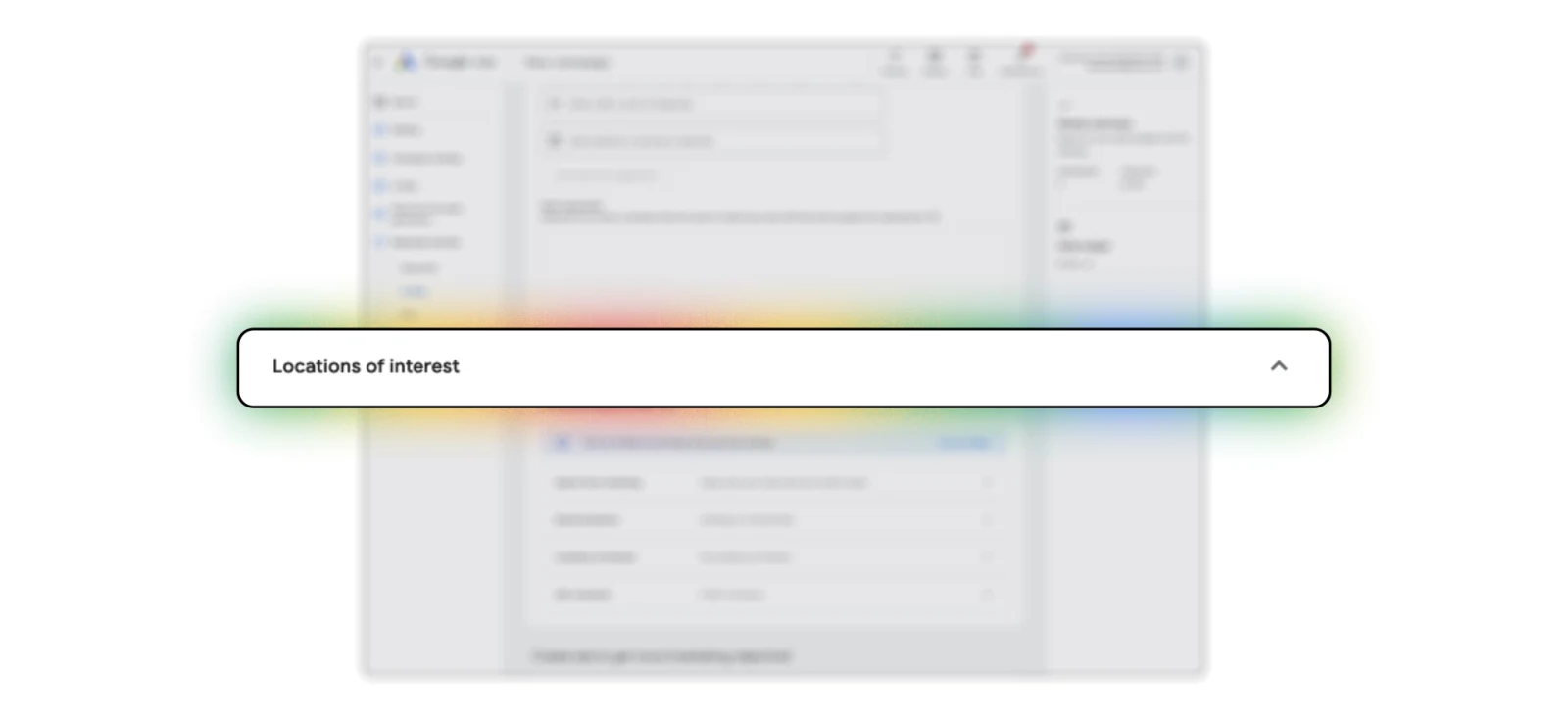
Google's official product demo shows locations of interest inside the AI Max workflow. Use it with, not instead of, normal campaign geography. Source: Google's AI Max launch demo.
Lead volume can hide a quality problem
If every form submission is treated as an equally valuable conversion, Google can optimize toward easy forms rather than qualified consultations or booked sessions. A photographer should judge AI Max on qualified leads, booked calls, completed bookings, geographic fit, and revenue. A higher raw conversion count is not automatically a better campaign.
Should You Turn On AI Max Now?
Test AI Max now only when the campaign already has trustworthy conversion data, one clear service theme, suitable landing pages, and enough budget to capture its current qualified demand. Otherwise, audit first. Some campaigns should leave Final URL expansion or text customization off even if they use other AI Max features.
| Decision | Use it when | Next action |
|---|---|---|
| Test now | Primary conversions represent real leads, ad groups have one job, eligible pages convert, and tracking works across URLs | Run one controlled experiment and compare qualified leads, bookings, and revenue |
| Audit first | The site mixes genres, conversion goals include soft actions, location intent is unclear, or URL eligibility has not been mapped | Complete the audit below before changing campaign settings |
| Leave a feature off | Fixed wording is mandatory, a tracking template fails on expanded URLs, or sensitive pages should never be selected automatically | Use the AI Max controls that fit while keeping text customization or Final URL expansion disabled |
What Can Final URL Expansion Change?
Final URL expansion can replace the landing page entered in a responsive search ad with another page on the same domain. Google says the selected page must be relevant to the query and themed to the ad group. That can help when a strong service page is more relevant than a generic homepage. It can also expose weak or unsuitable pages to paid traffic.
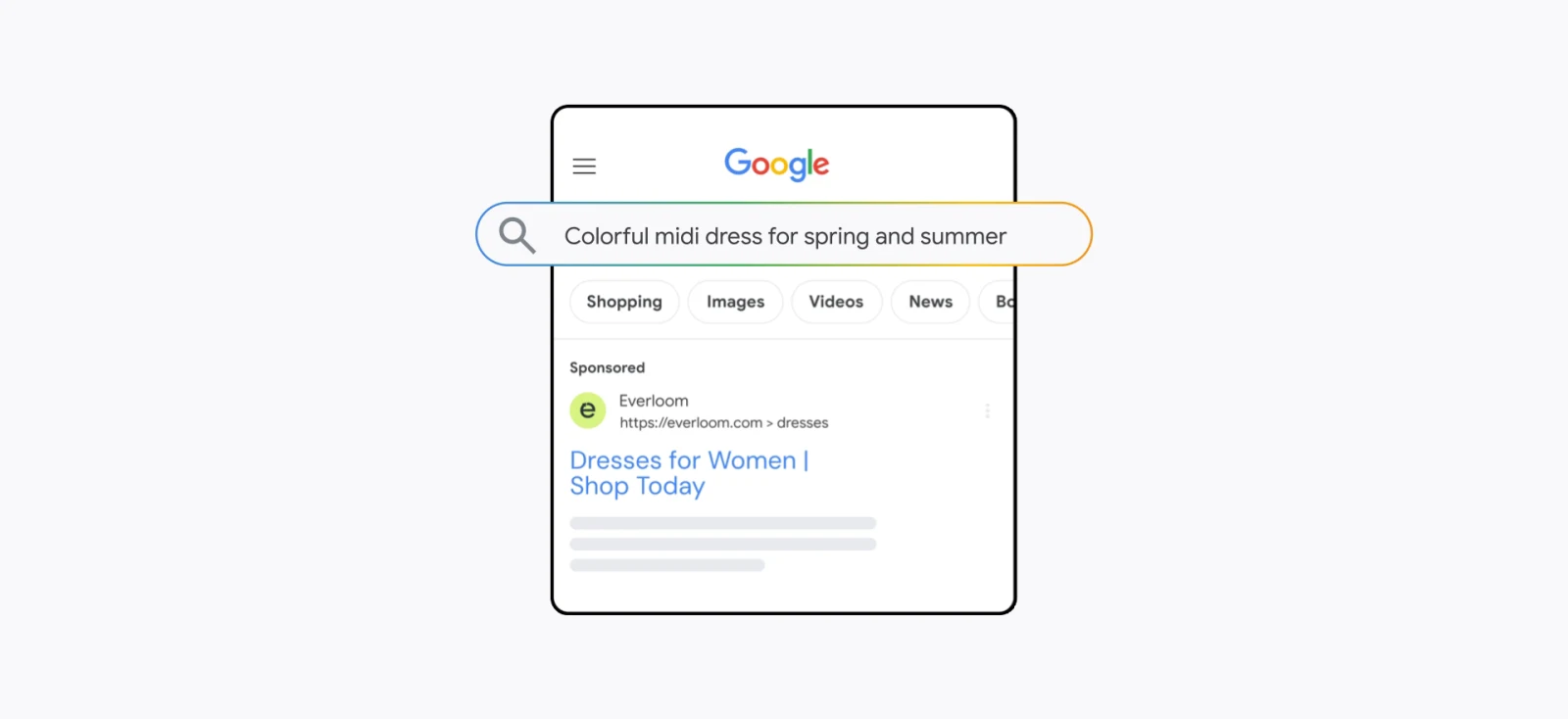
Google's product demo illustrates the query, landing page, and ad-copy connection behind Final URL expansion. Source: Google Ads and Commerce Blog.
Before enabling it, exclude pages that should never receive paid traffic. Common photography examples include:
- Client proofing galleries and login pages
- Privacy, terms, careers, and internal search pages
- Expired mini-session or seasonal offer pages
- Blog archives and portfolio tags with no inquiry path
- Services you do not actively sell
- Markets you no longer serve
- Pricing pages whose promise conflicts with the ad group's offer
If you would not pay to send a qualified prospect to a page today, do not leave that page eligible for automatic landing-page selection.
There is also a creative-control consequence. Google documents that pinned responsive search ad assets are not respected when a more relevant URL is chosen through Final URL expansion. URL inclusions can also prevent pinned assets from serving. If a city, legal disclaimer, price condition, or offer term must appear in a fixed position, leave Final URL expansion and URL inclusions off for that campaign or use Google's current disclaimer controls where available.
Can AI Max Break Tracking or Send Traffic to a 404?
Yes, an incompatible tracking template can break an expanded landing page. Google specifically warns that static tracking URLs or nonstandard uses of the {lpurl} placeholder can send visitors to the wrong destination or produce a 404 error.
Test the template with more than the homepage. Use a nested service page, a URL with query parameters, and any third-party call-tracking or redirect layer in the real click path. Then verify the final destination in a private browser window.
- Confirm the tracking template includes a supported
{lpurl}pattern. - Test a homepage and at least two nested service URLs.
- Confirm UTMs describe the actual destination instead of a hard-coded page name.
- Check that call and form conversions fire once, not twice.
- Monitor 404 reports and Google Ads landing-page reports immediately after launch.
If you are unsure whether your current site and tracking are ready, start with the free photographer website scan before expanding where paid traffic can land.
The Pre-AI-Max Audit for Photographers
Run this audit before a voluntary upgrade, an experiment, or the September legacy-setting transition. The order matters because automation can only work with the goals and pages it is given.
1. Fix the conversion goals
List every primary conversion in the campaign. Remove page views, button clicks, and duplicate events from bidding goals. Keep the actions that represent a real lead or a meaningful step toward a booking. If possible, send qualified-lead and booked-session outcomes back from your customer relationship manager.
2. Separate services and markets
Do not ask one ad group to interpret every genre. Group keywords, ads, and landing pages around one buying job. Keep destination weddings separate from local weddings. Keep corporate headshots separate from personal branding. Give each service a clear geographic promise.
3. Build URL exclusions before Final URL expansion
Crawl the domain and classify each indexable page as eligible, excluded, or needs repair. Repair broken inquiry paths and mobile forms before they become paid destinations.
4. Review brand and location controls
Confirm campaign geography first. Then use locations of interest when an ad group needs a specific geographic-intent rule. Add brand exclusions only when the real search-term evidence supports them. Brand controls and negative keywords solve different problems.
5. Review generated text and required wording
List phrases the system should not use. Luxury studios may want to block words such as "cheap." Boudoir and maternity studios should review sensitive claims and personal-attribute language. Remove inaccurate generated assets and use text guidelines where available.
6. Test the click path
Click through every eligible service page on a phone. Test the form, call button, thank-you page, analytics event, and customer relationship manager record. AI Max should not be the first thing to discover that a form is broken.
How Should a Small Studio Test AI Max?
Use a controlled experiment when the campaign is eligible. Test one established Search campaign rather than changing the whole account. Google offers an AI Max experiment that splits control and trial traffic, but some shared budgets, portfolio bidding setups, existing experiments, and other configurations can affect eligibility.
| Stage | What to monitor | Stop or repair signal |
|---|---|---|
| Before launch | Conversion goals, URL exclusions, geography, negatives, tracking template | Broken form, duplicate conversion, unsuitable eligible page |
| First several days | Search terms, actual landing pages, generated assets, 404s | Wrong genre, wrong market, misleading copy, broken destination |
| Weekly | Qualified-lead rate, booked calls, cost per qualified lead, page selection | More conversions but fewer qualified or booked prospects |
| After a full conversion cycle | Bookings, revenue, geographic fit, service mix, conversion lag | The trial does not beat the control on the business outcome |
Google says AI Max is not effective when a campaign is limited by budget. Expansion cannot fix an account that already lacks enough budget to capture its existing qualified demand. Fix the constraint before asking the system to find more reach.
Where Do You See What AI Max Actually Did?
The most useful view connects the search term, served headline, and landing page. Google also documents a source column, AI Max match-type rows, a "Selected by" column in landing-page reporting, and asset reports that identify Google AI additions.
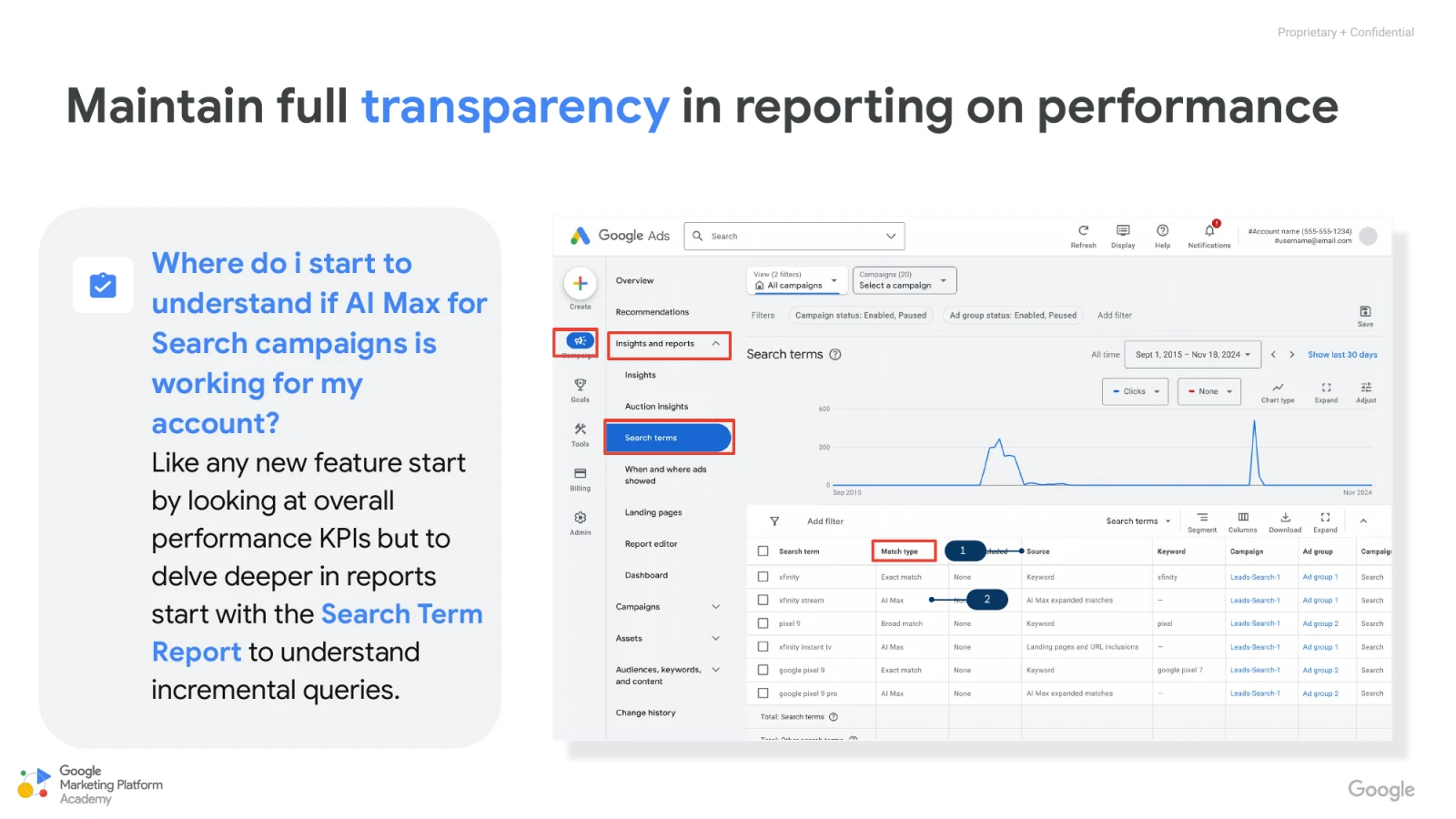
Google's reporting example highlights AI Max match type and source data in the search terms report. Source: Google Ads Help and Google Marketing Platform Academy.
Do not stop at the Google Ads conversion column. Join the report to your lead outcomes:
- Which search terms produced qualified consultations?
- Which landing pages produced bookings rather than low-intent forms?
- Which generated headlines attracted the right genre?
- Which locations produced prospects the studio could actually serve?
- Which sources produced revenue after the normal sales cycle?
The search terms report can still aggregate some traffic under "Other search terms." Better reporting does not mean perfect query-level visibility. That is another reason to evaluate downstream lead quality instead of trusting one interface number.
Does AI Max Make Google Ads Management Less Necessary?
No. It changes the center of the work. Less time may go into maintaining a long list of manual targets. More time goes into data quality, account structure, landing pages, controls, reporting, and lead feedback.
The Photography Client Machine principle still applies: paid traffic amplifies the system behind it. AI Max can find a new query, but it cannot repair a weak offer, a mixed-message page, a slow follow-up process, or a consultation that never happens. Those parts decide whether the click becomes revenue.
A photography-specific Google Ads service should now include an AI Max readiness audit, URL eligibility map, generated-asset review, geo-intent review, tracking-template test, and qualified-lead feedback loop. "We turned on Google's AI" is not campaign management.
For the broader budget, keyword, and campaign setup, read the complete Google Ads guide for photographers. If you want the campaign, landing pages, tracking, and follow-up managed together, see our Google Ads management for photographers.
Conclusion: Audit First, Then Test AI Max
Google Ads AI Max gives photographers more reach and more automation inside Search campaigns. It also gives Google more influence over the query, ad message, and landing page.
The immediate September 2026 change is narrower than many summaries claim. Automatically created assets and campaign-level broad match begin upgrading, and new DSA creation ends. Existing DSA automatic migration now begins in February 2027.
Use that time. Fix conversion goals. Separate genres and markets. Exclude weak pages. Test tracking templates. Review geographic intent. Then use an experiment and judge the result on qualified consultations, bookings, and revenue.
The best AI Max account is not the one with the most automation enabled. It is the one with the clearest inputs, safest boundaries, and fastest feedback from the sales process.