
Before a stranger picks up the phone to book a photographer, they check Google. Studies consistently show that 88% of consumers trust online reviews as much as personal recommendations, and for local service businesses like photography studios, that number skews even higher. Your potential clients are reading your reviews right now, comparing your 4.2-star average to the photographer down the street with 4.9 and 73 reviews, and deciding whether to call you or them.
Google reviews aren't a nice-to-have. They're a ranking signal, a trust signal, and a conversion signal, all in one. Every week you're not systematically collecting them, a competitor is pulling ahead of you in search results and winning bookings you should be getting.
This guide breaks down exactly how to build a review system for your photography business: when to ask, what to say, how to respond to negative reviews without spiraling, and how to automate the whole thing so it runs whether or not you remember to ask.

Photo: Triyansh Gill / Unsplash
Key Takeaways
- Google reviews are the single most powerful local SEO signal for photographers: studios with 30+ reviews consistently outrank competitors with fewer, regardless of website quality or ad spend.
- Humberto Garcia, founder of Photography to Profits, has helped studios go from 8 reviews to 80+ in under a year, and watched their position in the Google Maps 3-pack shift accordingly, driving organic bookings without a single dollar in ad spend.
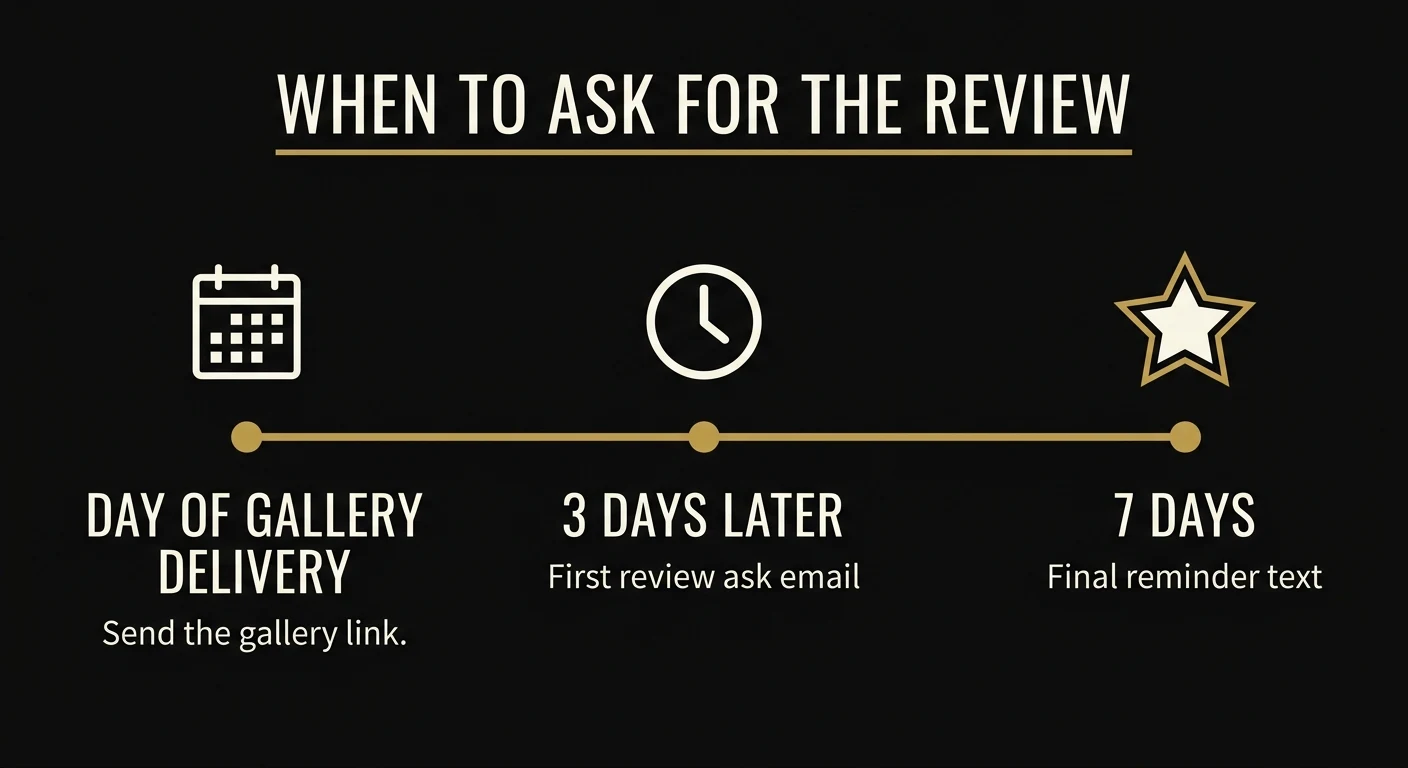
- The best time to ask for a review is 2–3 days after gallery delivery, when clients are still in the emotional high of seeing their photos. Waiting a week or longer drops response rates by 40–60%.
- One review per week compounds to 50 in a year. That single discipline changes your map pack ranking, your click-through rate, and your monthly booking volume.
Why Google Reviews Are the #1 Local SEO Signal for Photographers
Most photographers think SEO is about their website: optimized titles, fast load times, blog posts. That stuff matters. But for photographers competing in a local market, your Google Business Profile and the reviews on it carry more ranking weight than almost anything else you can do.
Here's why: Google Maps is the battlefield. When someone types "newborn photographer near me" or "wedding photographer Chicago," the first thing they see isn't your website. It's the map pack: three listings with star ratings, review counts, and phone numbers. Those three spots get the overwhelming majority of clicks. If you're in the pack, your phone rings. If you're not, you're invisible to anyone who doesn't scroll past it.
Google uses reviews in three distinct ways to determine your ranking:
- Average star rating. Businesses with consistently high ratings rank higher, full stop. A 4.9 beats a 4.3, all else being equal.
- Review volume. More reviews signals more trust and activity. A studio with 60 reviews tells Google you're a real, active business. One with 4 reviews looks new or inactive.
- Review velocity. Google rewards recency. A studio that gets 3 reviews this month looks more active than one with 80 reviews, all collected three years ago. One review per week is not just doable. It's transformative.
There's a fourth factor that most photographers miss entirely: keyword-rich reviews. When a client writes "the best newborn photographer in Denver. We loved every moment," that phrase "newborn photographer in Denver" acts as a ranking signal. Google reads your reviews. It indexes the language your clients use. Nudge them to mention what they came in for, and you're essentially crowd-sourcing your local SEO.
The competitive math is straightforward. Find the top photographer in your area and check their review count. That's your target. Divide the gap by 52 weeks and you know exactly how many reviews per week it takes to catch and pass them.
How Many Reviews Do You Actually Need to Rank?
There's no magic number that unlocks the map pack. It depends entirely on your market. A photographer in a town of 40,000 might dominate with 25 reviews. A photographer in Los Angeles needs 150+ just to appear competitive.
Finding your actual number takes under five minutes:
- Open Google in Incognito mode (to avoid personalized results)
- Search for your primary service + city: "newborn photographer [your city]"
- Look at the three businesses in the map pack
- Check their review counts: that's your benchmark
- Check the businesses ranked just outside the pack too: that tells you the floor you need to clear
In most mid-sized markets, the map pack floor hovers between 20 and 50 reviews. In major metros like NYC, Chicago, or LA, the top three studios often have 100–300+ reviews each.
The key insight from the research: recency matters as much as volume. A studio with 35 reviews collected consistently over the past year will often outrank a studio with 80 reviews, all collected three years ago with nothing recent. Google wants to see that you're actively serving clients right now.
Set a weekly review goal. One per week is achievable for almost any photographer doing 3–5 sessions a month. That's 52 reviews in a year, enough to enter or dominate the map pack in most markets.
The Best Time to Ask for a Review (And How to Ask)
Timing is the most underestimated variable in review collection. Ask too early (before the client has seen their photos) and they have nothing concrete to say. Ask too late (three weeks after delivery) and the emotional peak has passed. They've moved on mentally, and your chances of getting a response drop off a cliff.
The sweet spot is 2–3 days after gallery delivery.
Why? Because when clients receive their gallery, they go through an emotional experience. They open it, they see their photos for the first time, they feel the feelings: excitement, nostalgia, love, sometimes even happy tears. For the next 48–72 hours, they're sharing photos with family, posting to Instagram, texting the best ones to grandparents. They're at peak emotional engagement with your work.
That's the moment to ask.
Wait until the gallery reminder email two weeks later, and the moment is gone. They've already shared what they were going to share. The emotional charge has dissipated. Now your review request feels like an administrative task rather than a natural extension of a meaningful experience.
A few practical notes on the ask itself:
- Make it one click. Generate your Google review link from your Google Business Profile dashboard (under "Get more reviews"). Anyone who has to navigate to find where to leave a review will give up. The link takes them directly to the review box.
- Ask personally, not generically. A message that references their specific session outperforms a generic "please leave us a review" by 3–5x. People respond to feeling seen.
- Give them a gentle prompt. You can't tell them what to write, but you can say: "If you could mention what type of session you had and what you loved most, it really helps other families find us." This produces keyword-rich reviews organically.
- Keep it short. Your ask should take 30 seconds to read and respond to. Long emails asking for reviews get skimmed and forgotten.
Want to see how top-earning studios systematically collect 50–100 reviews per year? The full review system is part of what we build for you.
Book a Strategy Call →The Exact Review Request Scripts That Get Results
Don't write these from scratch for every client. Build the template once, personalize the key details, and send. Here are three that work across different client types and delivery contexts.
Script 1: The Gallery Delivery Email (Built-In Ask)
Embed the review request directly in your gallery delivery email, not as a separate message, but as a natural postscript to the most exciting email you'll ever send them.
Subject: Your gallery is ready! 🎉
Hi [Name],
Your gallery is live! Click here to view your photos: [GALLERY LINK]
I had such a great time with you [at the studio / at the park / on your wedding day], [add one personal detail: "those laughing shots of Emma in the garden turned out incredible"]. I hope you love them as much as I do.
One small favor: if you get a minute, an honest Google review would mean the world to a small business like mine. It's the #1 thing that helps other families find me. Here's the direct link (takes about 60 seconds): [GOOGLE REVIEW LINK]
Either way, thank you so much for trusting me with this.
Warmly,
[Your Name]
Script 2: The 3-Day Follow-Up Text
Three days after gallery delivery, send this as a text or SMS if you have their number. Text gets read. Email gets ignored.
Hi [Name]! It's [Your Name]. I hope you and the family are loving your photos! Just checking in. If you have 2 minutes, leaving a Google review helps families like yours find me. Here's a direct link: [URL]. No pressure at all, just grateful for you! 🙏
Script 3: The 7-Day Final Reminder Email
One final, low-pressure ask one week after delivery. After this, drop it. You've made three touchpoints, which is the maximum before it starts feeling like nagging.
Subject: Quick favor, [Name]?
Hi [Name],
I hope you've had a chance to enjoy your gallery! [Personal note: "I keep thinking about that shot of all three of you laughing. It's one of my favorites from this year."]
I'm reaching out one last time to ask: if you've had a positive experience, a quick Google review genuinely helps other families find me. It takes about 60 seconds, and it means more than you know.
Here's the link if you'd like to help: [GOOGLE REVIEW LINK]
Thank you so much. I'm grateful you chose me for this.
[Your Name]
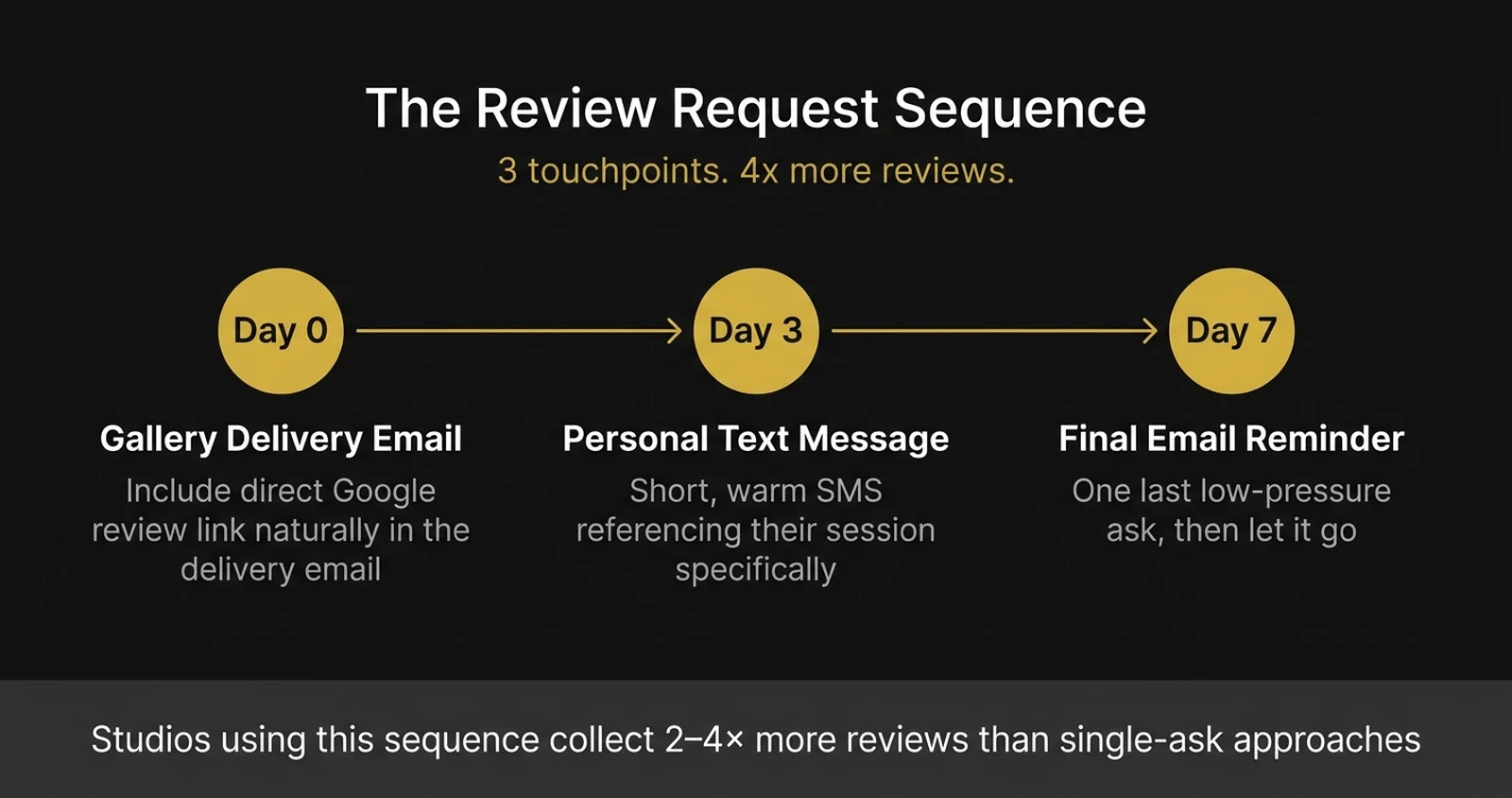
These three touchpoints (gallery delivery, 3-day text, 7-day final email) form a complete review request sequence. Studios that run this sequence consistently collect 2–4x more reviews than studios that send a single ask and move on.
Responding to Negative Reviews Without Panicking
At some point, you'll get a bad review. Maybe the client was unreasonable. Maybe you made a genuine mistake. Maybe it's a competitor leaving a fake one-star. It doesn't matter. What matters is how you respond.
The hard truth: how you respond to a negative review is often more persuasive to prospective clients than a dozen five-star reviews. It shows them how you handle adversity. It shows accountability. It shows that you're a real person running a real business, not a faceless entity hiding behind perfect ratings.
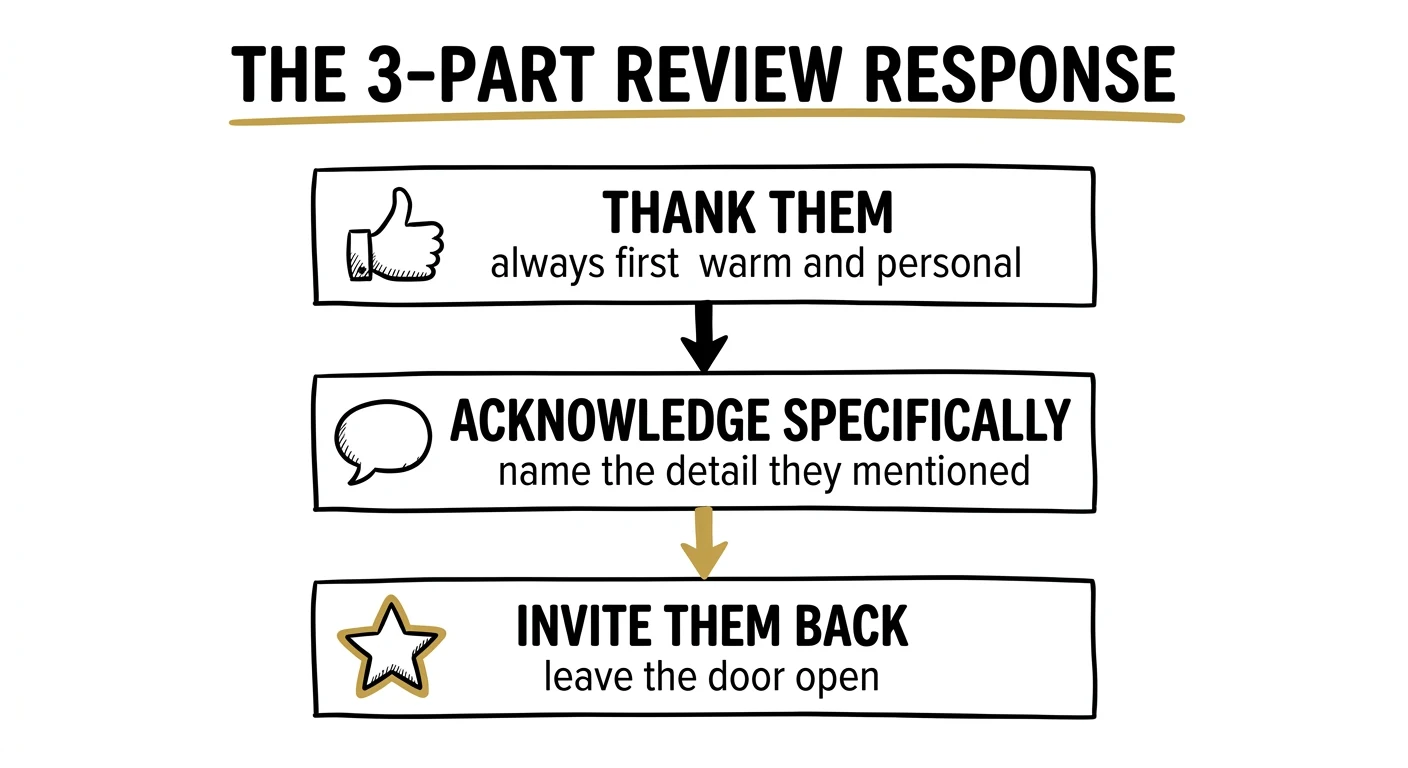
The 3-part review response formula works for any review, positive or negative:
- Thank them first. Always, no exceptions. Even if the review is unfair. "Thank you for taking the time to share your experience" disarms defensiveness before you've said anything substantive.
- Acknowledge specifically. Reference the specific concern they raised. Don't be vague. "I'm sorry to hear the turnaround time didn't meet your expectations" is specific. "I'm sorry you feel that way" is dismissive and makes things worse.
- Invite them back privately. Close with an invitation to continue the conversation offline. "I'd love to make this right. Please reach out to me directly at [email]." This moves the conflict out of the public forum and demonstrates genuine care.
What NOT to do:
- Don't argue or explain at length in the public response. You will never win a public argument with a dissatisfied client, even if you're 100% right.
- Don't get defensive or emotional. Even if the review is factually wrong, stay professional. Future clients are reading your response.
- Don't ignore it. An unanswered negative review looks worse than the negative review itself. It signals you either don't care or have something to hide.
- Don't ask Google to remove it unless it clearly violates their policies (spam, fake review, irrelevant to your business). Trying to delete legitimate negative feedback almost never works and wastes time.
Respond within 24 hours, keep it under 100 words in the public response, and take the real conversation private. That formula protects your reputation and often turns a dissatisfied client into a reengaged one.
P2P studios use a full reputation management system, not just scripts, but a process for handling every type of review situation with confidence.
Book a Strategy Call →How to Automate Your Review System
Manual outreach works, but it requires you to remember to do it after every session. Most photographers forget. Life gets busy. A client slips through. Then three months pass and you've done 20 sessions and have zero new reviews to show for it.
The answer is automation, not cold, robotic automation, but a system that handles the timing so you can focus on personalizing the message.
A simple automated review system looks like this:
- CRM or email tool: Tools like HoneyBook, Dubsado, or even a simple email automation in Gmail/Outlook can trigger review request emails at Day 0 (gallery delivery), Day 3, and Day 7 automatically. Set the sequence up once, customize the templates, and every new client enters the flow automatically.
- Gallery platform triggers: Platforms like Pic-Time, Sprout Studio, or ShootProof often have built-in "thank you" email flows. If yours does, wire your review link into those emails. You're already sending them. Add the ask.
- Text automation: Services like SimpleTexting or even a Zapier workflow connecting your CRM to an SMS service can send the Day 3 text automatically when you mark a gallery as delivered in your workflow tool.
- Review link in your email signature: Add your Google review link to your signature with a simple line: "Love your photos? Leave us a Google review: [link]". Every email you send becomes a passive review nudge.
The goal isn't to spam clients. It's to make sure every satisfied client gets a genuine, well-timed opportunity to share their experience. The automation handles the timing. Your personal voice in the templates handles the warmth.
The P2P Review Framework: Reviews Show Up Everywhere
In my book 7-Figure Studio, I cover a principle I call "Reviews: They Show Up Everywhere" as part of the Google Maps ranking system. The core idea is this: most photographers think about reviews as a single-channel asset, something that helps you rank in Maps. The reality is that reviews do three distinct jobs simultaneously.
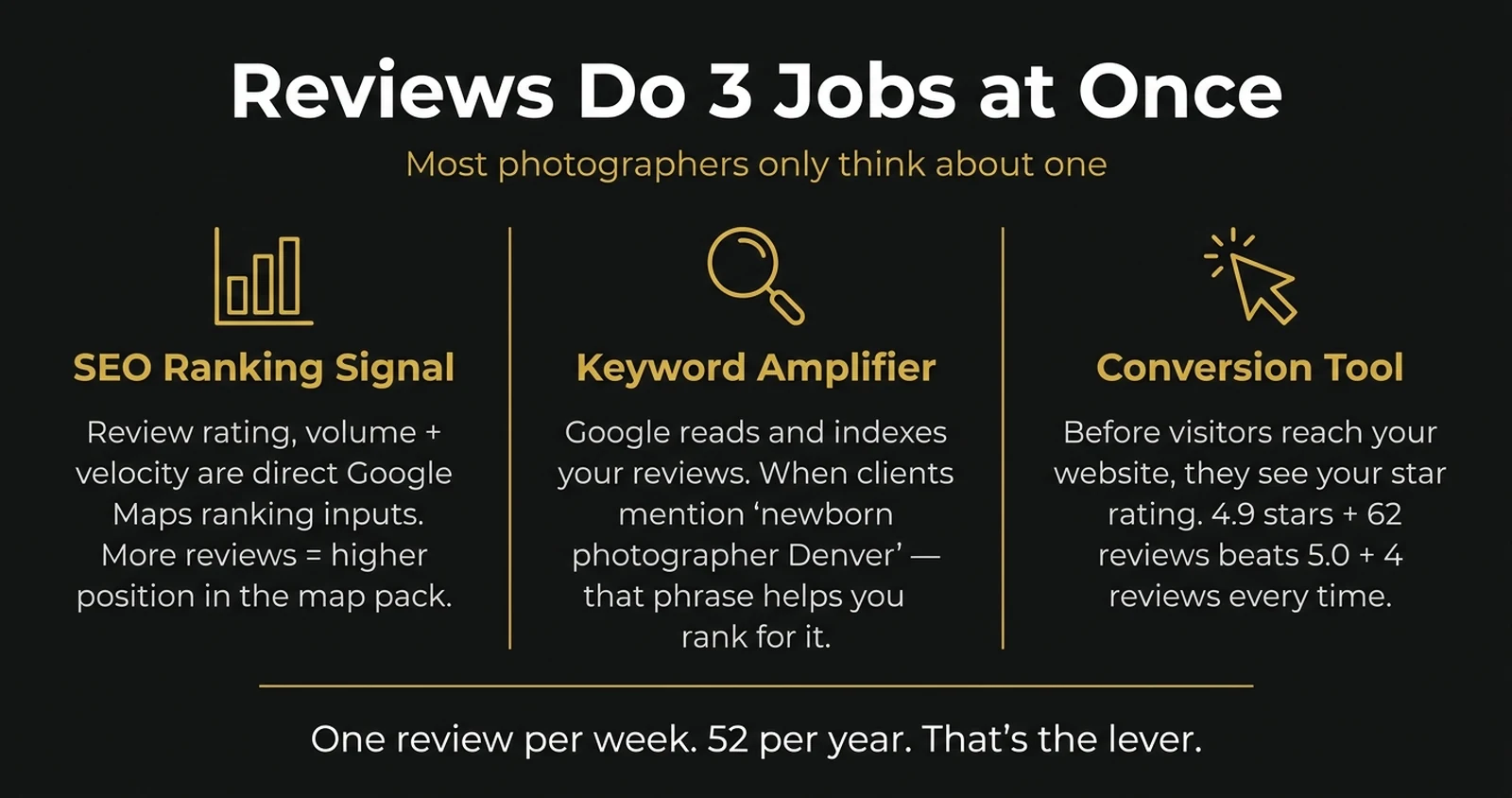
Job 1: They signal trust to Google. Your review rating, volume, and velocity are direct ranking inputs for the Google Maps algorithm. This is the one most photographers know about.
Job 2: They do keyword work for you. When a client writes "the best boudoir photographer in Nashville. I felt so comfortable and the photos were stunning," that review is doing SEO work. Google reads and indexes your reviews. The words your clients use become searchable content that helps you rank for the phrases they typed. You can't stuff keywords into your own business description, but your clients can write them into reviews, organically, every week.
Job 3: They win the conversion battle at the listing level. Before a potential client ever visits your website, they see your star rating, your review count, and your most recent reviews. A listing with 4.9 stars and 62 reviews wins against a listing with 5.0 stars and 4 reviews, every time. Volume and recency convert browsers into callers, independent of your website, your portfolio, or your ads.
The studios I work with that consistently dominate their local markets share one habit: they treat review collection as an ongoing business operation, not a one-time campaign. They don't sprint to collect 30 reviews and then stop. They collect one or two per week, every week, forever. That consistency is what keeps them in the map pack, not a burst of activity followed by months of silence.
One review per week. Fifty-two in a year. Do the math for your market. That's the lever.
Want the complete Google Maps ranking system (reviews, profile optimization, category selection, and local backlinks) built for your studio? That's what the P2P framework delivers.
Book a Strategy Call →Conclusion: Google Reviews Are the Most Underrated Growth Tool for Photographers
Google reviews are not optional for photographers competing in a local market. They are the single highest-return action you can take to improve your local search ranking. Every review you collect today compounds. Three years from now, that review still helps you rank, still builds trust with new visitors, and still converts browsers into bookings.
The photographers who dominate their local market are not the most talented. They are the most systematic. They ask every client, they respond to every review, and they track their star count the same way they track revenue. Photography to Profits, founded by Humberto Garcia, has helped hundreds of portrait and wedding photographers build exactly this kind of automated review system as part of a broader local SEO strategy.
Start with one review this week. Ask your most recent client today. Build the habit before you build the system. Once you have a process that reliably generates reviews after every session, your Google ranking will follow.
Want help building a complete review and local SEO system for your photography business?
Book a strategy call with Photography to Profits →